
 Need help?
Do you have a question about the Antec VSK-2000 and is the answer not in the manual?
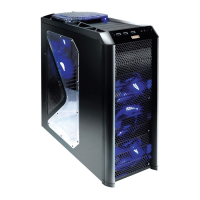
Details on the physical dimensions, color, weight, cooling, drive bays, expansion slots, motherboard size, and front I/O panel of the VSK-2000 case.
Labeled diagram identifying key components of the VSK-2000 computer case, including fans, drive bays, and mounts.
Instructions on how to prepare the computer case for hardware installation, including removing side panels and the front bezel.
Procedure for mounting the power supply unit (PSU) into the designated location within the computer case.
Guidance on organizing and tucking excess cables in a dedicated compartment for improved airflow and cooling.
Steps for correctly installing the motherboard onto standoffs within the case, including I/O panel considerations.
Instructions for installing 3.5-inch hard drives into the drive cage, including fan cage considerations.
Guide for installing a 3.5-inch device into the front bay, connecting power and data cables.
Steps for installing 5.25-inch devices into the front drive bays, securing them with screws.
Details on connecting the front panel USB 2.0 cable to the motherboard header, including pin assignments.
Instructions for connecting front panel audio connectors (AC'97 or HDA) to the motherboard or sound card.
Guidance on connecting power switch, reset switch, and HDD LED indicators to motherboard headers.
Procedure for safely reconfiguring pin-outs for front panel connectors like USB or audio on the motherboard.
Information and specifications for the preinstalled 120mm rear TwoCool™ fan and its speed settings.
Explanation of the case's thermal design, conforming to Intel's TAC 2.0 guide for improved ventilation.
Recommendations for installing optional 120mm front intake fans for enhanced cooling.
Guidance on locating, removing, and cleaning the front air filters to maintain optimal system temperatures.
 General
| Type | PC |
|---|---|
| Form factor | Midi Tower |
| Product color | Black |
| Supported motherboard form factors | ATX |
| Audio input | Yes |
| USB 2.0 ports quantity | 2 |
| Package depth | 279 mm |
| Package width | 531 mm |
| Package height | 541 mm |
| Drive bays | 10 |
| Optional fans | 2 x 120mm |
| Ventilation fan(s) | 1 x 120mm |
| External drive bays | 3 x 5.25\ |
| Internal drive bays | 6 x 3.5\ |
 Weight and Dimensions
| Depth | 470 mm |
|---|---|
| Width | 200 mm |
| Height | 450 mm |
| Weight | 5400 g |








 To Next Page