10
4.3 O
PTIONAL
F
ANS
There
are
a
total
of
two
optional
120mm
fan
mounts—
two
front
intake
fans
(at
the
front
of
the
HDD
cage). We
recommend using
Antec 120mm
speed control
fans
and
setting
the
speed
to
Low.
These
fans
must
be
installed
so
that
the
air is
blowing
into
the
case.
Note:
In order to build a quieter system, we recommend
NOT installing the optional fans unless it is necessary
for cooling. If you choose to install them we
recommend using Antec 120mm speed controlled
fans and setting the speed to Low.
4.4 W
ASHABLE
A
IR
F
ILTERS
Occasionally, it will be necessary to wash the air filters. Not
washing the filters may result in high system temperatures and
possible stability problems. We recommend checking the air
filters at least once a month initially. The frequency will change
depending on environmental conditions and system usage.
Users who run their systems 24/7 will have to check their
filters more often than those who don’t run their systems
every day.
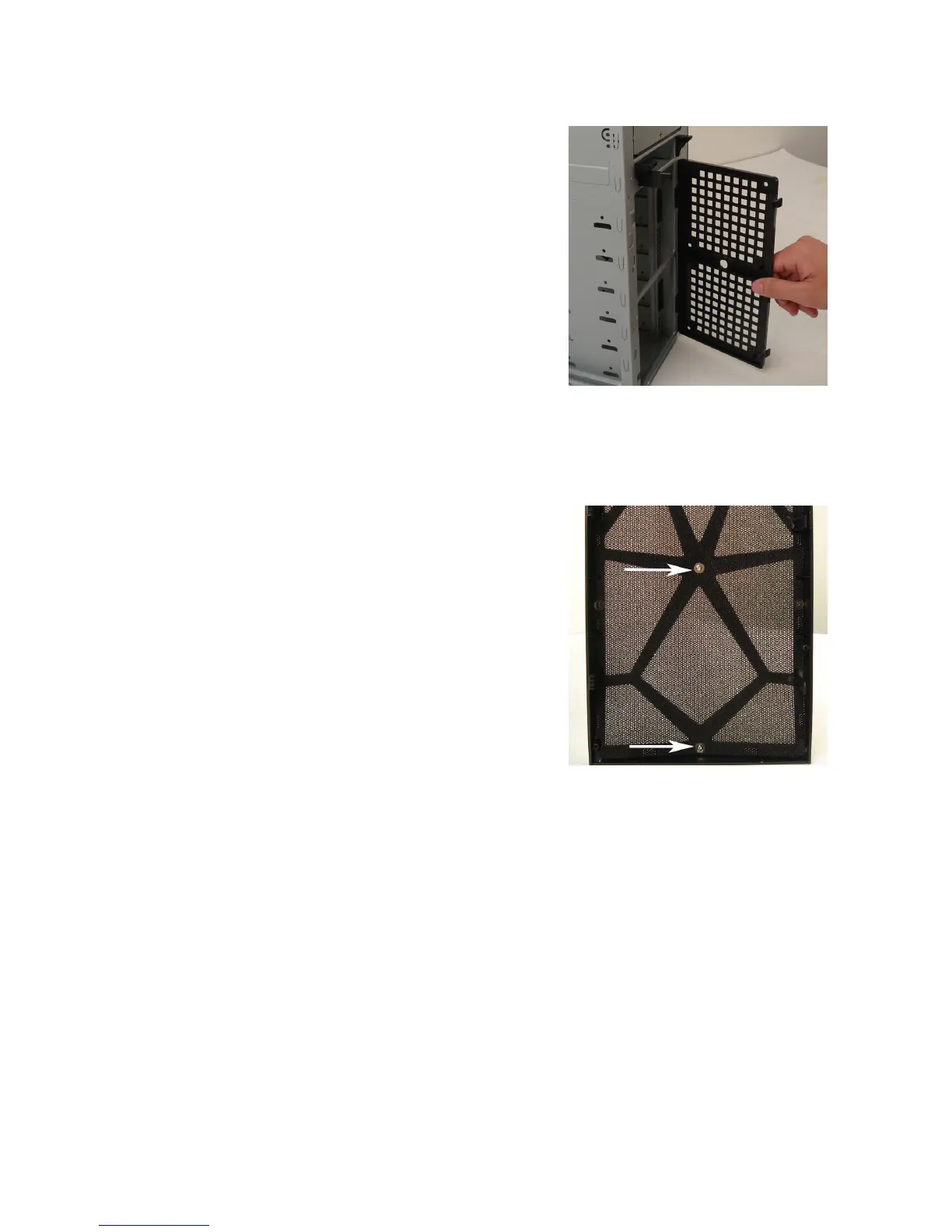
Front Air Filter
– There is an air filter located behind the front
bezel.
To remove the filters:
1.
Remove the front bezel as listed in section 2.1.
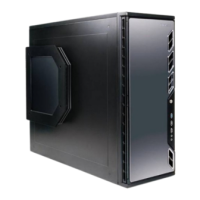
2.
Remove the screws in the center of the front bezel to release the air filter.









 To Next Page