Home
Anthem
Home Theater System
Statement D1
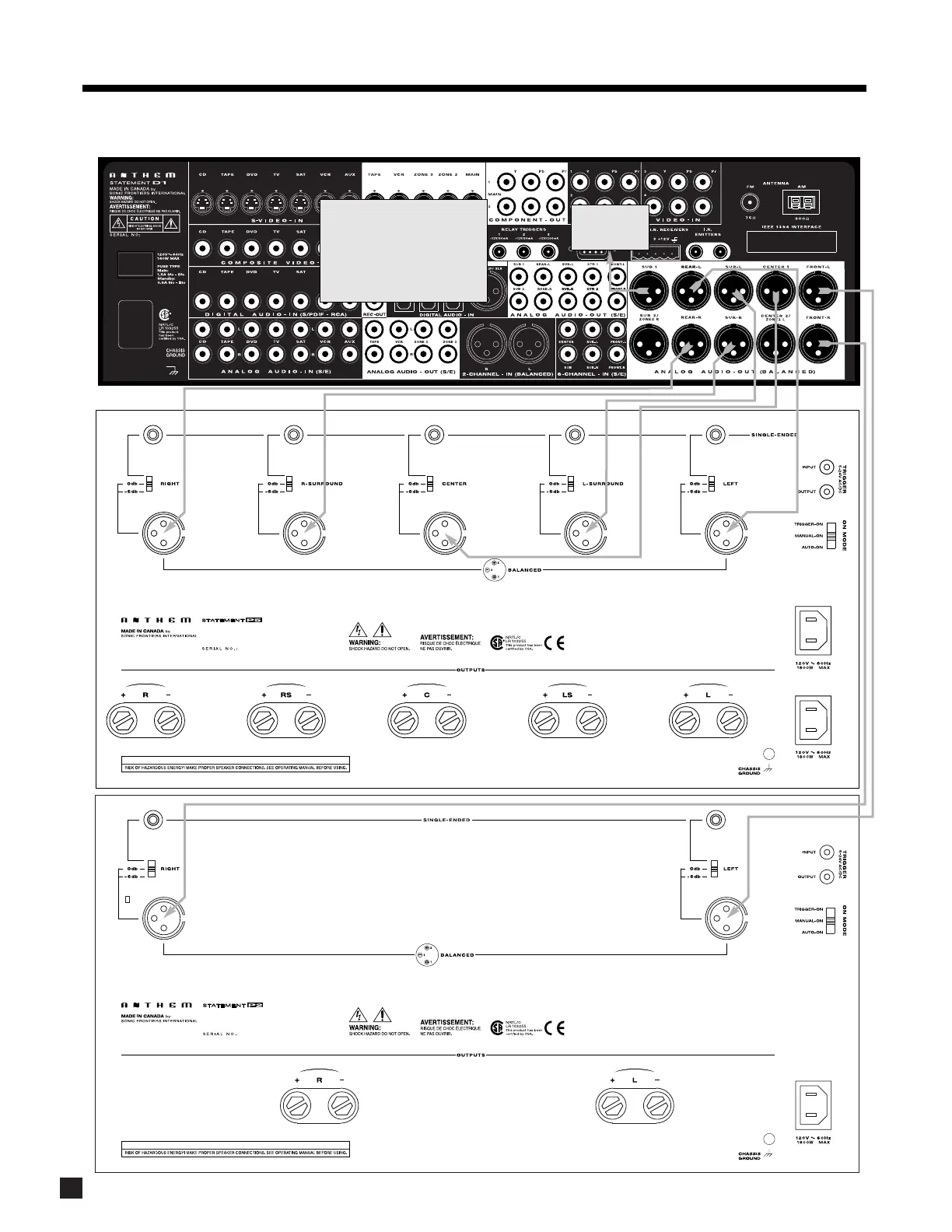
Page 16 (Statement D1 to Amplifiers and Powered Subwoofer (XLR))
Anthem Statement D1 - Statement D1 to Amplifiers and Powered Subwoofer (XLR)
86 pages
Manual
Save Page as PDF
To Next Page
To Next Page
To Previous Page
To Previous Page
Loading...
9
W
ARNING
2. QUICK
ST
ART
continued …
2.2.5
Statement D1 to Amplifiers and Powered Subwoofer (XLR)
To
powered
subwoofer
W
ARNING
T
rigger Setup Suggestion:
If it is not necessary to have both
amplifiers turned on when stereo
sources are playing, set triggers
to turn on only the 2-channel
amplifier when a stereo source is
selected (see section 7.4.9).
15
17
Table of Contents
Main Page
Default Chapter
2
Default Chapter
2
Safety Precautions
2
Table of Contents
5
Receiving and Unpacking the Statement D1
8
Packing List
8
Important Safety Instructions
8
Before Operating Your Statement D1
8
In-Use Notices
9
Supply Power Requirements
9
Packing Materials
9
1 Introduction
8
2 Quick Start
10
Quick Start Guide
10
Connector Diagrams and Descriptions
11
CD Player to Statement D1
12
DVD Player and TV to Statement D1
13
VCR and TV to Statement D1
14
Statement D1 to Amplifier and Powered Subwoofer (RCA)
15
Statement D1 to Amplifiers and Powered Subwoofer (XLR)
16
Speaker Placement
17
3 Panels / Displays / Remote Layout
18
Front Panel Layout
18
Front Panel Display
19
Rear Panel Layout
20
Remote Control Layout
21
4 Connections
22
Connecting Power to the Statement D1
22
Audio Connections
22
Digital Audio Inputs and Outputs
22
Analog Audio Inputs
22
Analog Audio Outputs
23
Video Connections
24
Powered I.R. (Infra Red) Receivers
26
Infra Red) Emitters
26
Relay Triggers
26
FM • am Antennas
26
5 Front Panel Operation
27
Power on / off
27
Path Selection
27
Copying the MAIN Path to ZONE2, ZONE3, or RECORD
28
Down-Mixing to 2-Channel Stereo
28
Master Control Knob
28
Source Selection
28
Channel S/E Input
28
FM • am Tuner
29
Automatic Tuning
29
Manual Tuning
29
Presets
29
Simulcast
29
Volume Control
30
Dialog Normalization
30
Mute
30
Surround Mode Levels
30
Bass / Treble / Balance
31
Tone Bypass
31
Surround Modes
31
Anthemlogic
32
Dolby Digital 2.0
32
Surround Modes for 2.0-Channel Source Material
33
Dolby Digital EX / Pro Logic IIX for 5.1 Sources
34
Dts-Es
34
THX Ultra2 / THX Surround EX
34
Mode and THX Operation for Stereo Program Material
38
Mode and THX Operation for Dolby Digital 5.1 and 6-Ch S/E
39
Mode and THX Operation for DTS Program Material
40
Dynamics
41
Front Panel Display
41
Status / Setup
41
6 Remote Control Operation
42
Powering the Statement D1 on and off
42
Path Selection
43
Copying the MAIN Path to ZONE2, ZONE3, or RECORD
43
Source Selection
43
Source Seek
43
Direct FM • am Station Entry
43
Sleep Timer
43
Lip-Sync Delay
44
Controlling Other Components
44
Searching for a Code
44
Volume Lock
44
Limitations on Learning
45
Deleting a Learned Command from a Key
46
Teaching a Key
46
Controlling the Statement D1 with Aftermarket Remotes
46
7 Setup Menu
47
How to Enter the Setup Menu
47
How to Navigate in the Setup Menu
47
How to Exit the Setup Menu
47
Setting up the Statement D1
48
Set Time / Timers
48
Speaker Configuration
51
Listener Position
56
Speaker Level Calibration
57
Source Setup / Presets
59
Composite Video S-Video Component Video
61
Adjust Input Levels
63
A-D / Audio-Out Format
64
Volumes / Rename Paths
65
Triggers / IR / RS-232
66
Displays / Timeout
68
Save / Restore Settings
70
Lockout / Passwords
72
8 Software Updating
73
Software Version Identification
73
Software Updating Via Your Dealer
73
Software Updating Via Your Computer and the Internet
73
Appendix A – IR Macros
75
Appendix B – Preset Memory Codes
76
Specifications
80
Warranty
83
Related product manuals
Anthem ARC
2 pages
Anthem AVM 20
84 pages


 To Next Page