03/13/2019 IN-0031_G 4 OF 8
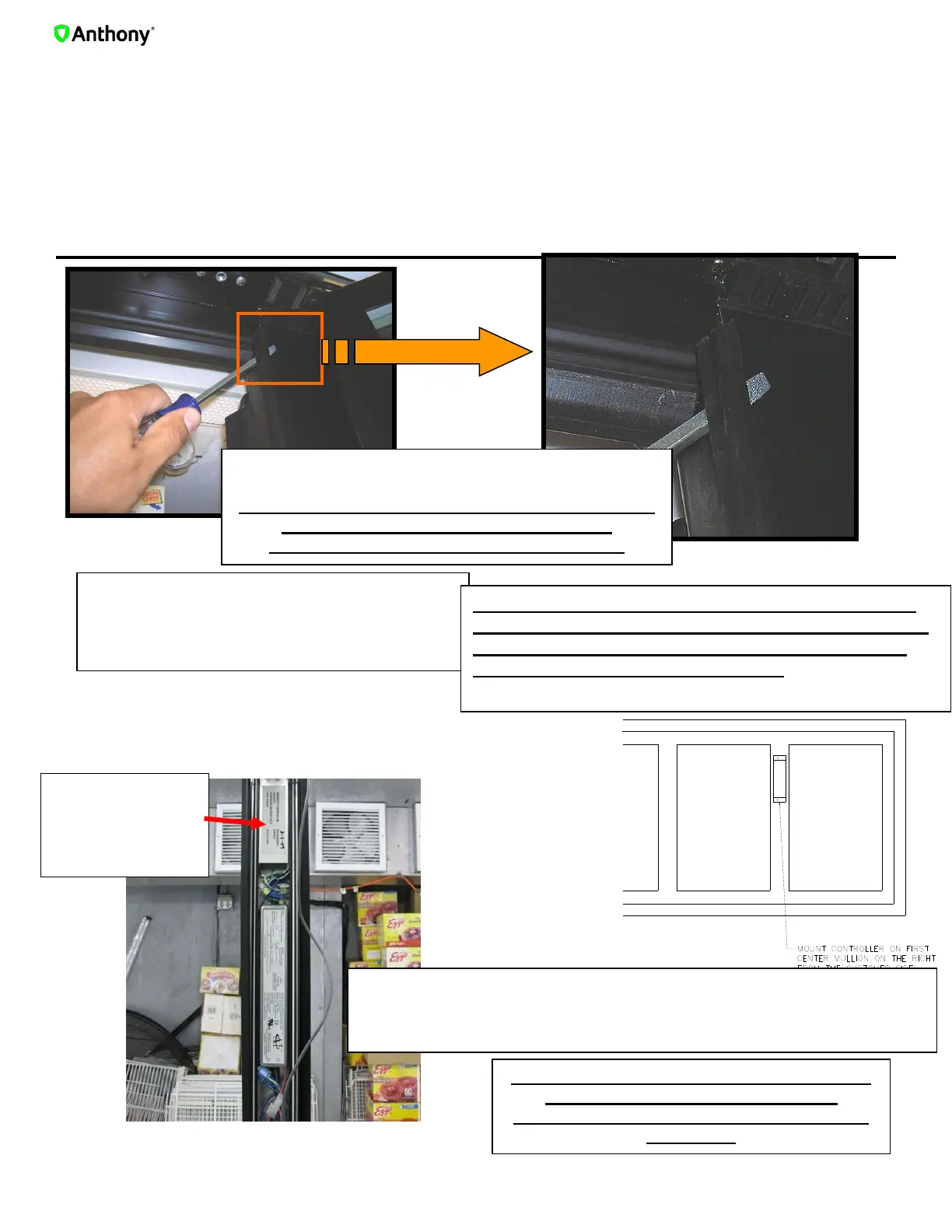
2.Controller Unit Installation for 101
Note Connection improvements have been made for Serviceability (Plug and Play connectors )
See Steps A - K
Mount the smart controller unit on the first center mullion on the right
from customer side using self tapping screws. As shown above.
Remove sealing plate by inserting a flat
screwdriver under the retaining strip starting
at the top as illustrated.
Locate the AI
SMART
CONTROLLER
Unit location
**VISTA DOORS ONLY – IF SMART CONTROLLER
DOES NOT FIT INSIDE MULLION. THE TECHNICIAN
MUST INSTALL THE SMART CONTROLLER UNIT
REMOTELY OUTSIDE THE FRAME.
**BEFORE MOUNTING SENSOR ON FRAME, MAKE
SURE THE HOLD OPEN ARM DOES NOT
INTERFERE WITH THE SENSOR LOCATION
**BEFORE MOUNTING SENSOR ON FRAME,
MAKE SURE THE HOLD OPEN ARM
DOES NOT INTERFERE WITH THE SENSOR
LOCATION
A
B
C


 To Next Page