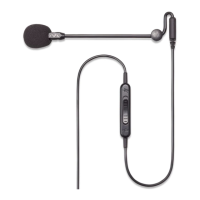
Need help?
Do you have a question about the Antlion Audio ModMic Wireless and is the answer not in the manual?
Choose smooth, flat surfaces, avoid rubber, and clean/dry with alcohol pad before attachment.
Peel backing, press firmly for 60s/1hr. Angle boom down. Attach to right side, port facing down.
Connect the USB receiver, power on the ModMic, ensure it's unmuted and set as default microphone.
Use the provided USB cable; yellow light indicates charging (blinking) or full charge (solid).
Tap the button to mute (red light), hold for 2 seconds to power off the device.
No software needed; uses default drivers. Recommended bitrate is 16-bit 48khz.
Requires Antlion USB receiver, not compatible with native Bluetooth. Use USB converter if needed.
Contact support for issues. Attach to the right side with port facing down for easier charging.
Position mic for optimal pickup, check mute, default device, USB ports, and receiver line-of-sight.
Lists all included accessories: microphone, clasps, pop filter, USB receiver, cables, and manual.
Learn the meaning of Yellow, Red, and Blue LEDs for charging, mute, and connection status.
Step-by-step guide to pair the ModMic Wireless and USB receiver using the power buttons.
Details FCC and Industry Canada compliance, designed to minimize harmful radio frequency interference.
Follow safety guidelines for charging, handling, and monitoring the battery to prevent hazards.
One-year warranty covers defects. Contact support for repairs. Understand exclusions and service terms.
 General
| Brand | Antlion Audio |
|---|---|
| Model | ModMic Wireless |
| Category | Microphone |
| Language | English |

 To Next Page