

EasyManua.ls Logo

Anysecu W2plus - User Manual

Anysecu W2plus
4 pages
Print Icon
To Next Page IconTo Next Page
Loading...
Instruction of Mobile Network Radio W2plus
Safety Warning before use
Input DC 10-24V, please Do NOT connect to 220V/110V power supply, which may cause burn to the
Radio.
Do not use the mobile radio in the explosive environments ( such as gas , dust , steam , etc . )
The machine can not be modified or adjusted for any reason.
Please don't let the mobile radio stand in sunlight directly for a long time , or put it near by the heating appliances.
Do not place mobile radio in extremely dusty ,moisture and water splashing places , and do not put in uneven surface.
Maintenance can only be carried out by professional and technical personnel.
■Get familiar to your Radio
Main keypad Function Introduce
Question and Answer IconNeed help?

Do you have a question about the Anysecu W2plus and is the answer not in the manual?

Summary

Safety Warnings

General Safety Precautions

Essential safety guidelines for operating the mobile network radio, including power and environmental considerations.

Getting to Know Your Radio

Radio Components and Controls

Identifies key physical components and buttons on the mobile network radio.

Keypad Functionality

Explains the primary functions of the radio's keypad for navigation and operation.

Getting Started

Initial Setup Procedures

Guides on installing SIM card, connecting power, and attaching antennas for initial use.

Application Download

Provides instructions for downloading the necessary application for the radio's functionality.

Talking Platform Integration

Real PTT Setup

Instructions for logging into Real PTT on mobile and PC for communication.

Smartphone App Usage

Details on using the Real PTT app on smartphones for communication.

Technical Specifications

RF Parameters

Details on the radio's maximum output power and receiving sensitivity.

GPS and Data Speed

Information on GPS functionality, data speed rates, and supported protocols.

Overview

This document describes the W2plus Mobile Network Radio, outlining its functions, technical specifications, and usage instructions.

Function Description

The W2plus is a mobile network radio designed for communication over cellular networks. It supports various talking applications like Real PTT, Zello, Echolink, and Walkiefleet. The device features a Power On/Off/Volume knob, an SOS key for sending emergency messages, a Mic Jack, a Speaker, a Mic Port, a Home/Dial/PTT button, Menu, Exit, OK, Up/Down buttons, and a Screen Lock/Hang up function. It includes ports for USB (Android type), Earphone Jack, GPS Antenna, GSM Antenna, Power Connector (DC10-24V), SIM Card (standard size), and TF Card.
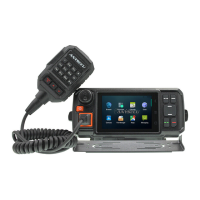
Important Technical Specifications

  • Operating System: Android 7.0
  • Screen Size: 4.5 inches, 480x320mm
  • Language: Multi-language support
  • Processor: MT6737M Quad-core processor 64bit
  • Memory: 1GB RAM + 8GB ROM
  • Dimensions: 170x80x85mm
  • Weight: 380g
  • Working Voltage: DC 10-24V
  • Working Temperature: -30°C to +75°C
  • Platform Tested: RealPTT, Zello
  • Talk Range: Limitless in WCDMA/GSM coverage
  • Frequency Bands (EU version):
    • TDD-LTE: Band38/40/41
    • FDD-LTE: Band1/3/5/7/8/20
    • WCDMA: Band 1/2/5/8
    • GSM/GPRS/EDGE: Band2/3/5/8
  • Frequency Bands (US version):
    • FDD-LTE: Band1/2/4/5/7/12/13/17/28a/28b
    • WCDMA: Band 1/2/4/5
    • GSM/GPRS/EDGE: Band2/5
  • Antenna:
    • WCDMA/GSM with external antenna
    • GPS antenna with external antenna
    • BT/WIFI antenna is built-in FPC antenna
  • GPS: GPS/AGPS, 1.57542GHz, Catch -144dBm, Track -159dBm
  • USB: USB 2.0
  • SIM Type: Standard SIM card
  • Maximum Output Power:
    • WCDMA 2100/1900/900/850MHz: Power class 3 (+24dBm +2.5/-1.5dBm)
    • GSM/GPRS 850MHz/900MHz: Power class 4 (+33dBm +2.5/-0.5dBm)
    • GSM/GPRS 1800MHz/1900MHz: Power class 1 (+30dBm +2.5/-0.5dBm)
  • Receiving Sensitivity:
    • WCDMA 2100: ≤-108dBm
    • WCDMA1900: ≤-109dBm
    • WCDMA900: ≤-109dBm
    • WCDMA850: ≤-109dBm
    • GSM850/900/1800/1900: ≤-107dBm
  • Data Speed Rate:
    • GSM CS: UL 9.6kpbs/ DL 9.6kpbs
    • GPRS: Multi-slot Class 10
    • EDGE: Multi-slot Class 12
    • WCDMA CS: UL 64kpbs/ DL 64kpbs
    • WCDMA PS: UL 384kpbs/ DL 394kpbs
  • Protocol: HSDPA/WCDMA/EDGE/GPRS/GSM

Usage Features

  • Power On/Off/Volume: Long press to turn on/off (without ACC cable), short press for lock screen. Turn clockwise for volume+, counterclockwise for volume-.
  • SOS Key: Short press to send SOS messages to a dispatcher, selected group, or group members for talking applications.
  • Navigation: Menu for current page/function settings, Home for home interface, OK for enter/yes/type message change line, Exit for current page/interface exit, Up/Down for direction control.
  • Screen Lock/Hang up: Hang up a call or close the screen.
  • Dial/PTT: PTT for talking apps, shortcut for talking apps/phone call dial interface.
  • Getting Started: Requires a standard-size SIM card with activated data flow.
  • Power Connection: Connect ACC power cable (red for positive, black for negative, blue for ACC cable). For car installation, ACC cable enables automatic power-on with car ignition.
  • Antenna Installation: Install GPS and GSM antennas before use to ensure signal.
  • SIM Card Installation: Insert a standard SIM card into the port at the bottom of the radio, then close the dust cover.
  • Internet Connection: Can connect via Wi-Fi or mobile data.
  • App Download: Apps can be downloaded from the Play Store, via a browser, or from a computer. For computer download, enable USB debugging in developer options, connect the radio via USB, and transfer APK files to the "phone storage--download" folder.
  • Talking Platform (Real PTT):
    • Login Account: Requires an account (yearly fee, purchased from a radio supplier or local agency) based on server area.
    • PC Platform (Dispatcher): Download Real-PTT, log in, use the "Space key" to talk, and control other functions with a mouse.
    • Smartphone: Download RealPTT APP and operate similarly to the mobile radio.
  • Other Apps: Supports Zello, Echolink, Walkiefleet, and other communication applications.

Maintenance Features

  • Safety Warning:
    • Input DC 10-24V: Do NOT connect to 220V/110V power supply to prevent burns.
    • Environment: Do not use in explosive environments (gas, dust, steam, etc.).
    • Modifications: The machine cannot be modified or adjusted.
    • Exposure: Avoid direct sunlight for prolonged periods or proximity to heating appliances.
    • Placement: Do not place in extremely dusty, moist, or water-splashing areas, or on uneven surfaces.
    • Professional Maintenance: Maintenance should only be carried out by professional and technical personnel.
  • Flash or Root: Refer to your agency for flashing or rooting procedures, as professional operation is highly recommended.
  • Manual Accuracy: The manufacturer strives for accuracy and completeness, but acknowledges potential omissions or errors. All functions and designs are subject to updates without prior notice.

Anysecu W2plus Specifications

General IconGeneral
BrandAnysecu
ModelW2plus
CategoryRadio
LanguageEnglish