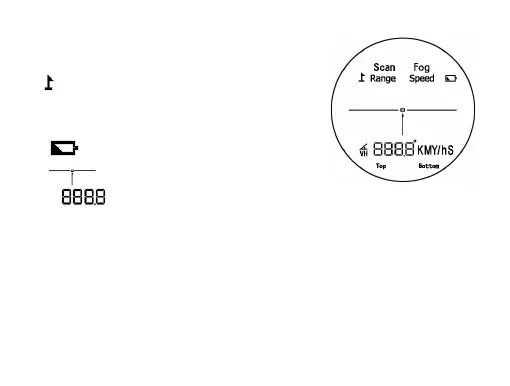
LCD DISPLAY:
1. “Range” : Range finder mode
2. “ +Scan” : Flagpole lock mode / Golf mode
3. “Fog” : Fog mode
4. “speed” : Speed measurement mode
5. “ ” : Low battery indication
6. “ ” : Aiming indication
7.
“ ” The distance and speed will be displayed. If it fails to measure, then
four dashes“----”will appear.
8.
“M”/ “Y” : Distance unit indications. Shows in the “range mode” (long press the
“M” Button two seconds to change it)
9.
“
KM/h
”
or
“
m/s”: Speed unit indications. Shows in the “Speed measurement
mode”(long press the “M” Button two seconds to change it)


 To Next Page