03
Overview of icons and buttons
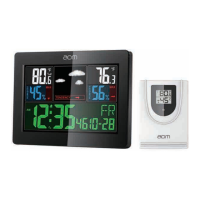
Front side and display
1. Outdoor Temperature
2. RF symbol
3. Weather forecast
4. Weather trend
5. Indoor humidity
6. Indoor Temperature
7. Low battery indication indoor
8. Max/Min for indoor
9. Trend of indoor
10. Day of week
11.Alarm
12. Date
13.Month
14.Time
15.Trend of outdoor
16. Outdoor humidity
17. Low battery indication outdoor
18.MAX/MIN for outdoor
Press button
Press and hold (3 seconds)
(A)
MODE
-
Setting the time format,time shift,hours,
year,date,day of the week language
(B)
+
Displays max/min temperature and
humidity readings
(C)
-
Displays temperature units
°C/°F
-
(D)
ALARM
Alarm time display/alarm activation
when alarm time display
Setting an alarm when alarm time display
(E)
SEARCH
Searches for the sensor
Back side
-
Top side
F= For AC 4.5V adaptor
G=SNOOZE/LIGHT – Activates display backlight and snooze feature
Wireless sensor
H= Outdoor temperature and humidity
I = LED of signal transmission from the sensor
J = A hole to hang the device on the wall


 To Next Page