5
Front panel
1
3
2
7
6
5
4
9
8
10
14
15
18
19
22
23
24
12
11
16
17
20
21
13
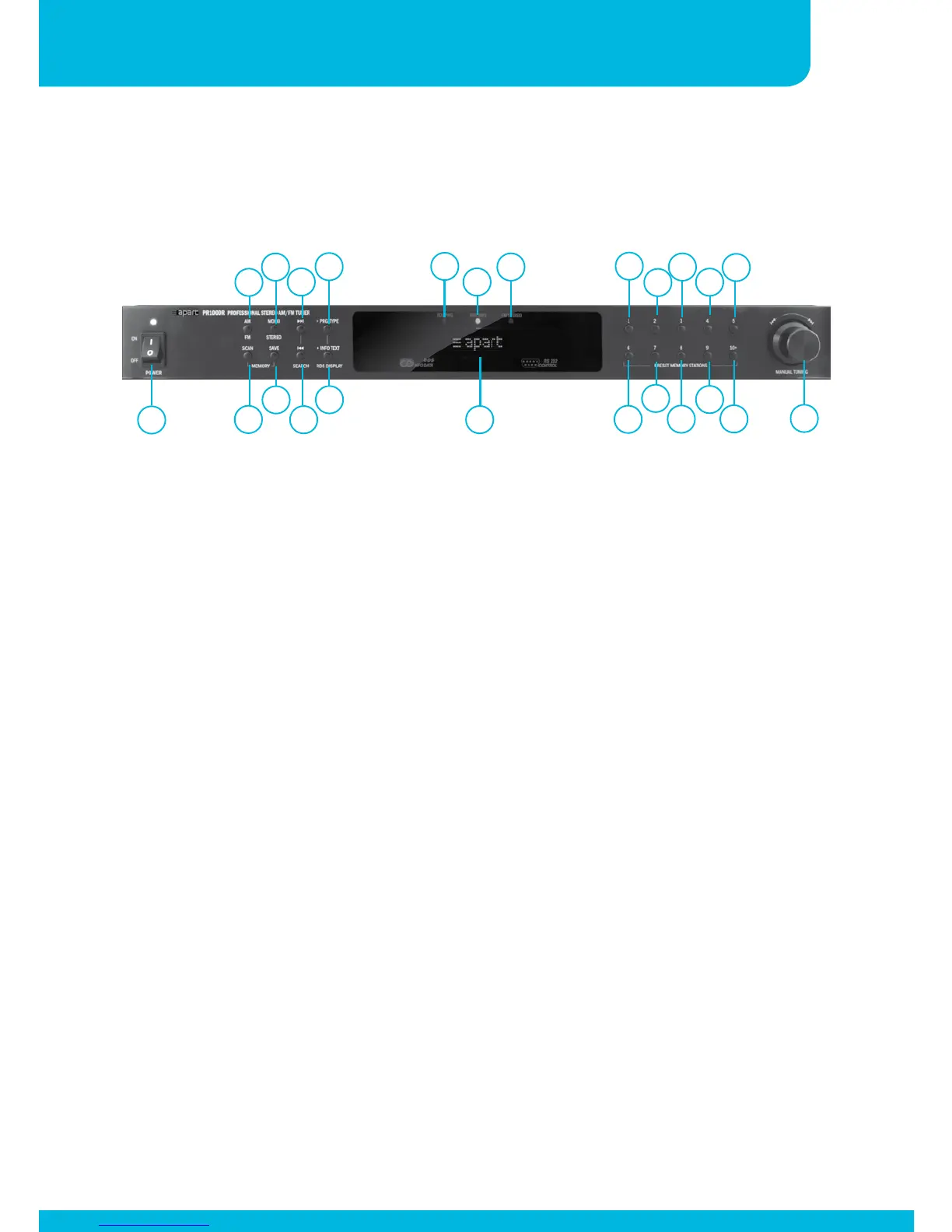
1. Power knob / power led: flip the switch to turn the unit on and
off. In standby mode, the power led lights up slightly dimmed.
In the off position the unit is fully turned off.
2. AM / FM mode selection: push this button to alternate between
FM and AM band mode.
3. Scan : push this button to automatically scan the stored preset
radio stations, with every push on the scan button, you will
jump to the next preset. When you keep the button pushed for
a few seconds, M-SCAN appears in the display and the tuner
will automatically scan all presets once.
4. Mono / stereo selector : in FM tuning mode, use this switch to
activate stereo or mono mode. In case of weak reception, mono
mode will drastically reduce noise. In case of stereo reception,
the led ‘12’ will light up.
5. Save button: push this button to save the currently selected
radio station, push a numeric button (or button combination)
afterwards and confirm your selection by pressing the save
button a second time.


 To Next Page