22
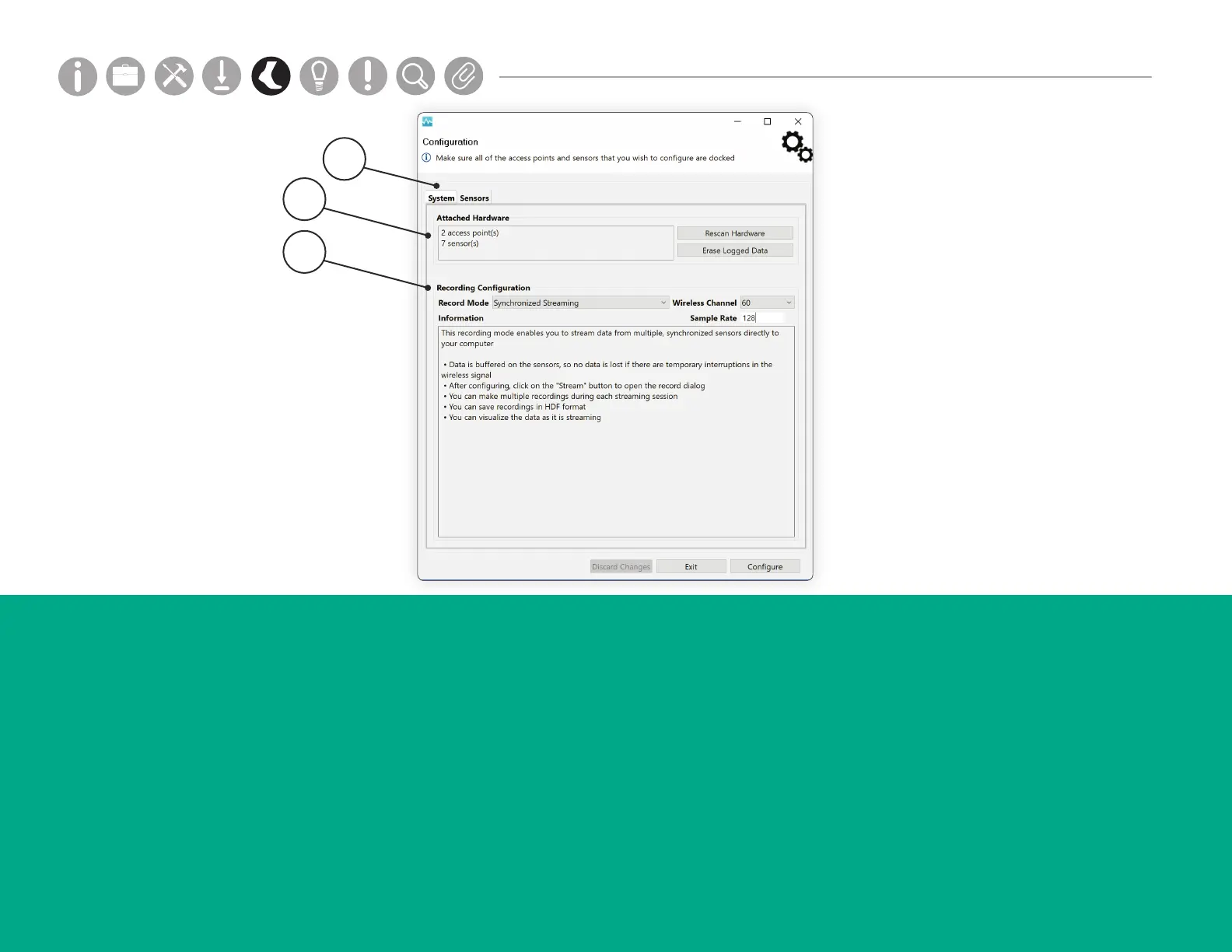
HARDWARE CONFIGURATION
3. Recording Conguration
The “Recording Conguration” section allows you to
choose the type of recording that occurs on the sensors,
adjust the wireless channel, and add sample rate.
Sample rate can range from 20-800Hz. *Note default
rate for APDM products is 128Hz. Up to 1600 samples
per second can be streamed on one Access Point.
The “Record Mode” drop down list contains options
for choosing the recording mode. These options rely on
what hardware is currently attached. The “Information”
box below contains details pertaining to the current
selected mode.
1. System Tab
The system tab provides an overview of the major
conguration details.
2. Attached Hardware
The Attached Hardware section lists all of the
detected hardware. To connect or disconnect hardware,
add or remove hardware and click the “Rescan
Hardware” button. To clear the current memory used on
the sensors, click “Erase Logged Data.” To clear sensor
debug logs, click “Clear Sensor Debug Logs.”
2
3
1
Parts
Setup M.L. How to
M.L. Software Download Troubleshooting
Hardware Cong
Tech Stats/Info
Parts
Setup M.L. How to
M.L. Software Download Troubleshooting
Hardware Cong
Tech Stats/Info
Parts
Setup M.L. How to
M.L. Software Download Troubleshooting
Hardware Cong
Tech Stats/Info
Parts
Setup M.L. How to
M.L. Software Download Troubleshooting
Hardware Cong
Tech Stats/Info
Parts
Setup M.L. How to
M.L. Software Download Troubleshooting
Hardware Cong
Tech Stats/Info
Parts
Setup M.L. How to
M.L. Software Download Troubleshooting
Hardware Cong
Tech Stats/Info
Parts
Setup M.L. How to
M.L. Software Download Troubleshooting
Hardware Cong
Tech Stats/Info


 To Next Page
 Loading...