23
Parts
Setup M.L. How to
M.L. Software Download Troubleshooting
Hardware Cong
Tech Stats/Info
HARDWARE CONFIGURATION
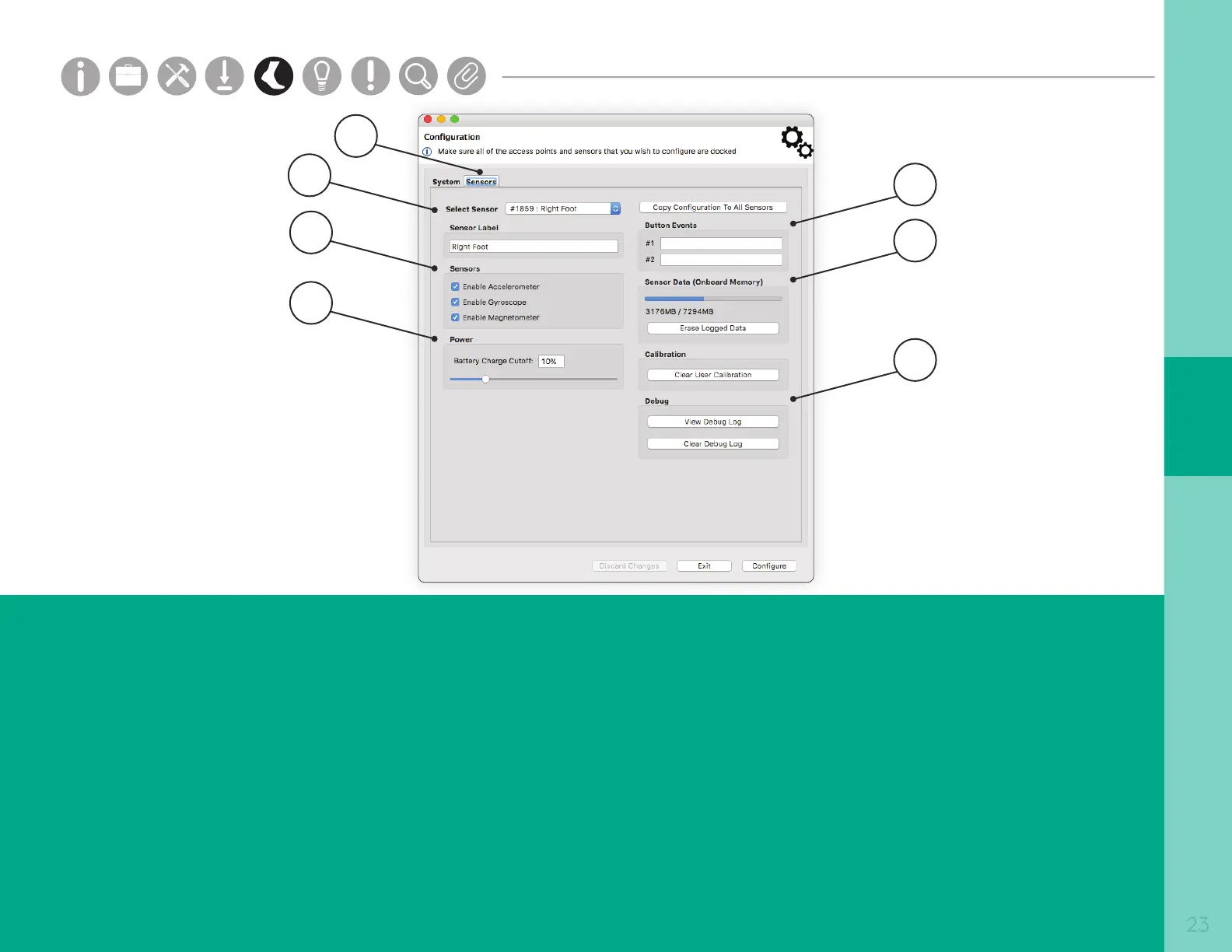
5. Button Events
The Button Events section allows you to specify the text for
events that will be saved to your Opal when in logging
mode. See the “Opal Screen Interface” page for details on
putting an Opal into the Event Logging mode.
6. Sensor Data
The Sensor Data section allows you to view and clear the
current memory used on the selected sensor.
7. Debug
The Debug section allows you to view and clear the debug
log on the selected sensor.
1. Sensors Tab
The Sensors Tab provides specic conguration details for a
particular sensor.
2. Select Sensor
The Select Sensor dropdown allows you to customized
conguration details for the selected sensor.
3. Sensors
The Sensors section allows you to enable and disable attributes
of the currently selected sensor.
4. Power
The Power section allows you to select at what battery level the
sensors will go into standby mode. In standby mode, the clock on
the Opal will continue to keep time.
2
3
4
6
7
1
5
Parts
Setup M.L. How to
M.L. Software Download Troubleshooting
Hardware Cong
Tech Stats/Info
Parts
Setup M.L. How to
M.L. Software Download Troubleshooting
Hardware Cong
Tech Stats/Info
Parts
Setup M.L. How to
M.L. Software Download Troubleshooting
Hardware Cong
Tech Stats/Info
Parts
Setup M.L. How to
M.L. Software Download Troubleshooting
Hardware Cong
Tech Stats/Info
Parts
Setup M.L. How to
M.L. Software Download Troubleshooting
Hardware Cong
Tech Stats/Info
Parts
Setup M.L. How to
M.L. Software Download Troubleshooting
Hardware Cong
Tech Stats/Info
Parts
Setup M.L. How to
M.L. Software Download Troubleshooting
Hardware Cong
Tech Stats/Info


 To Next Page
 Loading...