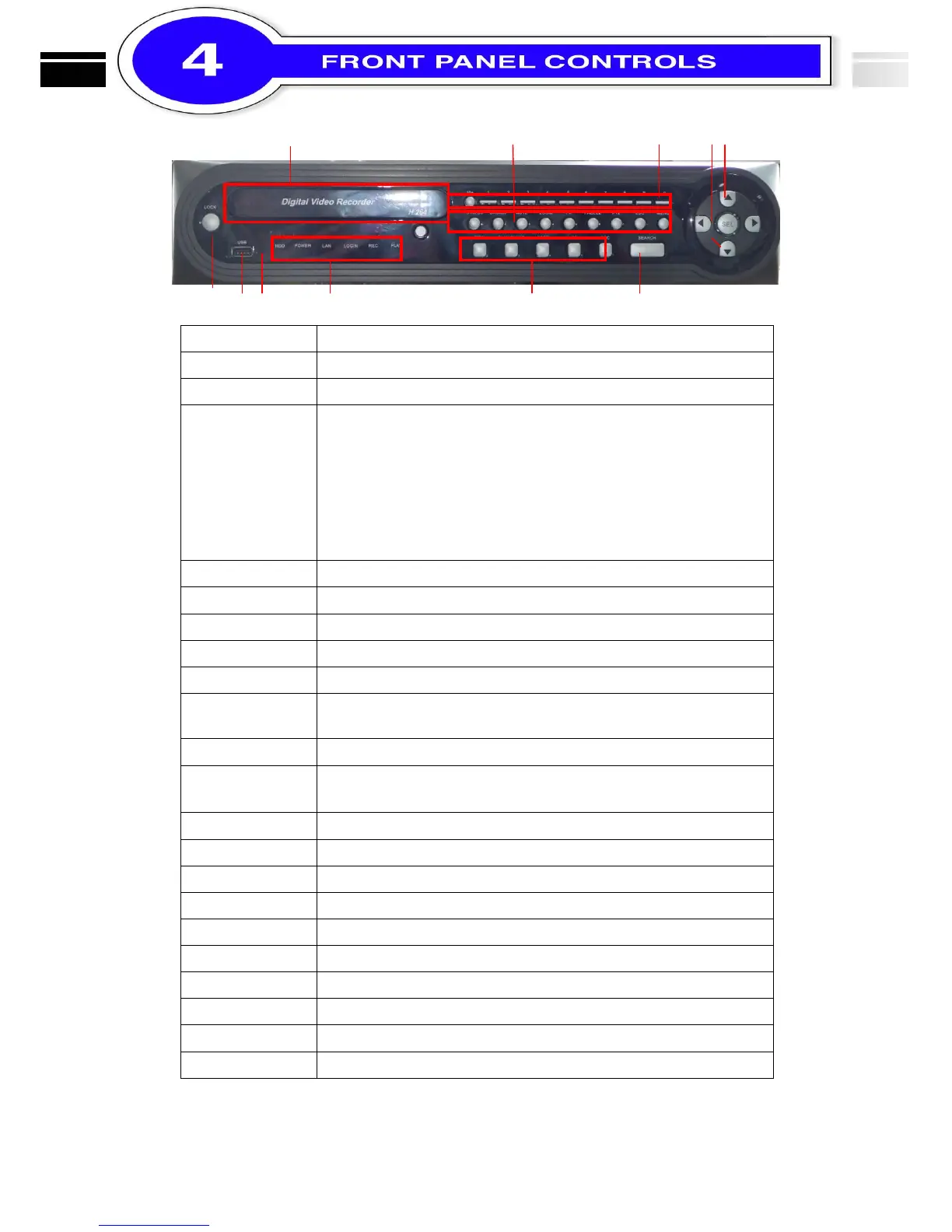
On / Off Key Lock in live mode.
Input sensor for the remote control
④ LED Display
(From left to right)
HDD:Hard disk drive
Power:Power is on
LAN:Network connected
LOGIN:User login
REC:Recording
PLAY
:
DVR play video
In PLAYBACK mode, press to play rewind 4x, 8x, 16x, 32x
In PLAYBACK mode, pause / resume playback
In PLAYBACK mode, stop playback
In PLAYBACK mode, press to play forwards 4x, 8x, 16x, 32x
In LIVE mode, press to display time search menu.
In SETUP mode, move the cursor up / down, reduce / increase the value
of key.
。
In SETUP mode, press to enter sub-menu
Select the full screen channel in live mode.
Select the full screen channel in playback.
In live mode, enter the System Information menu
In LIVE mode, press to display the BACKUP menu.
In LIVE mode, enable/ disable live audio
In LIVE mode, enlarge the display of a channel.
In LIVE mode, display with picture in picture format.
In LIVE mode, display can be FREEZE.
In SETUP mode, Exit / Return to previous setup menu
In LIVE mode, press to display menu.
Optional DVD-RW backup device. (Option)



 To Next Page