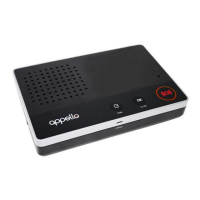
Turning On and Off
To turn the unit on, insert the barrel plug into the rear of the unit. Note
that there are two locating lugs on the silver barrel of the connector that
should align with corresponding slots in the socket. Insert the plug and
rotate the plug until the lugs are aligned with the slots so the plug can
be inserted further. Push the plug until the silver plug barrel is no longer
visible and it will not move any further. Rotate the plug clockwise by 90
degrees. Pull on the plug to ensure it is securely locked in.
To turn the unit off, remove the plug by rotating it 90 degrees
anticlockwise before pulling it out.
Disclaimer
To the maximum extent permitted by law, the manufacturer of Smartlife
will not be liable or responsible to you for any damage, loss or injury,
you may suffer or incur in connection with any failure of your system
due to incorrect usage, and usage that is inconsistent with this guide,
including a failure to follow the instructions set out in this guide.
Due to external factors it is possible that in exceptional circumstances
the system may not operate as expected. Such factors include radio
interference, lightning strikes or communication network outages.
These are outside our control, we cannot accept any responsibility
for damages or other consequences resulting from any failure. If you
suspect your system is damaged or not functional, please perform a
‘System Test’. If your Smartlife beeps continually this indicates it is not
functioning as expected, please contact your provider immediately.
Do not cover the top of the Smartlife base unit. This can affect the
volume from the speaker and the visibility of the button indicators.
When the system is turned OFF, and there is NO Power button light,
your system will not operate and you cannot send an alert for help.
Use of this system conrms acceptance of these limitations. If you
suspect your system is damaged or not functional, please contact us.


 To Next Page
 Loading...