EasyManua.ls Logo

Apple Apple-1 - System Operation and Setup; Introduction to Apple Computer System; Getting the Apple-1 System Running

Apple Apple-1
15 pages
Print Icon
To Next Page IconTo Next Page
To Previous Page IconTo Previous Page
Loading...
INTRODUCTION
The Apple Computer
is
a
complete
micro-
processor system, consisting
of a Mos
Technology
6502 microprocessor
and
support hardware,
in-
tegral video display
electronics, dynamic
memory
and refresh hardware,
and fully
regulated
power
supplies. It
contains resident
system monitor
software,
enabling
the user,
via the
keyboard
and display,
to write, examine,
debug,
and run
programs
efficiently;
thus
being an
educational
tool
for
the learning
of
microprocessor
program-
ming, and
an
aid
in
the development of
software.
plied),
although
static
memory
may
also
be used.
All
refreshing
of
dynamic memory,
including
all
"off-board"
expansion
memory,
is done
auto-
matically.
The
entire
system timing,
including
the
microprocessor
clock
and
all video
signals,
originates
in a single
crystal
oscillator.
Further,
the printed
circuit
board
contains
a
"breadboard area",
in
which the
user can add
additional
"on-board"
hardware
(for
example,
extra
PIA's,
ACIA's,
EROM's,
and
soon).
The
integral
video
display
section and the
keyboard
interface
renders
unnecessary
the
need
for
an external
teletype.
The display
section con-
tains its own memory,
leaving
all
of RAM
for
user
programs,
and
the
output format
is 40 characters/
line,
24
lines
/page, with
auto
scrolling. Almost
any ASCII
encoded
keyboard will
interface
directly
with the Apple system.
The board
has sockets for upto
8K bytes
of the 16
pin,
4K
type, RAM, and
the
system is
fully expandable to
65K via the edge
connector.
The
system uses dynamic memory {4K
bytes sup—
This manual
is
divided
into
three
Sections:
Section
I GETTING THE
SYSTEM
RUNNING.
Section
II USING THE
SYSTEM
MONITOR.
(listing
included)
Section III
EXPANDING
THE
SYSTEM.
Please
readSection
I
thoroughly,
before
at-
tempting
to
"power-up"
your system,
and
study
Section
III carefully
before attempting
to expand
your
system. In addition
to this manual, Apple
"Tech
Notes"
are
available which
contain
exam-
ples of expansion
hardware
and
techniques.
SECTION
I
GETTING
THE
SYSTEM
RUNNING
The Apple Computer
is
fully
assembled,
tested,
and burned
in. The only
external devices
necessary for
operation
of the system
are:
An
ASCII
encoded
keyboard,
a video
display monitor,
and
AC
power sources of
8 to 10
Volts (RMS)
@3
amps
and28Volts
(RMS)
@1
amp.
The following
three
articles
describe
the attachment
of these
devices
in detail.
Keyboard:
Any
ASCII
encoded keyboard, with
positive
DATA
outputs, interfaces directly
with
the
Apple
system
via
a "DIP"
connector. If your
keyboard
has negative logic DATA
outputs
(rare),
you can
install inverters
(7404)
in
the breadboard
area.
The strobe can
be
either
positive or negative,
of
long or short duration.
The
"DIP"
keyboard
con-
nector
(B4)
has
inputs
for
seven
DATA
lines,
one
STROBE
line,
and two
normally-open
pushbutton
switches,
used
for
RESET
(enter
monitor), and
CLEAR SCREEN
(see schematic
diagram,
sheet
3
of
3,
for
exact circuitry).
This
keyboard
con-
nector
also
supplies
three voltages,
(+5V,
+12V,
and
-12V)
of
which one or more
may
be
necessary
to
operate
the keyboard, Pin
15 of
the keyboard
connector
(B4) must be tied
to
+5V
(pin
16)
for
normal
operation.
NOTE:
The system monitor
accepts only
upper-
case alpha (A-F,
R).
It
is
therefore
convenient,
though
it's
not
essential, to have a
keyboard
equipped
with
upper-
case
alpha lock
(usually in the
electronics) .
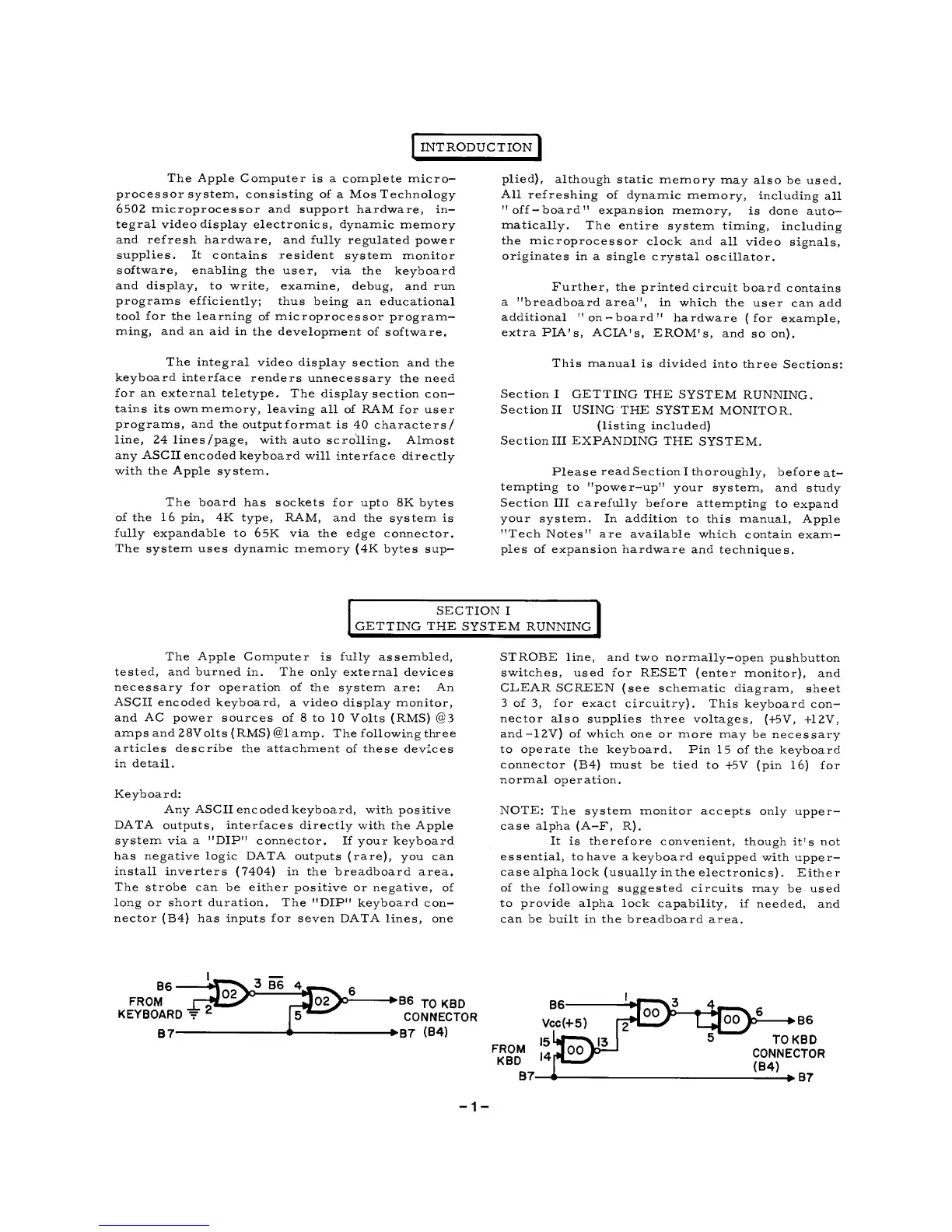
Either
of the following
suggested
circuits may
be
used
to
provide
alpha
lock
capability, if
needed, and
can be
built
in
the breadboard
area.
B6
FROM
KEYBOARD
~
2
-£E>^
B7-
pE>^-
*B6
jo KBD
CONNECTOR
B7
(B4)
t*Ey
>B6
TO KBD
CONNECTOR
(B4)
*B7
-1-

Related product manuals