72 Appendix C Connecting to the Internet
PPPoE Configuration
Some DSL-based ISPs use Point-to-Point Protocol over Ethernet (PPPoE). If you use a
DSL modem and need a user name and password to connect to the Internet, check
with your ISP to determine if you should connect using PPPoE.
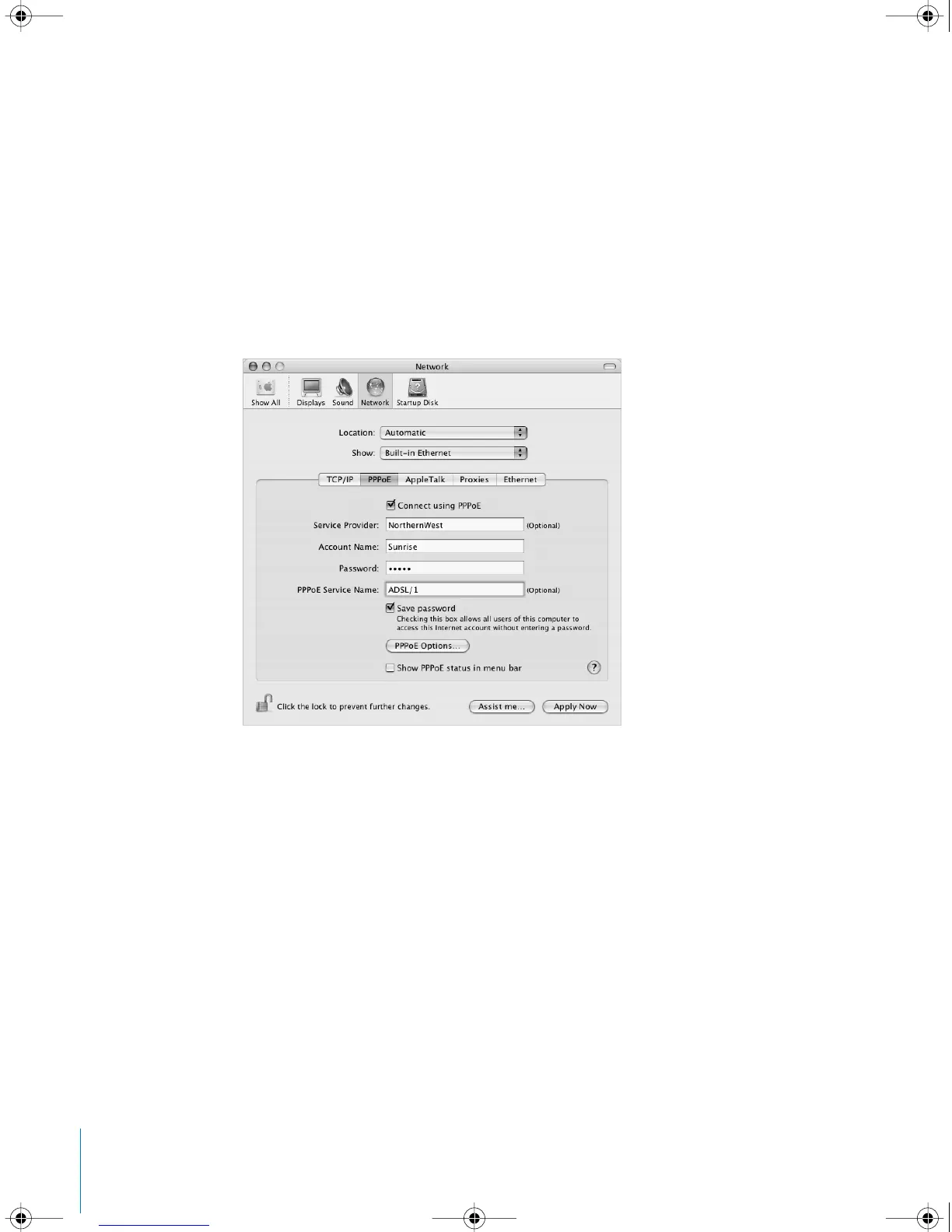
To set up a PPPoE connection:
Have your user name, password, and if required, the domain name server (DNS)
address from your ISP available as you configure your network (see page 63).
1 In Network preferences, choose Built-in Ethernet from the Show pop-up menu.
2 Click PPPoE and select “Connect using PPPoE.”
3 Type the information into the corresponding fields. If you want all users of your
computer to use the same connection method, select “Save password.”
Note: To connect automatically when you start a TCP/IP application, such as a web
browser or email, click PPPoE Options, then select “Connect automatically when
needed.”
LL2522.book Page 72 Wednesday, February 18, 2004 11:53 AM



 To Next Page