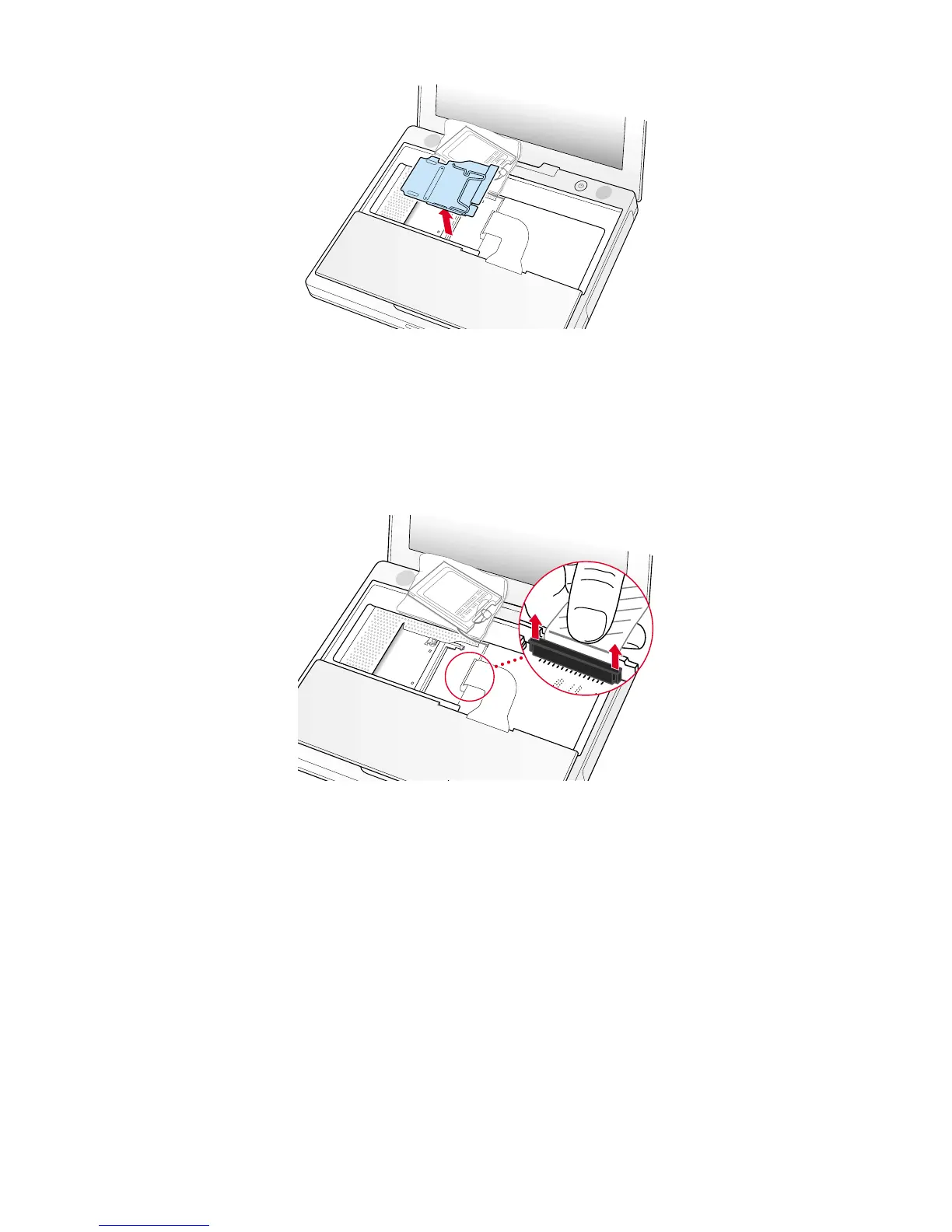
5. Lift the RAM shield out of the computer. Carefully pulling up on the wire holder may help to remove the shield (Figure 8).
6. Locate the keyboard cable connector (Figure 9).
7. Firmly grasp the cable as shown in the illustration.
8. Carefully pull straight up on the cable until the connector releases.
Important : Pull straight up, do not twist or pull the cable sideways.
Note : If needed, use your fingers to pry up the connector from side to side.
9. Set the keyboard aside.
Installing the Replacement Keyboard
1. Lay the replacement keyboard in the correct orientation over the keyboard opening, then flip it toward you and lay it face
down on the palm rests and trackpad to expose its connector cable.
2. Firmly insert the keyboard cable connector into its connector on the computer.
4 B073-0614 Rev. EiBook (Dual USB - Late 2001 - 14.1 LCD - 16 VRAM - 14.1 LCD 16 VRAM) - Keyboard
Figure 8
Figure 9



 To Next Page