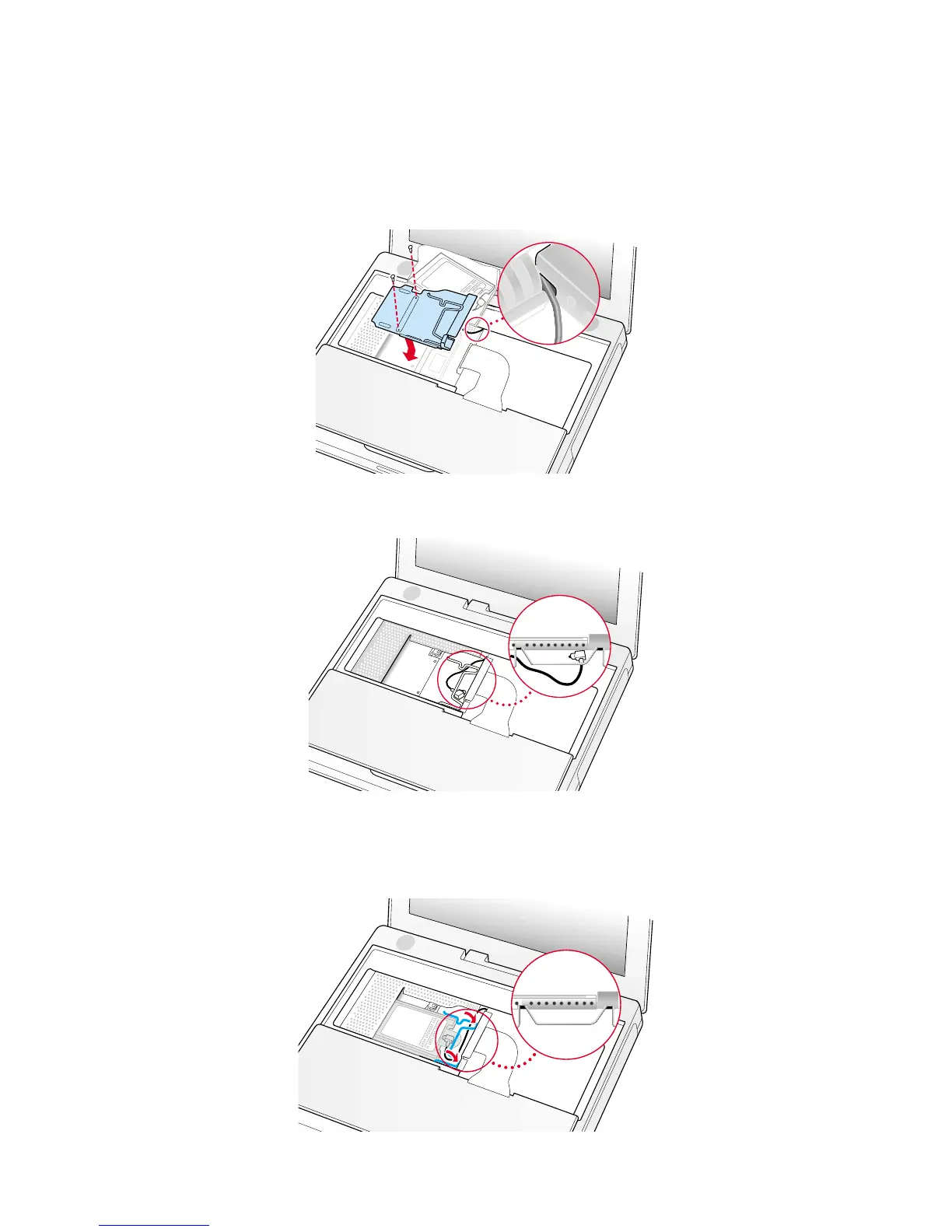
3. Insert the RAM shield (Figure 10).
4. Verify that the end of the wire of the wire holder (where it is attached to the RAM shield, on the keyboard side) does not
catch on the side of the compartment. The screw holes on the shield and computer should align and the shield should lay
uniformly flat.
5. Verify that the AirPort antenna cable routes through the notch in the RAM shield without pinching.
6. Replace the RAM shield screws.
7. If you do not have an AirPort Card, flip down the wire holder over the AirPort Card antenna cable and secure it by inserting
the prongs of the holder into the slots in the RAM shield (Figure 11).
8. If you have an AirPort Card, gently slide it (with the AirPort ID number and bar code facing up) under the wire bracket and
securely into the AirPort Card slot.
9. Use the wire holder to secure the AirPort Card in place by inserting its prongs into the slots in the RAM shield (Figure 12).
5B073-0614 Rev. E iBook (Dual USB - Late 2001 - 14.1 LCD - 16 VRAM - 14.1 LCD 16 VRAM) - Keyboard
Figure 10
Figure 11
Figure 12



 To Next Page