EasyManua.ls Logo

Apple IIe - Page 15

Apple IIe
320 pages
Print Icon
To Next Page IconTo Next Page
To Previous Page IconTo Previous Page
Loading...
Introduction
to
the
Apple
lie
15
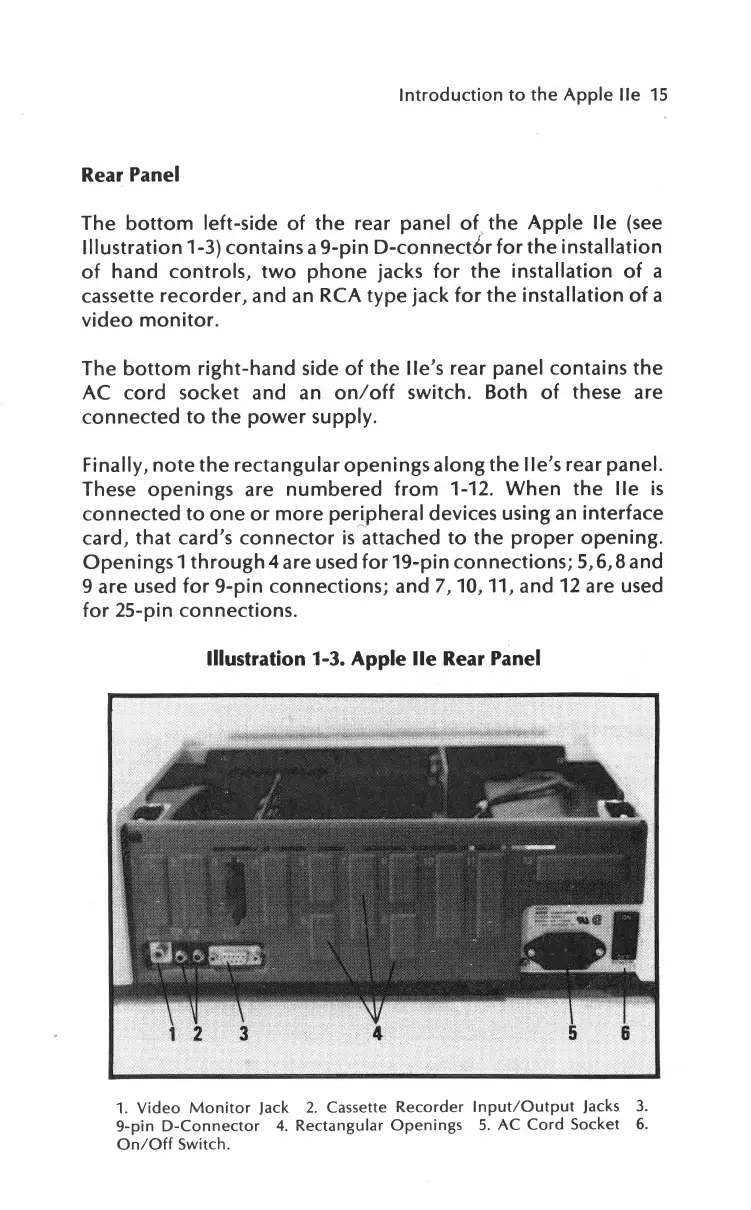
Rear
Panel
The
bottom
left-side
of
the
rear
panel
of
.
the
Apple
lie
(see
Illustration
1-3)
contains
a
9-pin
D-connect6r
for
the
installation
of
hand
controls,
two
phone
jacks
for
the
installation
of
a
cassette
recorder,
and an RCA
type
jack
for
the
installation
of
a
video
monitor.
The
bottom
right-hand
side
of
the
lle's
rear panel
contains
the
AC
cord
socket and an
on/off
switch. Both
of
these are
connected
to
the
power
supply.
Finally,
note
the
rectangular
openings
along
the
lle's
rear
panel.
These
openings
are
numbered
from
1-12.
When
the
lie
is
connected
to
one
or
more
peripheral
devices using an
interface
card,
that
card's
connector
is
attached
to
the
proper
opening.
Openings
1through4
are used
for
19-pin
connections;
5,6,8
and
9 are used
for
9-pin
connections;
and
7,
10, 11, and 12 are used
for
25-pin
connections.
Illustration
1-3.
Apple
lie
Rear
Panel
6
1.
Video
Monitor
Jack
2.
Cassette
Recorder
Input/Output
Jacks
3.
9-pin
D-Connector
4.
Rectangular
Openings
5.
AC
Cord
Socket
6.
On/Off
Switch.

Other manuals for Apple IIe

Related product manuals