iPad General Troubleshooting — Eective iPad Troubleshooting 33
2010-04-30
Recharge Battery
When a device does not have enough power to start up to the Home screen, recharge is an
appropriate troubleshooting step.
• The device may charge for over two minutes to get enough power to display the “Charging.
Please Wait” alert.
• The device may charge for up to ten minutes to get enough power to start up.
IMPORTANT: Only use the 10W USB Power Adapter when charging iPad from a power outlet.
While the Apple USB Power Adapter or iPod USB Power Adapter may appear to be compatible,
their power output is not sucient to charge the device. Note: The iPad 30-pin USB cable is
interchangeable with the iPod/iPhone 30-pin USB cable.
The iPad must have a sucient battery charge before proceeding with most troubleshooting.
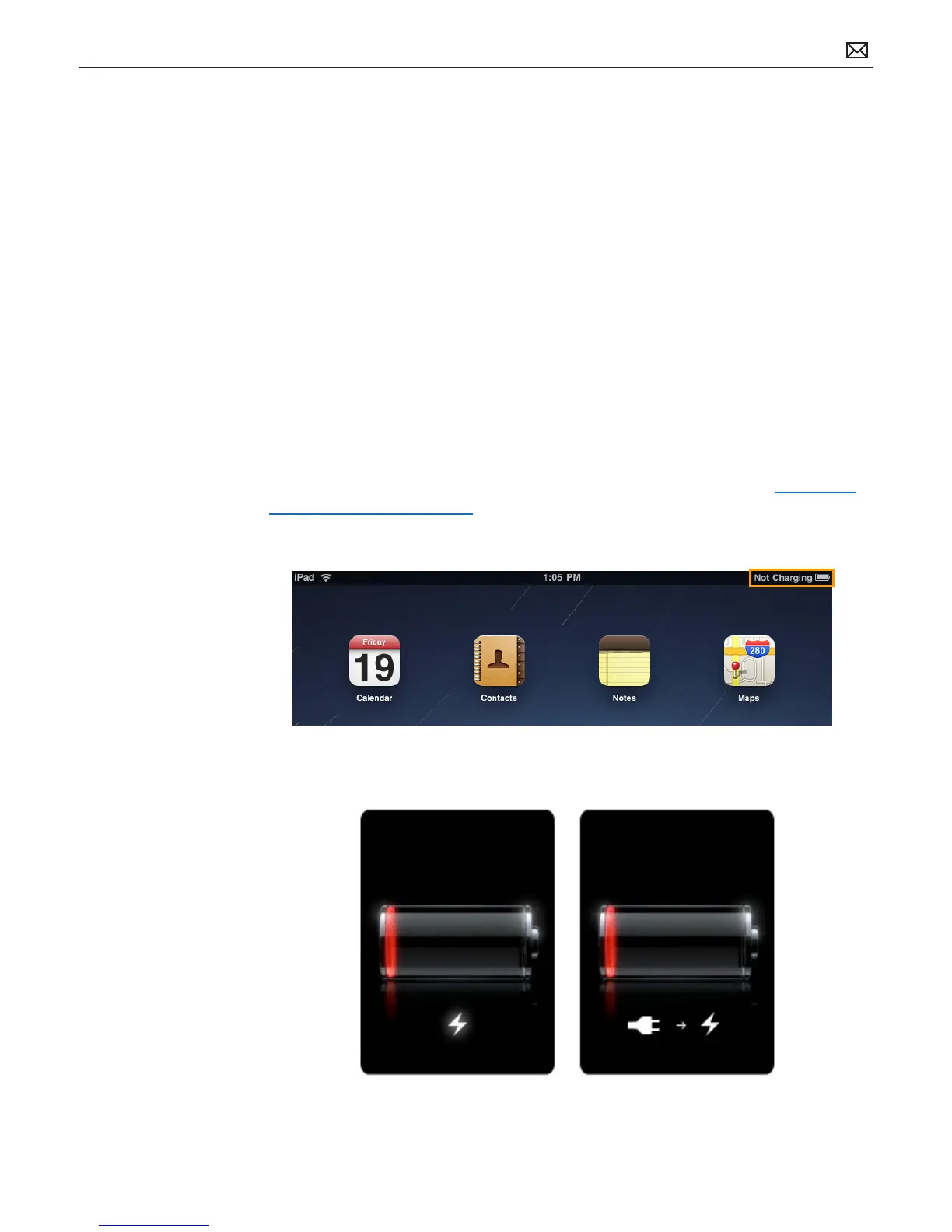
Do not charge iPad with the computer port. If iPad is connected to a source that does not
provide enough power to suciently charge the device, the notication “Not charging” appears
next to the battery indicator in the status bar (top right corner).
Refer to the following article for more information on charging the iPad battery: http://www.
apple.com/batteries/ipad.html
If either of these screens are present, keep iPad connected so it continues charging.



 To Next Page