iPad for Learning Trial – iPad Quick Start Guide Page 4
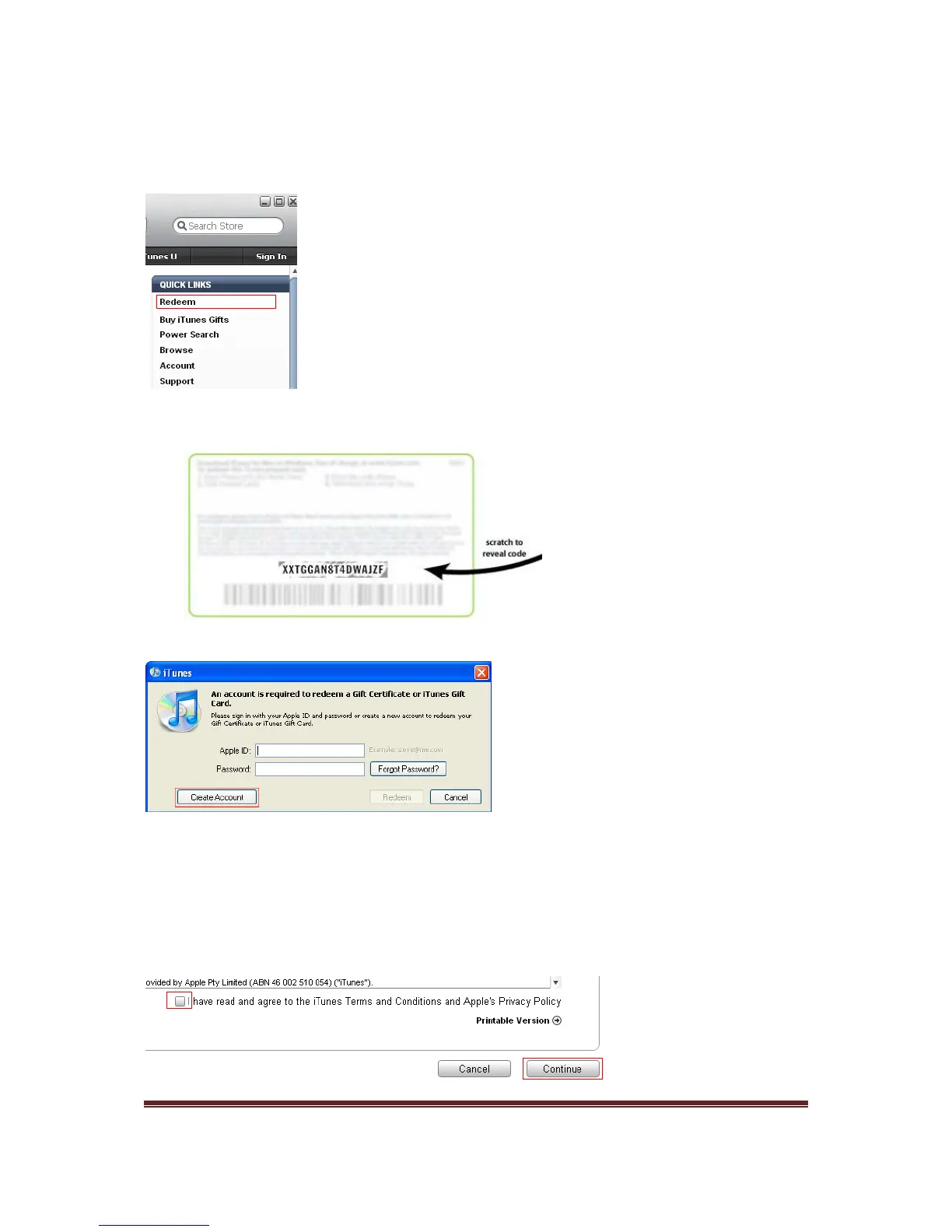
3. In the upper-right corner of the iTunes store window, verify that the button says ‘Sign
In’. If this button displays an email address instead, click the email address and then
click ‘Sign Out.’
4. In the QUICK LINKS window in the right-hand column, click Redeem.
5. In the resulting screen, enter the 16-digit code printed on the back of the iTunes gift
card (it starts with the letter ‘X’) then click
Redeem.
6. A new window will be displayed. Click Create Account
7. Click Continue
8. The next screen displayed is the iTunes Store Terms and Conditions and Apple’s
Privacy Policy. Make sure you read the iTunes Store Terms and Conditions and
Apple’s Privacy Policy, if you are comfortable with these terms and conditions, select
the I have read and agree to the iTunes Terms and Conditions and Apple’s
Privacy Policy check box and press Continue.



 To Next Page