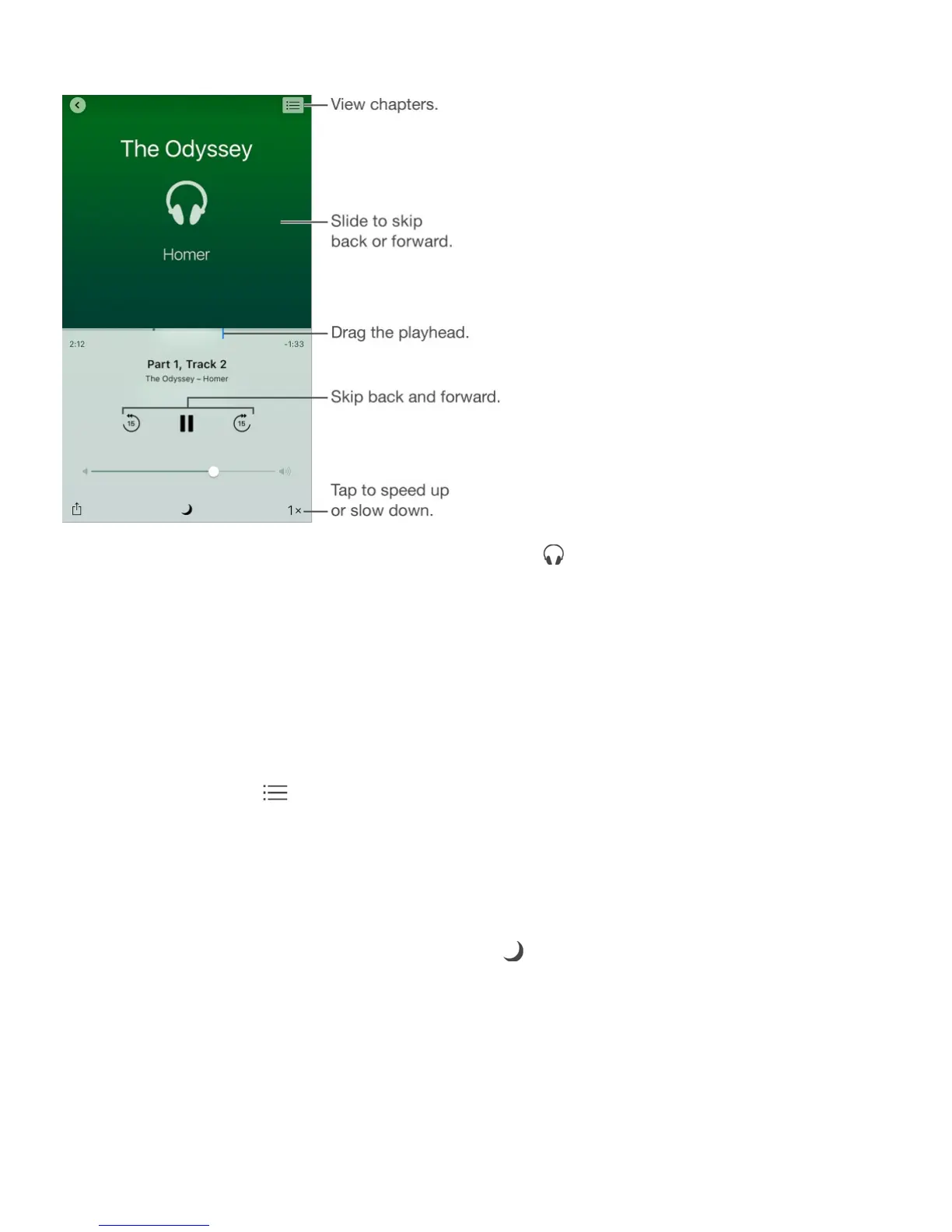
Listen to an audiobook
Open an audiobook. Audiobooks are identified by a on the cover. Tap the book you
want to listen to. If you don’t see it in the library, swipe left or right to view other collections.
Skip farther forward or back. Touch and hold the arrows, or slide and hold the cover. To
change the number of seconds that skipping moves, go to Settings > iBooks.
Speed it up, or slow it down. Tap the playback speed in the lower-right corner, then
choose a different speed. 1x is normal speed, 0.75x is three-quarters speed, and so on.
Go to a chapter. Tap , then tap a chapter. Some books don’t define chapter markers.
Go to a specific time. Drag the playhead, located underneath the book cover. Where you
started listening during this session is marked with a small circle on the timeline. Tap the
mark to jump to that spot.
Set a sleep timer. Before starting playback, tap , then choose a duration until the audio
automatically stops.
Download an audiobook previously purchased from the iBooks Store.You can
download an audiobook again from the Purchased list in the iBooks Store anytime, free of
charge.
Organize books



 To Next Page