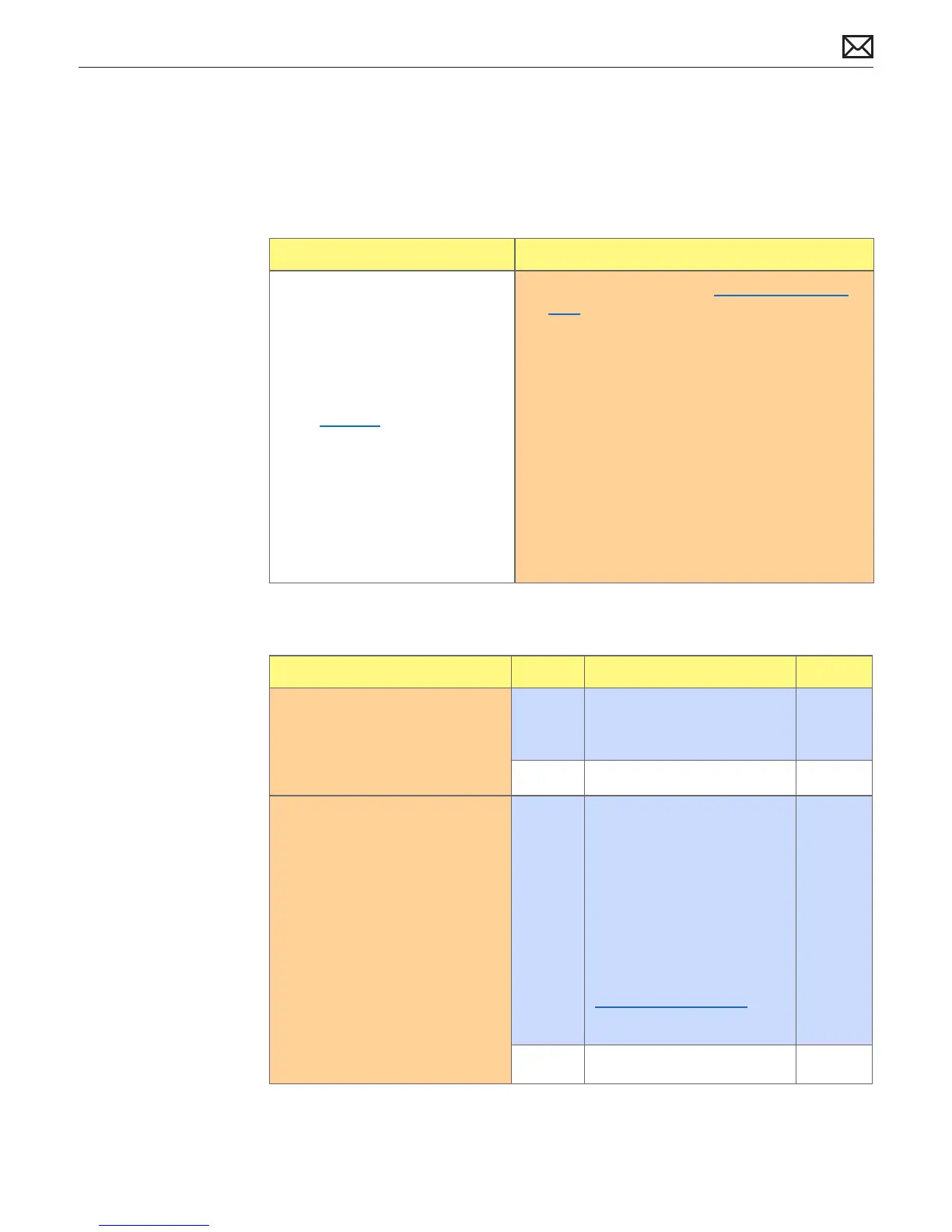
Mac Pro (Mid 2010) Symptom Charts — Power, but No Boot 56
2010-08-31
Power, but No Boot
Unlikely cause: Enclosure, processor board, processors, front panel board, fans, power supply
Quick Check
Symptoms Quick Check
Power, but No Boot
• Power, fans, hard drive spin,
startup chime
• Power LED is on, Caps Lock LED
illuminates when pressed
• Video observed (if no video, go
to No Video)
• No boot
1. Reseat all DIMMs. Refer to Memory Diagnostic
LEDs.
2. Reset SMC.
3. Reset RTC.
4. Reset PRAM
5. After power ON, verify front panel power/sleep
LED is illuminated and not ashing any error
sequences indicating a memory failure.
6. Attempt to startup from original install media, or
known good boot device with compatible Mac
OS X.
7. Verify internal hard drive available, smart status,
check structure and privileges using Disk utility.
Deep Dive
Check Result Action Code
1. Reset SMC. Verify the computer
boots from the internal hard
drive
Yes Corrupt SMC State preventing
successful power ON and
startup.
No Go to step 2
2. Remove the customer DIMMs
and install a single known
good compatible DIMM
in socket #1. Start up the
computer with Option key
pressed using a known good
keyboard. Verify the Startup
Manager appears.
Yes Computer boots to Finder
with known good DIMM.
Add another known good
DIMM in socket #2 and
retest. If computer starts up,
isolate and replace aected
customer DIMMs. Ensure the
DIMMs are installed correctly
following the recommended
DIMM arrangement (see
Memory Conguration) or
crashing problems will arise.
X02
No Go to step 3



 To Next Page