10 Chapter 1 Ready, Set Up, Go
Important: Removetheprotectivelmaroundthe60WMagSafePowerAdapter
beforesettingupyourMacBookPro.
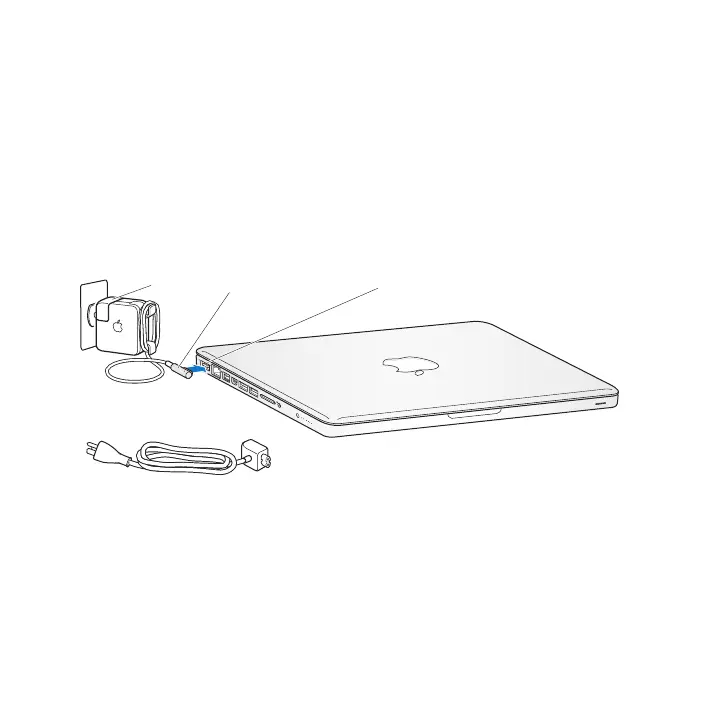
Step 1: Plug in the 60W MagSafe Power Adapter to provide power to the
MacBook Pro and charge the battery.
MakesuretheACplugisfullyinsertedintothepoweradapterandtheelectrical
prongsonyourACplugareintheircompletelyextendedposition.InserttheAC
plugofyourpoweradapterintoapoweroutletandtheMagSafeconnectorintothe
MagSafepowerport.AstheMagSafeconnectorgetsclosetotheport,you’llfeela
magneticpulldrawingitin.
AC power cord
MagSafe connector
AC plug
¯ MagSafe power port
Toextendthereachofyourpoweradapter,replacetheACplugwiththeACpower
cord.FirstpulltheACpluguptoremoveitfromtheadapter,andthenattachthe
includedACpowercordtotheadapter,makingsureit’sseatedrmly.
Whendisconnectingthepoweradapterfromanoutletorfromthecomputer,pullthe
plug,notthecord.



 To Next Page