UserGuideforRTP‐3280EthernetInterface
AppostarTechnologyCo.,Ltd. Page2
PrintingviaTCP/IP
TherearetwomethodsofsendingdatatoRTP‐3280forprinting.ThefirstoneisusestandardTCP/IPportas
connectionportofprinterdriver.ThesecondoneisuseVCOMtooltocreateavirtualCOMportasthe
connectionportofprinterdriver.Wedetailthetwomethods
below.
UseStandardTCP/IPPort
1. InstalltheprinterdriverthatcomeswiththecompanionDisc.
2. OpenthePrintersandFaxesfromWindowsStartmenu
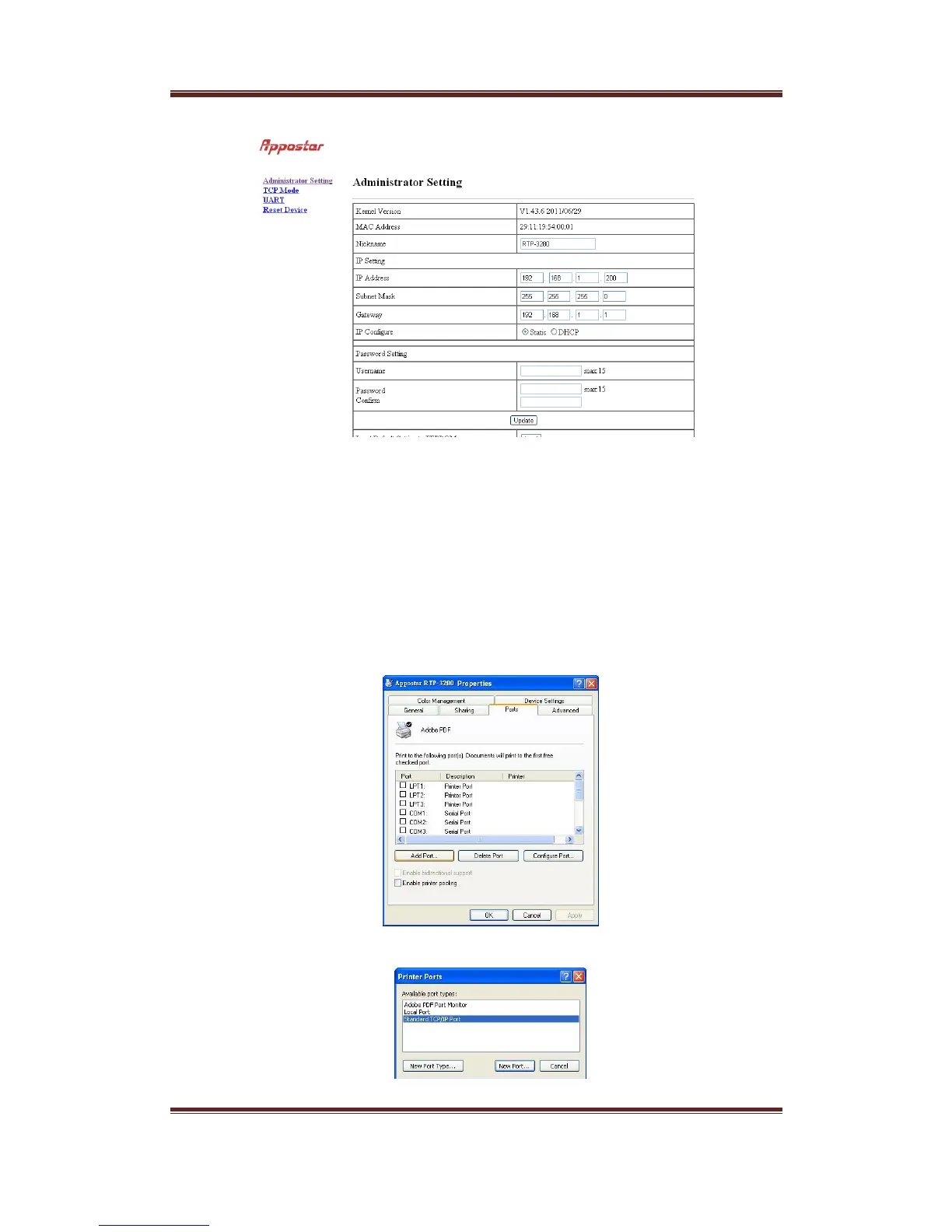
3. SelectRTP‐3280andclickrightbottomofmouse,clickPropertiesbottomtoshowthepropertypageof
RTP‐3280.SelectPortspage.
4. PressAddPort…bottom.SelectStandardTCP/IPPortandpressNewPort…toaddastandardTCP /IPport.


 To Next Page