NIS
4
Basic Operation
Power On/Off
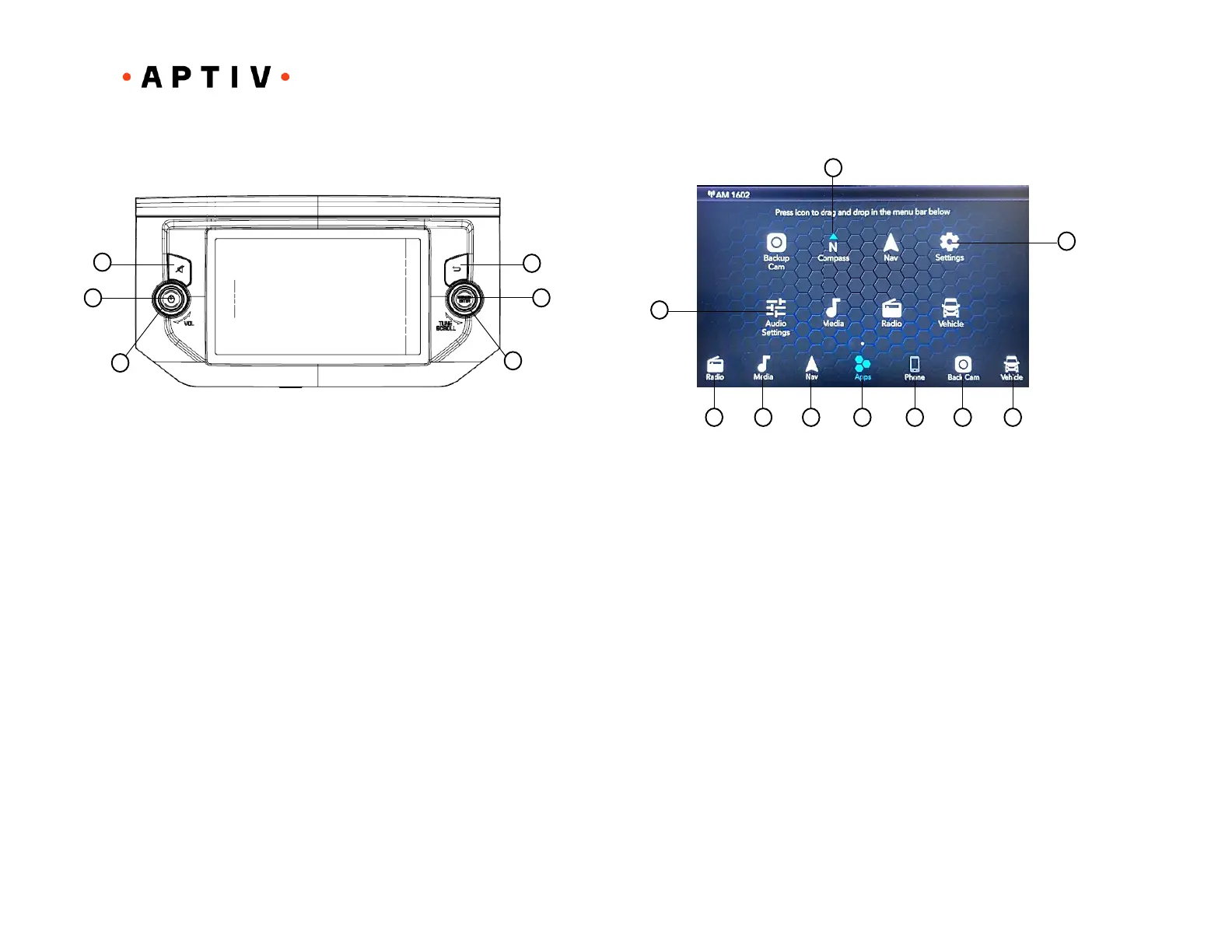
Press the POWER button (2) to turn the unit on/off.
Volume
To increase the volume, rotate the Encoder Knob (5) clockwise. To decrease
the volume, rotate the Encoder Knob counter-clockwise.
Mute
Press the MUTE button (1) to mute the audio output. Press the MUTE button
again to restore the audio output to the previous level.
Return
Press the RETURN button (6) to return to the previous page/operation.
Browse/Enter
Push the ENTER/BROWSE button (5) to accept a highlighted section on the
screen.
Tune/Scroll
Rotate the TUNE/SCROLL (4) rotary knob to scroll through a list or tune a radio
station when in Radio Mode.
NOTE: Depending on the vehicle options, feature settings may vary.
Radio
Press the RADIO button (1) on the touchscreen to enter Radio Mode. The
different tuner modes: AM, FM, and DAB can be selected by pressing the
corresponding buttons on the touchscreens in Radio Mode.
Media
Press the MEDIA button (2) on the touchscreen to access media sources such
as: Disc (if equipped), USB Device, AUX, Bluetooth, and SD Card (if equipped)
as long as the requested media is present.
Navigation (if equipped)
Press the NAV button (3) on the touchscreen to enter Navigation Mode. Refer
to the Navigation section in this manual for further details.
Apps Menu
Press the APPS button (4) on the touchscreen to open the Apps main menu.
On this screen, you will be able to access all of your available apps. To access
an App directly, press the corresponding button on the touchscreen, and you
will be directed to that App.



 To Next Page