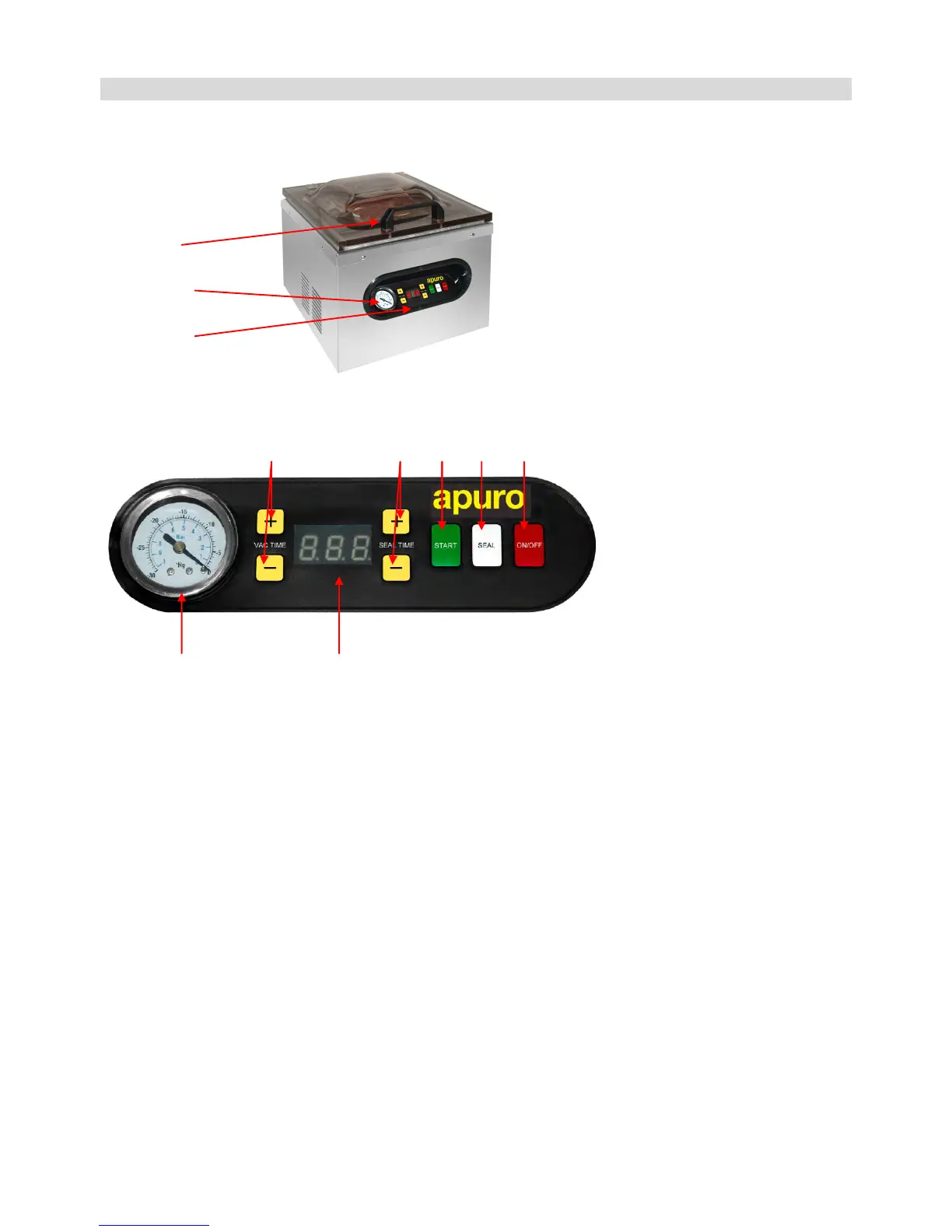
Location of Controls
Vacuum lid
Vacuum gauge
Control panel
E D C B A
F G
Controls
A. On/Off Button (On/Off)
After the machine is plugged in, LED display (G) will show Off, press the On/Off button, LED display (G) will show On. Now
the machine is ready to use. After using the machine, press the On/Off button before unplugging the machine. During use
pressing the On/Off button will stop the machine.
B. Seal Button (Seal)
Press the “Seal” button to stop the vacuum cycle and instantly seal the bag to prevent crushing delicate items.
C. Auto Vacuum Start Button (Start)
After closing the lid, press “Start” button. The machine will vacuum and seal automatically.
D. Seal Time Adjusting Button (Seal Time “+” or “-”)
Simply adjust the seal time “up” or “down” by using “+” or “-” buttons.
E. Vacuum Time Adjusting Button (Vac Time “+” or “-”)
Simply adjust the vacuum time “up” or “down” by using “+” or “-” buttons.
F. Vacuum Gauge
Shows the vacuum level inside the vacuum chamber.
G. LED Display
1. Shows the vacuum/seal time.


 To Next Page