FOreword
Thanks for purchasing Aputure VLMic D2,the perfect on-camera microphone for
your Video produotions,oapabIe of oapturing broadCastˉ
quaⅡ
ty sound This
miorophoneˇ ˇⅢ he|p eIevate your DsLR f"lη
-making t°
the neXt|eve|of production
quaⅡ
ty
Instructions:
●
Read th s instructon manuaI
●
Keep this nstΓuCuon manua|AIWays incIude th s instrucuon manua|When
passing the products on to the th rd pa改 ies
●
Heed a"warp ngs and fo"ow a"nstruc刂
ons in this nstruo刂 on manua
●
Uso only a microfiber c丨
oth for CIeaning the product
·
op占raie carefu"yto not cause any damage by d氵
opping"
●
Do not pIace the product near any heat sources suoh as radiators,stoves,or
other devices(inc|uding ampⅡ
fiers)that pr。
duce heat
●
WARNING:To reduoe the"sk ofⅡ
re or e eotHc shock,do not use the product
near water and do not eXpose itto rain or moisture
●
Do nottouch the product dur ng recording to not oapture the unwanted noise
of handⅡ
ng
●
Do notreoord us ng the∨
-Mic D2When unmounted "’
s easyto cause damages
on produCt or your diVersIty devico
●
When storing,keep the microphone in cool and dlγ
p|ace
●
Keepthe V-MoD2’s Volume at a reasonabIe,safe Ievel Rotate the sens"v"y
whee|to zero and then adjustthe audio|evel of recording device before recording
Intended use
Intended use of Vˉ Mic D2means:
●
The user has⒎
ead the instruct|ons ofthis manua|
●
The uoeris using the products within the operating cond tions and|innitat ons
descr bed in this instruction manual
·
‘‘
|mproper use"means using the produots otherthon as deso"bed in these
instruotions or under operating conditions Which differfrom those described
herein Improper use is not W thin the guarantee range
Deta"ed instrucΙ on manualforthe VoM c D2can befound on the mov e soIuuon page on
lntroduction
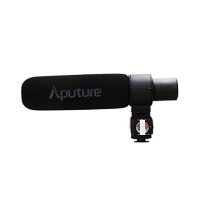
Aputure、 /-Mic D2is a direcuonal condenser shotgun miorophone thatfeatures a
super-oardioid polar pattern,Ⅱ
ne gradient aooustics,t"-isolation system,and
features that eas"y fi|ters unwanted background noise,Vibrations,and loˇ
v
frequenc es W th AF(Audi°
Frequency)peak indicators,you can sync up your
ca mera’s peaking leVe|to the V-R/iC D2 and adjustthe audio output sens tiv"y of
the∨
-Mic D2 "a so has a oW power nd catorandis equipped w"h a oold shoe,
mak ng"oompa刂 ble w"h most DsLRs and oamcorders
Main Features
1Adjustable sens"ivity
2 superˉ cardiold reCording paⅡ
ern
3 AF peak indicators(-12dB,°
ver)
4Adjustable AF Peak to synchronize w"h any dev Ce
5Low serˉ
noise
6 Loˇ
v-Cut fiⅡ
er
7 PoWerindicator
8T"丬
so a刂on system
9 Windscreen andˇ
vindshieId
围日
A丬u引aueAF Pmk b synC№
m⒛ M仙 any de叫
∞
Turn the sens淡
iv"y wheel(Page4,5)°
nthe V M o D2to zero sw"ch“
PRE CAL”
(Pre-caⅡ
bra刂 on)(Page4,4)t°
“
RUN” The V Mio D2w"send a beeping signaIto
the oamera so that you can Vieˇ
V⒒ s audio leVeI on your camera’
s audio metering
Adjustthe oamera’s recording leVe|so thatthe beeping signal peak|s at OdB
Turn“ PRE CAL” off on“ sTOP”
Now you Can usethe X/Mio D2’ s AF peak
ind cators(12dB,oVERXPage4,1)to m°
nitor Whetherthe audio you are
recording is o"pping or not
Adjustable sensitivity
Adjust the sensitivity Wheel(Page4,5)s°
thatthe audio peak leVeI you are captu冖
ng
is within the AF peakindicatorsC12dB,oVER)As y°
u reoord,you oan use the
sensitiVity WheeI to eas"y ohange your audioleVe|s and capture aˇ
vide range of
di仟 erentIy leve丨ed sound


 To Next Page
 Loading...