-5--4-
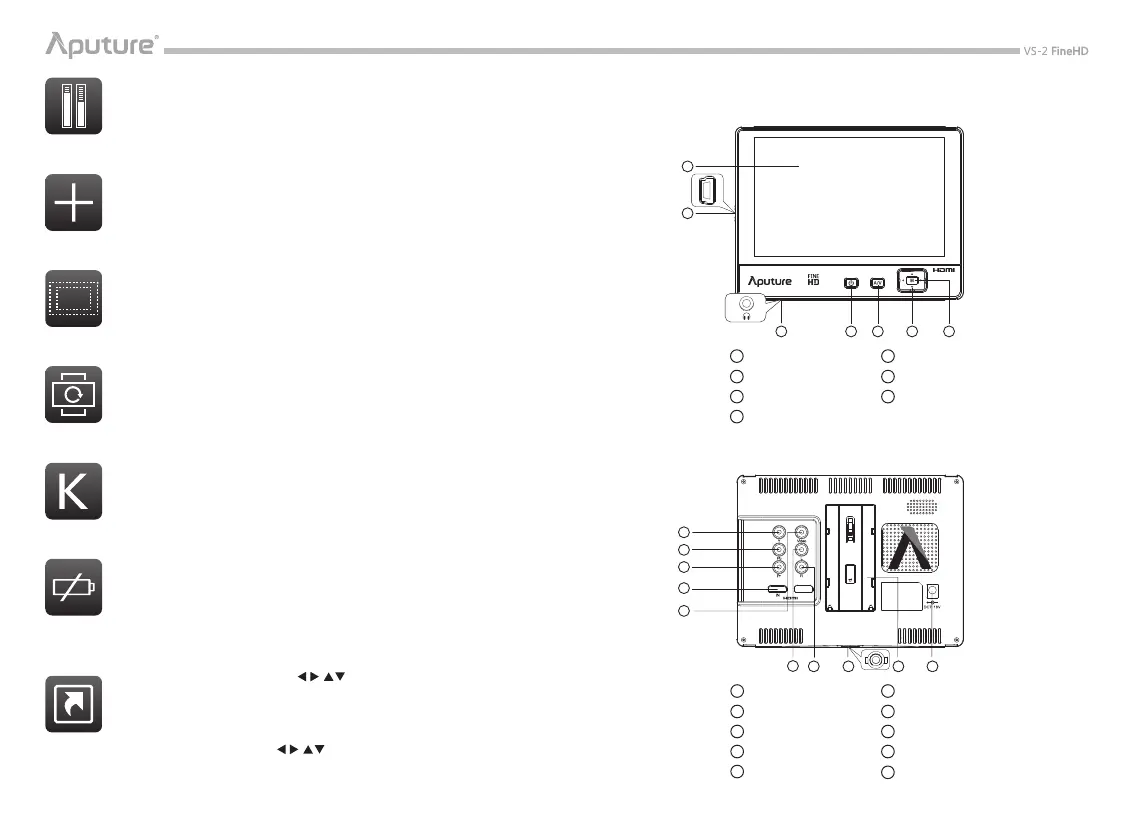
NOMENCLATURE
Front
Back
1 Screen
2 Mini USB Input
3 Earphone Jack
4 Power Switch
5 Signal Switch
6 Navigator
7 Menu Button
1 Y Input
2 Pb Input
3 Pr Input
4 HDMI In
5 Video Signal Input
6 Left-channel Input
7 Right-channel Input
8 1/4“ Thread
9 Battery holder
10
Power Input
* The Mini USB Input can only be used for rmware update.
1
2
3 4 5 6 7
2
1
3
4
5
6
9
10
8
7
Volume Bar
Monitor the volume in left and right channels. And it is marked by 3 colors,
green, yellow, and red, depending the Volume Level.
Center Mark
The Center Mark can be displayed together with another marker, Safe Area.
Safe Area
A wide range of safe area displays and aspect ratios, 2.35:1/ 1.33:1/ 1.66:1/
1.85:1/ 70%/ 80%/ 90%, can be selected.
Flip
The picture of the VS-2 FineHD can be freely ipped both vertically and
horizontally.
Color Temp
Color Temperatures of 6500K, 9300K or a User preset value can be selected.
Low Battery Alert
When your battery power is low, a red battery-shaped signal will icker on
the middle of the screen, which means that the monitor may be shut down
in a minute. If so, please replace your battery.
Shortcut
VS-2 FineHD has four buttons < >that can be assigned to
custom functions, such as, Safe Area, Center Marker, Color Bar, Peak,
Co-Zebra, Monochrome, Histogram, Camera Mode, Freeze, Vertical Flip,
Horizontal Flip, Zoom and Scan mode. Navigate to “Shortcut” to customize
functions of the Navigator < >.


 To Next Page