-6- -7-
POWERING
POWER ON/OFF
SIGNAL INPUT
Press the <A/V >button. Then choose appropriate signal input
mode by pressing< / >. Conrm the signal input mode by
pressing <M> button.
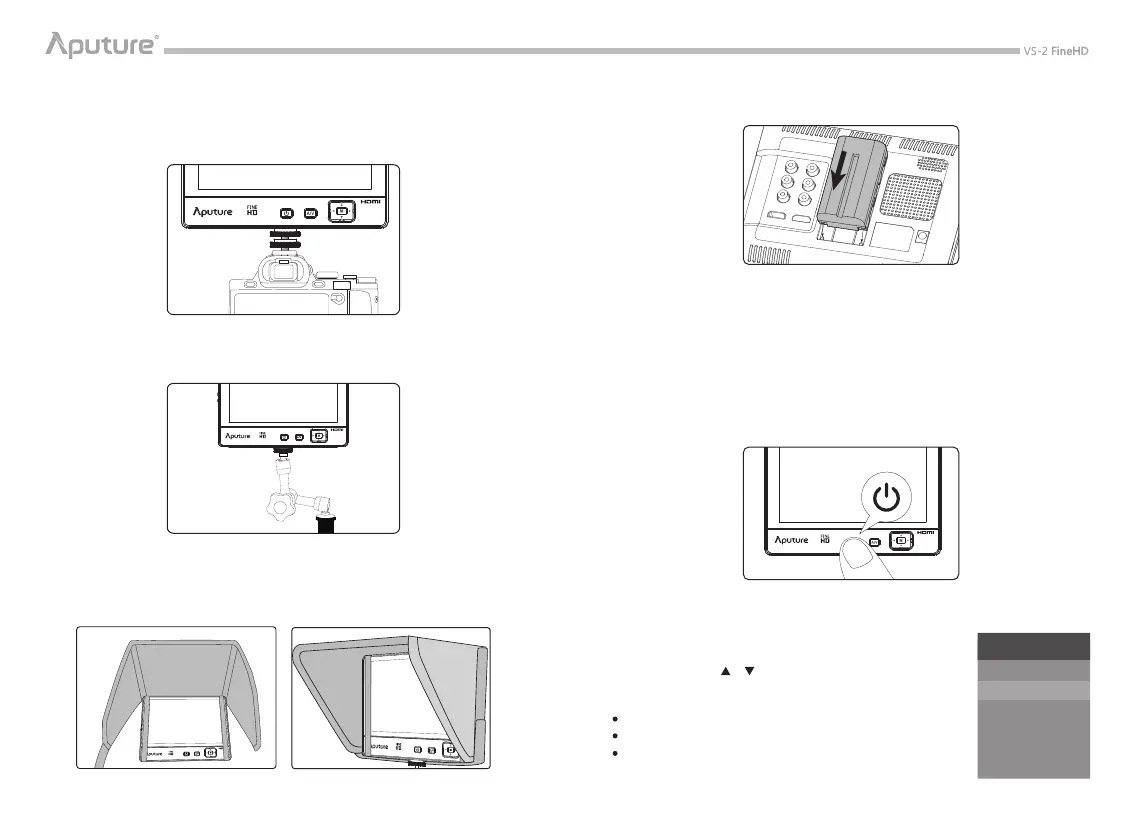
As shown, slot the battery into the battery holder.
* The following batteries are recommended: Sony NP-S Series: NP-F550/F570/F770/F960/F970,
Sony NP-FM/QM Series: FM50/FM51/FM55H/FM500H/QM50/QM51/QM71D/QM91D.
* You can also power it by a DC 7-18V through the input on the back of V-Screen.
The option, AV, corresponds to inputting the signal from Video, L, R.
The option, YPBPR, corresponds to inputting the signal from Y, Pb, Pr.
The option, HDMI, corresponds to inputting the signal from HDMI In.
INPUT SOURCE
AV
HDMI
YPBPR
* It takes about 15 seconds to load the system.
PREPARATION
INSTALLATION
SUNHOOD
1) Mount monitor on your DSLR or camcorder with cold shoe out from articulate arm.
2) Mount VS-2 FineHD on articulate arm and connect them with any other equipment
through 1/4” connector.
*The articulate arm can be disassembled for various demands.
Ax the sunhood on the monitor with tape as shown by the picture.
First of all, please check VS-2 FineHD has connected the battery or adapter. Then, if you
press the Power Switch for 0.8 second, indicator will turn to green which means that the
monitor has turned on. After using the monitor, you may press the Power Switch for 1.2
seconds, and the monitor will be shut down.


 To Next Page