02
1.PleasemakesureyouhaveaMatter-compatibleappand
aMatter-compatibleThreadBorderRouter.
2.Removetheinsulatingtab.Theindicatorshouldstart
breathing.
Pleasenote:Iftheindicatorisnotbreathing,pressand
holdtheresetbuttonfor5secondsuntiltheLED
indicatorstartsblinkingandreleaseit.Thedevicewill
enterthepairingmode.
3.OpentheMatter-compatibleappandscan theMatterQR
setupcodeon the manualorpackage,orentertheMatter
numericsetupcodeprintedontheproduct toaddthe
devicetotheapp.
Quick Setup
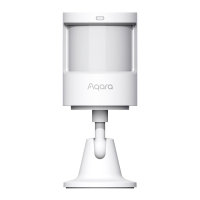
Motion and Light Sensor P2
Model: ML-S03E/ ML-S03D
Battery: CR2450 × 2
Wireless Protocols: Thread, Bluetooth 5.0
Bluetooth Operation Frequency: 2402-2480 MHz
Bluetooth Maximum Output Power ≤ 13 dBm
Thread Operation Frequency: 2405-2480 MHz
Product Specifications


 To Next Page