13
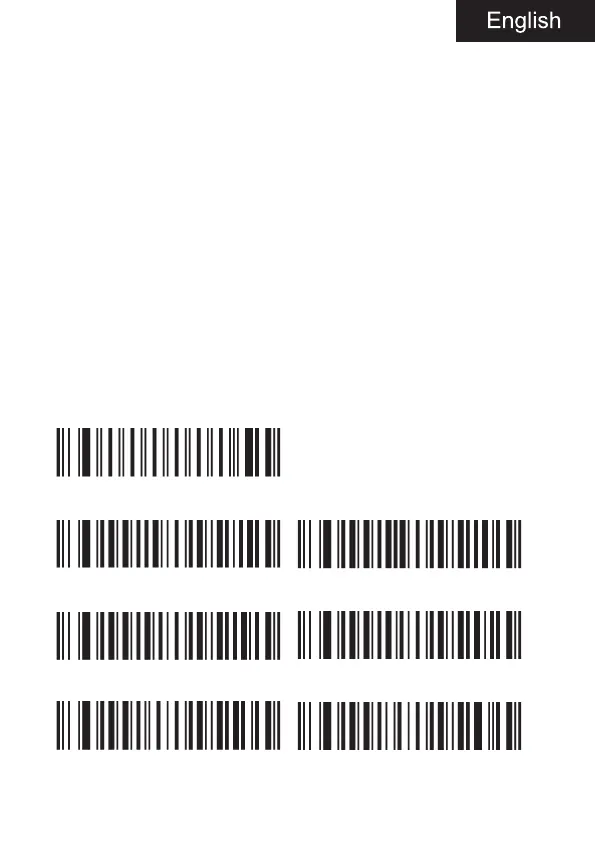
2. Scan “configure barcode type 1 length”.
3. Scan bytecode values “0”, “1”, “0” in turn.
4. Scan “configure barcode type 1 byte value”.
5. Scan byte code values “0”, “8” and “3” in turn.
6. Scan “enter / exit programming mode”.
Add length lock for multiple barcode types:
Example 2
1. Scan “enter / exit programming mode” to put the device into program-
ming mode.
2. Scan “configure barcode type 1 length”.
3. Scan bytecode values in turn.
4. Scan “configure barcode type 1 byte value”.
5. Scan bytecode value in turn.
6. Scan “configure barcode type 2 length”.
7. Scan bytecode values in turn.
8. Scan “configure barcode type 2 byte value”.
9. Scan bytecode values in turn.
10. Scan enter / exit programming mode.
Enter / exit programming mode
Configure barcode type 1 length Configure barcode type 1 byte value
Configure barcode type 2 length Configure barcode type 2 byte value
Configure barcode type 3 length Configure barcode type 3 byte value



 To Next Page