NOTESD - IND B – 02/2012 26 / 52
Systems settings:
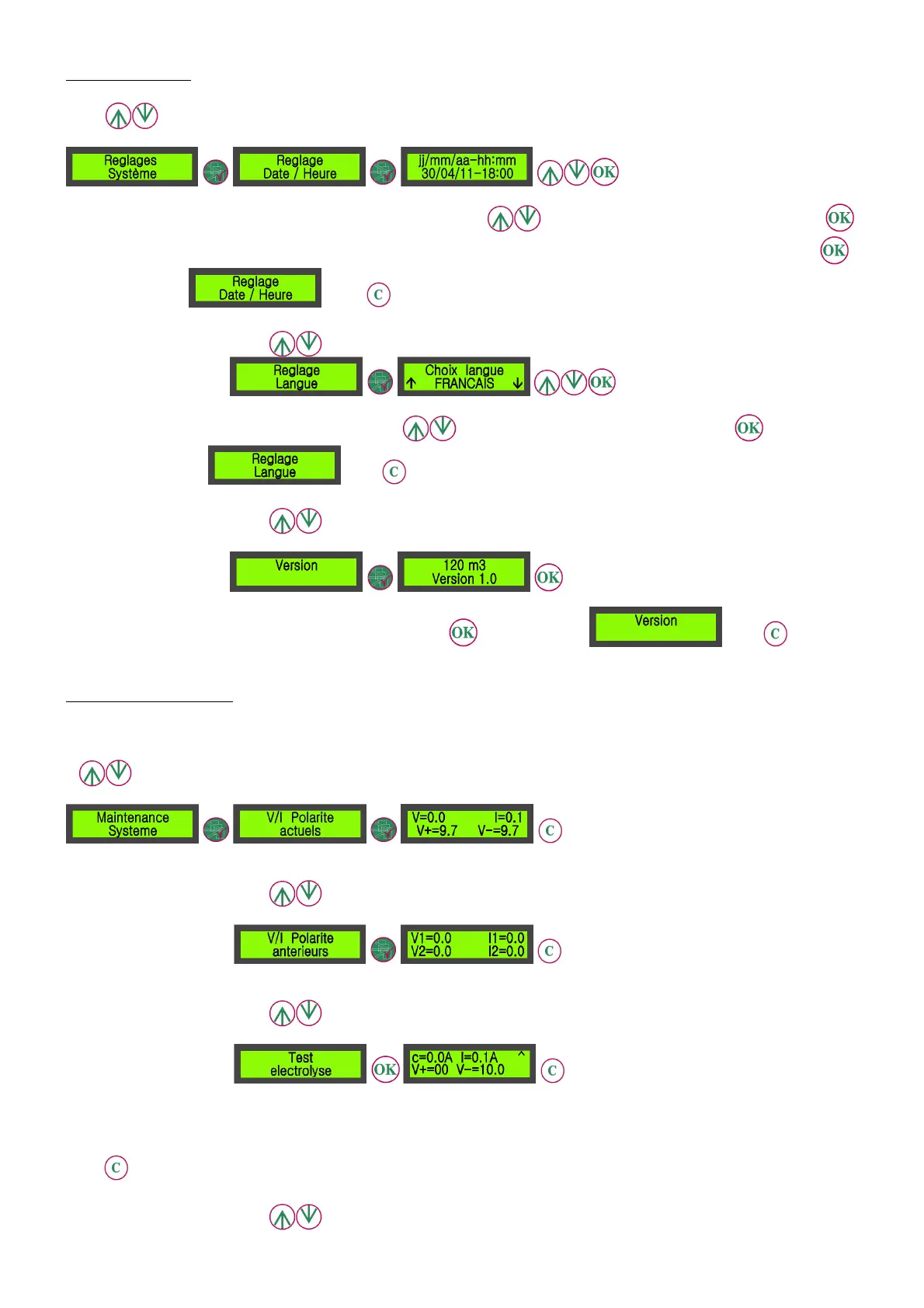
Use this sub-menu to access the standard settings for time, date and language and to visualize the devices’ version.
On the screen that has been opened, the day setting flashes. Press , to change the setting, then save by pressing
to proceed to the next setting. Proceed the same way for the other settings. After the last save is done, when pressing
the screen displays . Press to come back to the main display menu.
The screen displays a language in capital letters. Press to select the language then save by pressing . The screen
display comes back to . Press to come back to the main display menu.
The screen displays the relevant chlorinator’s version. Press to come back to . Press to come
back to the main display menu.
Systems’ maintenance:
This section allows to visualize the details of the various current or former operation parameters of the chlorinator and to
test its operation.
Indicates the current voltage and intensity at the cell’s terminals.
Indicates the last 2 voltages and intensities at the cell’s terminals since the last polarity reversal.
Allows to force the cell’s power supply and to display voltages and tensions.
c= increasing or decreasing intensity that the regulation wants to assign to the cell.
I= actual intensity of the electric current through the cell.
indicates a test with increasing or decreasing electric current. After the testing period the display remains stable,
press
to launch a test in the other way.
V+ et V- are the voltages at the cell’s terminals.


 To Next Page