5
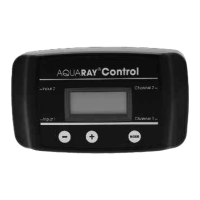
MODE DISPLAY COMMENTS
Run HH : MM : SS Clock display plus
indication of the status
of channels 1 & 2
Set Time (Hour) SET TIME Use ‘+’ and ‘-’ to
H
H:MM set the time
Set Time (Minute) SET TIME Use ‘+’ and ‘-’ to
HH:M
M set the time
Set Ch.1 On (Hour) ON 1 Use ‘+’ and ‘-’ to
H
H:MM set the on time
Set Ch.1 On (Minute) ON 1 Use ‘+’ and ‘-’ to
HH:M
M set the on time
Set Ch.1 Off (Hour) OFF 1 Use ‘+’ and ‘-’ to
H
H:MM set the off time
Set Ch.1 Off (Minute) OFF 1 Use ‘+’ and ‘-’ to
HH:M
M set the off time
Set Ch.1 Ramp RAMP 1 Use ‘+’ and ‘-’ to
M
M set the length of time
the dimming process
takes in minutes
Set Ch.2 On (Hour) ON 2 Use ‘+’ and ‘-’ to
H
H:MM set the on time
Set Ch.2 On (Minute) ON 2 Use ‘+’ and ‘-’ to
HH:M
M set the on time
Set Ch.2 Off (Hour) OFF 2 Use ‘+’ and ‘-’ to
H
H:MM set the off time
Set Ch.2 Off (Minute) OFF 2 Use ‘+’ and ‘-’ to
HH:M
M set the off time
Set Ch.2 Ramp RAMP 2 Use ‘+’ and ‘-’ to
M
M set the length of
time the dimming
process takes in minutes
Set Channel 1 LEV 1 Use ‘+’ and ‘-’ to set the
Level 1
00 on level of Channel 1
as percentage output
Set Channel 2 LEV 2 Use ‘+’ and ‘-’ to set the
Level 1
00 on level of Channel 2
as percentage output
Set Channel 1 MIN 1 Use ‘+’ and ‘-’ to set the
Minimum Level 0
05 off level of Channel 1
as percentage output
Set Channel 2 MIN 2 Use ‘+’ and ‘-’ to set the
Minimum Level 0
05 off level of Channel 2
as percentage output
1 2


 To Next Page
 Loading...