Pg. 2
1. Introducon and how it works
The AquaTrip is a programmable electro-mechanical Water Trip Switch. It monitors water ow into the property and is
able to shut o the water automacally in the event of a leak, a cracked pipe, a tap or faucet le running, a leaky toilet
cistern or some other plumbing failure. It can detect very low water ow, and is more sensive than most water
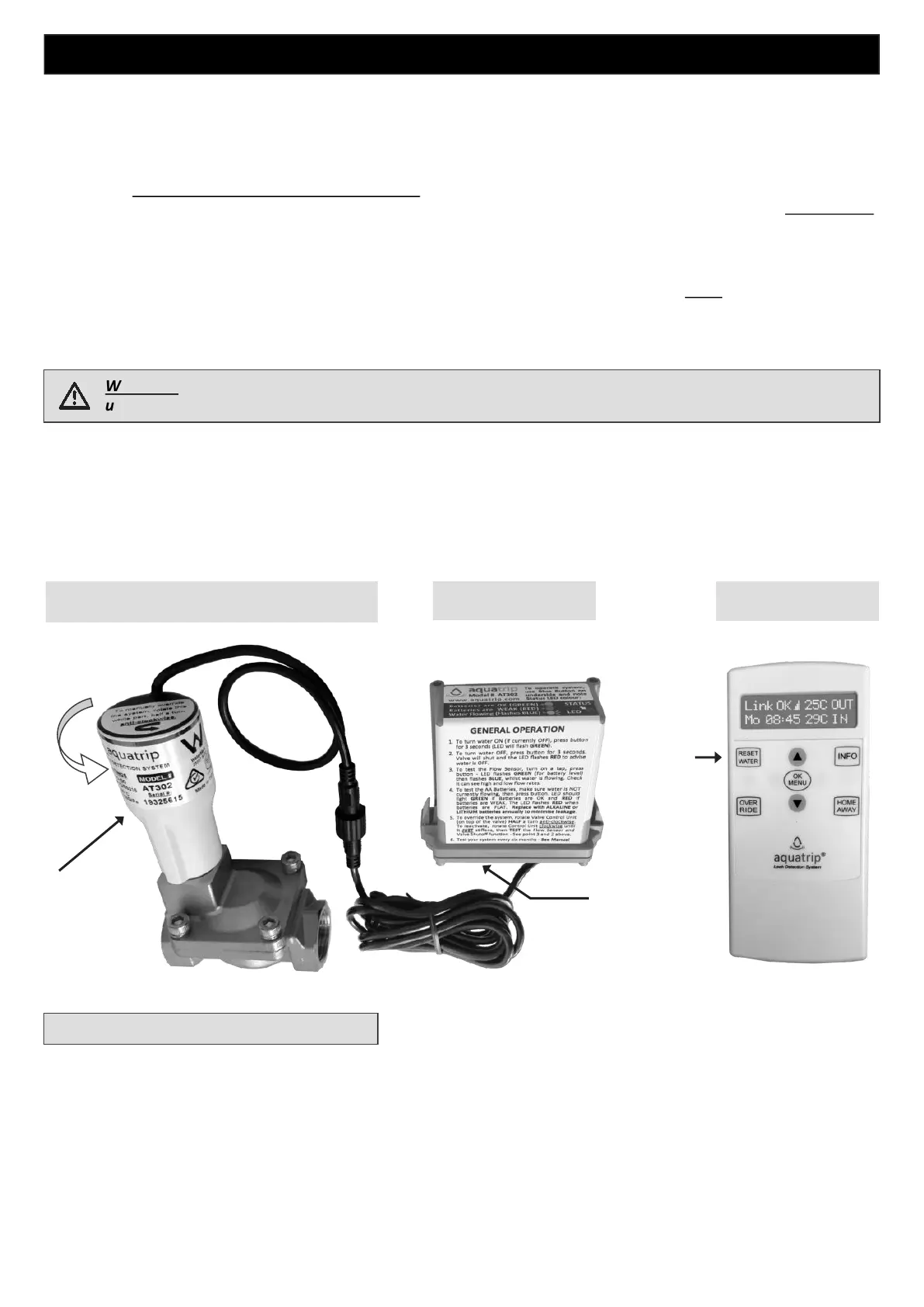
meters. It consists of a Control Panel wirelessly connected to a Control Box, connected by a cable to a Flow Sensor,
with an integrated Shuto Valve.
The System works by measuring water ow over me, and is equipped with a Flow Sensor linked to a Timer. You must
program the Flow Time seng on the AquaTrip with the longest period of me you think water may ow connuously
on the property (without a break in ow), during normal use. This Flow Time can be set from 1 minute to 3 hours. The
System will shut o the water if it sees connuous water ow for longer than the Flow Time that you have
programmed into it.
For example: If you set the Flow Time to 30 minutes and the water ows connuously for more than 30 minutes, the
System will trip and shut o the water supply.
As long as all water ow stops at some point within the 30 minutes, the Flow Sensor mer is reset. The mer then
restarts from zero when the water ow resumes.
WARNING - Before you operate or program the System, read all the warnings in this manual. If you do not
understand the warnings, please contact your plumber for advice or contact - info@aquatrip.com
In order for the System to respond as quickly as possible to a leak, it has mulple modes which allow for variable Flow
Times for dierent mes of the day and or night. These can be manually or automacally acvated if you are going to
be away from home, or used to enhance over night detecon while everyone is asleep.
AquaTrip cannot prevent leaks occurring, but it may alert you to the existence of a leak once the Flow Time has been
exceeded. It is up to you to program these Flow Times to a duraon which will suit your normal water usage. It is best
to start with shorter mes, as the system will then be able to indicate a leak or inadvertent use as quickly as possible
aer it occurs. You can change the Flow Time sengs at any me.
What to do if the water turns OFF ?
To turn the water back on, press the RESET WATER buon on the Control Panel. The water will turn on within 15 to 30
seconds. If the water does NOT turn back on, or the Control Panel does not respond for some reason, you can always
turn the water on manually by pressing the blue Control Buon on the underside of the Control Box for > THREE
seconds, OR, using the Emergency Manual Override procedure explained in Secon 10. If this does not work, check
the local Council mains water supply in your area has not been turned o.
If your AquaTrip turns o the water, the Control Panel will emit a beep and the display will ash every 5 minutes.
(To ensure peaceful sleep, the Panel will not beep between 10pm and 6am).
You must look for any obvious leaks to idenfy the cause of the ‘Trip’ before turning the water back on. If none are
evident, turn the water on and look for a less evident cause.
Blue
Control
Button
Control Panel Control Box
RESET
WATER
Buon
Flow Sensor and Shuto Valve
Rotate for
Emergency
Manual
Override


 To Next Page