Need help?
Do you have a question about the Aranet Aranet4 and is the answer not in the manual?
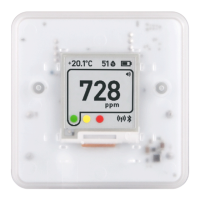
Displays air temperature in Celsius or Fahrenheit.
Shows the relative humidity percentage of the air.
Displays CO2 concentration in parts per million (ppm).
Indicates alarm status; speaker icon visible when active.
Indicates CO2 levels: Green (low), Yellow (average), Red (high).
Shows automatic or manual CO2 calibration mode status.
Indicates PRO version connectivity to base station or cloud.
Displays the current battery status of the device.
Indicates adjustable CO2 thresholds set via the Aranet4 app.
The inverted screen alerts when CO2 concentration is too high and unhealthy.
Warning not to remove batteries during firmware upgrade.
Indicates the battery is exhausted and needs replacement.
Shows the ongoing progress of the CO2 calibration process.
Displays the PIN code for pairing the device with a smartphone.
Alerts when temperature is too low, potentially damaging the sensor.
Instructions on how to access and adjust the device's configuration switches.
Details the functions of switches for calibration mode, temperature units, and Bluetooth.
Explains enabling/disabling device connectivity to Aranet radio for PRO version.
Lists capabilities provided by the Aranet4 app for device interaction.
Provides instructions for connecting the Aranet4 device to a smartphone via Bluetooth.
Describes the base station's role in collecting and storing data from Aranet sensors.
Instructions for initiating sensor pairing mode for the Aranet4 PRO.
The Aranet4 is a battery-powered CO2 meter designed for monitoring indoor air quality in various environments such as homes, schools, offices, and other private or public spaces. In addition to CO2 levels, it also measures temperature, relative humidity, and atmospheric pressure (the latter being accessible via the Aranet4 app).
The core function of the Aranet4 is to provide real-time air quality data, specifically focusing on CO2 concentration. It utilizes a nondispersive infrared (NDIR) sensor for CO2 measurement. This sensor works by emitting infrared light into a chamber where CO2 gas absorbs a specific wavelength of this light. The amount of light that passes through the chamber is inversely proportional to the CO2 concentration: less light indicates higher CO2 levels. An optical filter ensures that only the relevant wavelength of light is measured.
The device features a power-efficient e-ink screen that displays the current measurements. The screen shows the temperature in Celsius or Fahrenheit, relative humidity as a percentage, and CO2 concentration in parts per million (ppm). The CO2 level is visually indicated by a color-coded threshold bar: green for normal (below 1000 ppm), yellow for average (1000 to 1400 ppm), and red for unhealthy (above 1400 ppm).
The Aranet4 can provide visual and sound notifications if CO2 concentration reaches unhealthy levels. A speaker symbol on the screen indicates when the alarm function is active. These alarm settings, including adjustable CO2 thresholds, can be configured through the Aranet4 app.
The Aranet4 is designed for ease of use and provides several features to enhance the user experience:
Proper maintenance ensures the accuracy and longevity of the Aranet4 device:
 General
| Measurement Parameters | CO2, Temperature, Humidity, Atmospheric Pressure |
|---|---|
| Atmospheric Pressure Measurement Range | 300 to 1100 hPa |
| Atmospheric Pressure Accuracy | ±1 hPa |
| Battery Life | up to 4 years |
| Temperature Measurement Range | 0 °C to 50 °C (32 °F to 122 °F) |
| Temperature Accuracy | ± 0.3 °C |
| Humidity Measurement Range | 0 to 100 %RH |
| Connectivity | Bluetooth |
| Display | e-ink |
| Storage Conditions | -20 to 60 °C, 0 to 95% RH (non-condensing) |


 To Next Page