Gen 5 enGLISH
ALARm CLOCk
ALARM CLOCK
405
605
705
TV
+
▲
!
To use this function, you must download and install the latest rmware (version 2.0 or higher) on your ARCHOS product(s):
www.archos.com/rmware
The alarm clock function is available on the ARCHOS 405, 605, 705 and TV Plus.
SETTING THE ALARM CLOCK
1
2
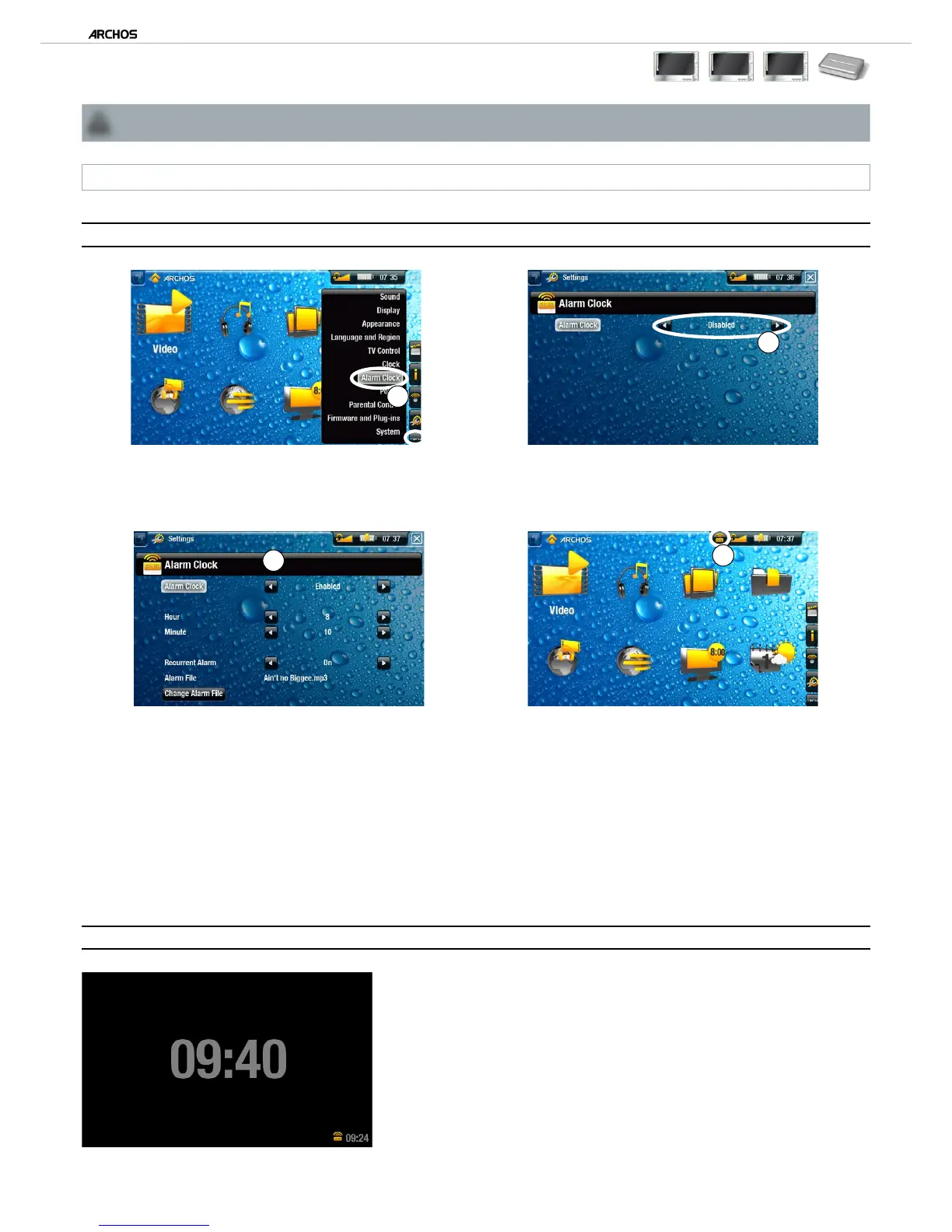
From the Home Screen, select menu, “Settings”, then choose “Alarm Clock”.
Set “Alarm Clock” to “Enabled” (if you want to turn off the alarm clock, select “Disabled”)
3
4
The following parameters will appear:
“Hour”, “Minute”: set the time you want the alarm clock to go off.
“Recurrent Alarm”: set this to “on” if you want the alarm to go off everyday at the same time.
“Alarm File”: the name of the le to be played when the alarm goes off.
“Change Alarm File”: select this to dene a new alarm le. You can choose a video, a song, a Web radio or a Web TV (if you have pur-
chased the “Web TV & Radio” plug-in).
When you close the window, you will see a symbol appear in the top status bar, on the left of the volume icon, indicating that the alarm clock is
enabled.
TIME DISPLAY
When your device is externally powered and the screen backlight shuts off, then tapping
the touchscreen or pressing a button will display the current time as well as the time set
for the alarm clock (bottom right). After a few seconds, the backlight will shut off again.
While the time is being displayed, tapping the touchscreen or pressing a button again will
bring you to the ARCHOS Home Screen.
If you do not want this function, you can disable it in the “Clock” settings.
•
•
•
1.
2.
3.
-
-
-
-
4.



 To Next Page