7
ENGLISH
THE ARCHOS INTERFACE
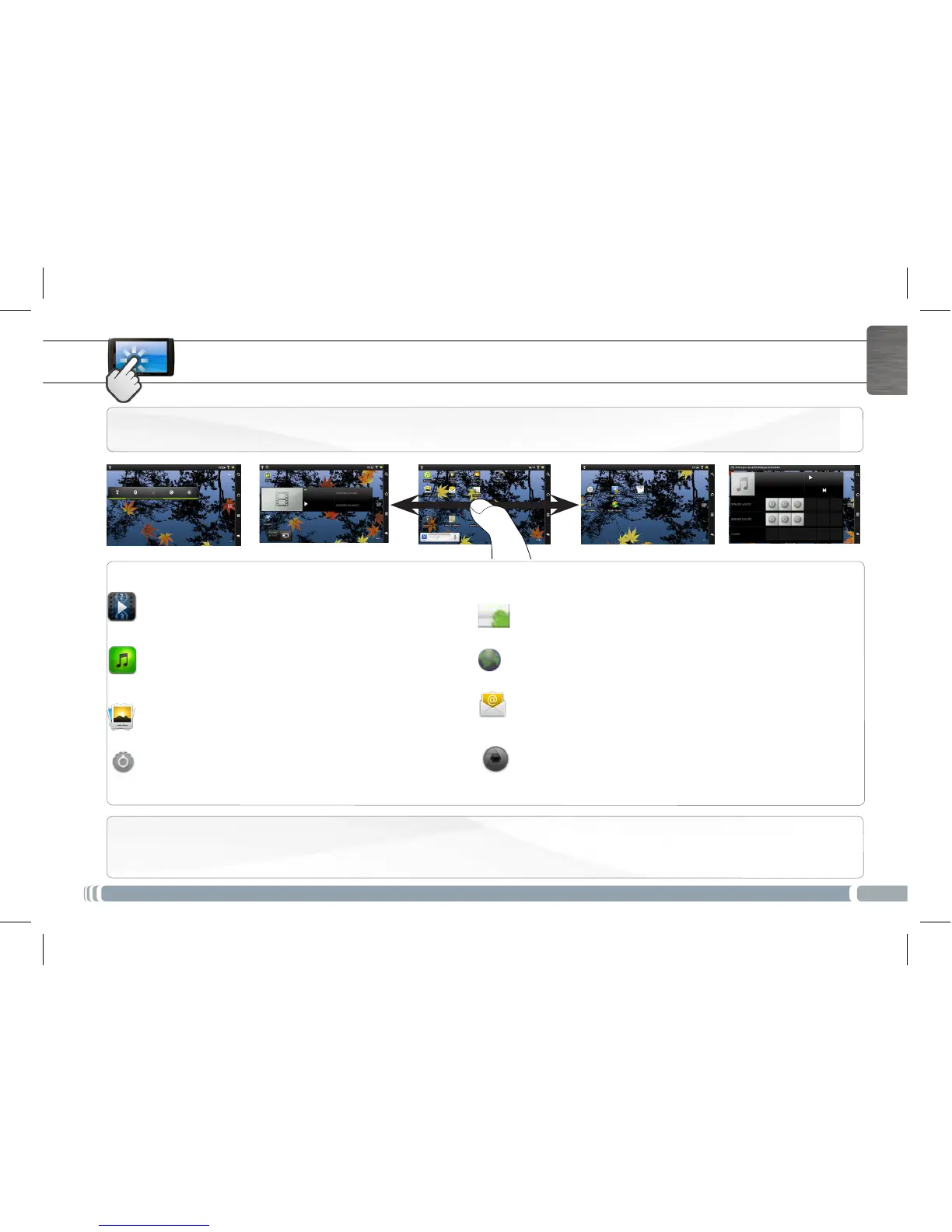
Preinstalled applications :
For your convienence, some applications have been preinstalled. You can get more applications via Android Market.
Main applications
Video: Stop halfway through a video and pick up where you
were watching just by tapping on the little “+” symbol, on the
rightofthelename.
Music: Slide your nger (vertically or horizontally) on
the album covers, on the left, to navigate more visually
through your albums.
Gallery: View your pictures as a photo wall and then
one-by-one, or as a running slideshow. Simply drag
your nger horizontally to jump from one photo to
another.
Android Market: use the market application by Google to
download free and paid applications.
Browser: Have multiple pages open at once to jump back
and forth between them.
Email: Allows for e-mail accounts of the type POP or IMAP.
Camera: Take still image photographs or video sequences.
At any time, simply tap on the thumbnail on the top right to
display the last-taken pictures.
The extended Home screen: Slide your finger horizontally on the screen to navigate between the 5 panels of the extended Home
screen.
Changing the Settings: From the Home screen, tap on the
Settings icon and choose a category: Wireless & networks,
Sound & display, Date & time, etc.
UserGuide_Archos80 G9_book.indd 7 17/06/2011 12:57:25



 To Next Page