- 4 -
Single Shade Filters
Singles
®, Super Singles 240™,
XT
™, and
Xtreme™
(X450F & X540F)
models are
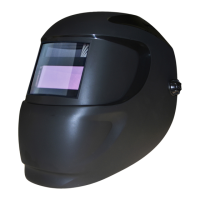
single shade auto-darkening welding filters. This means that when the arc is struck the
lens automatically darkens to a specific predetermined shade.
• The
XT
®
is available in a dark shade of 10 with a light shade of 2.5
(see table 5).
•
•
The
Singles
®
is available in 4 different dark shades. Shades 9, 10, and 11 are
available with a light shade of 2.5 and shade 12 is available with a light shade of 3
(see table 5).
• The
Super Singles 240™
is available in a dark shade of 10.5 with a light state of
2.5 with a sensitivity and delay mode for TIG welding and a power off mode for
grinding (see table 5).
• The
Xtreme™
X450F and X540F are available in a dark shade of 10.5 with a
light shade of 2.5 with a sensitivity and delay mode for TIG welding and a power
off mode for grinding (see table 5).
Variable Shade Filters
•
Industrial Xtreme™
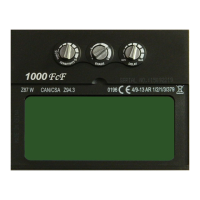
has a knob, located on the outside of the helmet, which can
be rotated to decrease or increase the shade level 7-14, without the need to
remove the helmet or gloves along with sensitivity and grinding adjustment. An
on/off mode specifically designed to maintain the light state when grinding and set
delay from dark to light (see table 6).
• The
Industrial ™
has a knob located on the outside of the helmet, which can be
rotated to decrease or increase the shade level, without the need to remove the
helmet or gloves. The I450 and I540 has a shade selection 7 to 14 and the I240
has a shade selection 9-13. Both with a light state of 3 (see table 6).
• The
Xtreme™
(X450V and X540V) filters have a button on the filter which allow
you to easily change shades from 9 to 12 with a light state of 3. There is a heads-
up display located above the viewing area, which allows the welder to quickly see
the current shade and an on/off mode specifically designed to maintain the light
state when grinding (see table 6).
• The
Shades™
450 and 540 filters have a button on the filter which allows you to
easily change shades from 9 to 12 with a light state of 3. There is a heads-up
digital display at the bottom of the inner viewing area, which allows the welder to
quickly see the current shade and mode (see table 6).
Sensitivity and Delay adjustments (Super Singles 240™,
Xtreme™, Shades, and Industrial™ 450 and 540, and Industrial
Xtreme™ Filters Only)
In addition to adjusting the shade level, these filters have the ability to change the arc
detection sensitivity from the general welding mode to a more sensitive TIG welding
mode. A delay mode is also included and is typically on when performing most welding
applications except spot welding. When the delay mode is off, or on fast, the filter
switches quickly from the dark shade to the light shade and slower when the delay
mode is in the “on” or “slow” position. When spot welding, the delay mode is off, or on
fast, allowing the user to quickly move from one weld to the next without having to wait
for the filter to lighten in order to see his next target. The delay mode is utilized for
longer duration welds where the slower switching time, from the dark shade to the light
shade, allows the weld puddle to cool and darken further reducing the glare to the
welder’s eye (see table 1).


 To Next Page
 Loading...