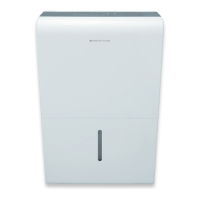
This document is the owner's manual for Arctic Wind dehumidifiers, covering models 2AD22A, 2AD35A, 2AD50A, and 2ADP50A. It provides essential information for safe installation, operation, and maintenance of the device.
Function Description
The Arctic Wind dehumidifier is designed for indoor residential use to reduce humidity levels in a room. It operates by drawing in humid air, passing it over evaporator coils to condense moisture, and then expelling drier air. The collected water can be stored in a removable bucket or continuously drained via a hose. Some models include a pump feature for draining water to a higher elevation. The unit features various operating modes, including continuous dehumidification and a comfort mode that automatically maintains relative humidity between 45% and 55%. It also incorporates safety features like auto-defrost and auto-shutoff when the water bucket is full or removed.
Important Technical Specifications
- Operating Environment: The unit is designed to operate in temperatures between 5°C/41°F and 32°C/90°F, and relative humidity between 30% and 80%.
- Refrigerant: Some models use a flammable refrigerant (R290). Specific information on the type, amount, and CO2 equivalent may be found on the unit's label.
- Floor Area Requirement: For units using flammable refrigerants, the appliance should be installed, operated, and stored in a room with a floor area larger than 50 ft².
- Continuous Drain Hose Outlet: For continuous draining, an external drain hose (ID ≥ 5/16'') with a female threaded end (ID: M=1'') is required (not included).
- Pump Drain Hose: For models with a pump, a pump drain hose (ΦOD=1/4'') is supplied.
- Humidity Control Range: The desired humidity level can be set between 35% RH and 85% RH in 5% increments.
- Timer Settings: The timer can be set in increments of 0.5 hours up to 10 hours, and then 1-hour increments from 10 to 24 hours for both auto-start and auto-stop functions.
- Filter Cleaning Reminder: The FILTER light illuminates after 250 hours of fan motor operation, indicating it's time to clean the air filter.
- Humidity Reading Accuracy: The accuracy of the relative humidity reading in the room is ±5% for humidity levels between 30% and 90%.
Usage Features
- Control Panel: The unit features a control panel with various buttons and indicators, though specific layouts may vary by model.
- COMFORT Button: Activates a dehumidification setting that automatically maintains room humidity between 45%-55% RH. In this mode, manual humidity adjustment is deactivated.
- FILTER Button: Serves as a reminder to clean the air filter. Pressing and holding it resets the timer after cleaning. On wireless models, pressing it for 3 seconds initiates wireless connection mode, indicated by "AP" on the LED display.
- CONTINUE Button: Activates continuous dehumidifying operation, where the unit runs without being controlled by a specific humidity setting.
- TURBO Button: Toggles between normal and high (Turbo) fan speeds for maximum moisture removal.
- TIMER Button: Allows setting a desired ON or OFF time for the dehumidifier, with increments from 0.5 to 24 hours.
- Humidity Set Control (Left/Right Buttons): Used to adjust the desired humidity level between 35% RH and 85% RH.
- POWER Button: Turns the dehumidifier on and off.
- PUMP Button (on some models): Activates the pump operation for continuous draining to a higher elevation.
- LED Display: Shows current relative humidity, auto start/stop settings, and desired humidity levels.
- Water Bucket: Collects condensed water. The unit will shut off and display "P2" when the bucket is full or not properly seated.
- Continuous Draining: Allows water to be automatically emptied into a floor drain using an external hose.
- Pump Draining (on some models): Enables automatic draining to a suitable drainage facility using the supplied pump drain hose, even if the drain is above the unit's level.
- Auto Shut Off: The dehumidifier automatically shuts off when the bucket is full, removed, or when the desired humidity level is reached. The fan continues to run for an additional 3 minutes after reaching the desired humidity.
- Auto-Restart: In case of a power interruption, the unit automatically restarts with its previous settings once power is restored.
- Auto Defrost: The unit automatically enters auto defrost mode when frost/ice builds up on the evaporator coils. The compressor cycles off, and the fan continues to run until the frost disappears.
Maintenance Features
- Cleaning the Water Bucket: The bucket should be cleaned every few weeks to prevent mold, mildew, and bacteria growth. Use water and a mild detergent; do not use bleach or abrasives. Do not use a dishwasher.
- Cleaning the Air Filter: The filter is integrated with the back panel and should be removed and cleaned every two weeks under normal operating conditions. Pull the filter outwards, wash it with clean water, dry it, and then re-install it. Operating the dehumidifier without a filter can lead to dirt and lint clogging, reducing performance.
- Cleaning the Unit: The air intake and outlet grilles can be cleaned with a vacuum attachment or brush. Do not splash water directly onto the main unit to avoid electrical shock or rust.
- Pump Filter Cleaning (for pump models): If the pump operation light blinks at 1Hz, it indicates a pump failure, and the pump filter should be cleaned. This involves removing the bucket, taking down the pump, and cleaning its filter.
- Preparing for Storage: Before long-term storage, turn off the unit and wait one day before emptying the bucket. Clean the main unit, water bucket, and air filter. Wrap the power cord, cover the unit with a plastic bag, and store it upright in a dry, well-ventilated place.
- Troubleshooting Tips: The manual includes a troubleshooting chart to help diagnose common issues before calling for service, such as the unit not starting, not drying air effectively, making loud noises, frost on coils, or water on the floor. Error codes like P2, ES, and AS are explained, along with their respective solutions.


 To Next Page
 General