38 / EN
Washing Machine / User Manual
4.2.8 Displayed Program Time
You can see the programme duration on the
display of your machine while selecting a
programme. Depending on the amount of laundry
you have loaded into your machine, foaming,
unbalanced load conditions, fluctuations in power
supply, water pressure and program settings, the
programme duration is automatically adjusted
while the programme is running.
SPECIAL CASE: At programme start of Cottons
and Cotton Eco programmes, display shows the
duration of half load, which is the most common
use case. After programme starts, in 20-25
minutes actual load is detected by the machine.
And if the detected load is higher than half load;
washing program will be adjusted accordingly and
program duration increased automatically. You
may follow this change on the display.
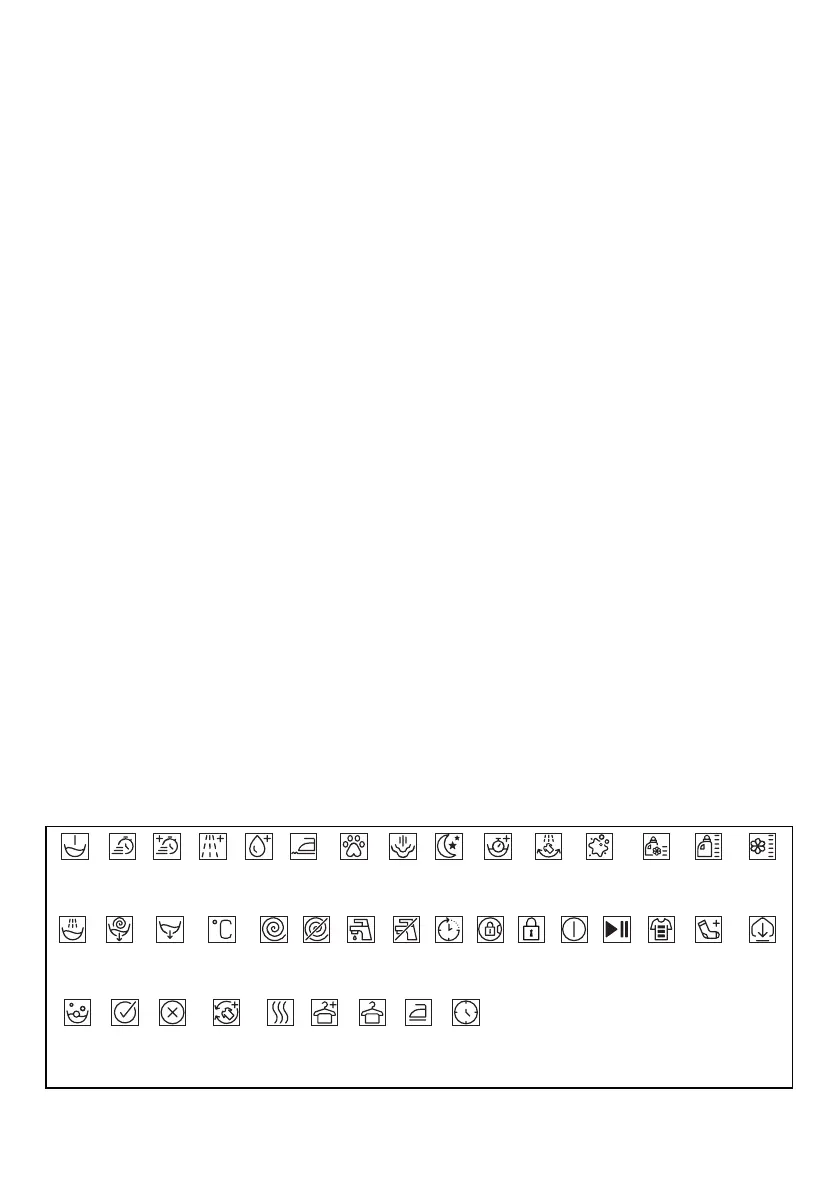
Rinse
Spin+Drain
Prewash Fast Fast+ Extra
Rinse
Extra
Water
Anti
Crease
Pet Hair
Removal
Rinse
Hold
No
Water
Drain
Soaking
Spin No
Spin
Tap
Water
(Cold)
Steam
Time
Delay
Night
Modu
Temperature Door
Lock
Child
Lock
On/Off Start /
Pause
Soil Level Add
Garment
AutoDose
Liquid
Detergent
Selection
Softener
Selection
Wash
Downloaded
Program
Steeping
Ok
(End)
Cancel
AntiCrease+ Iron
Dry
Cupboard
Dry
Extra
Dry
Timed
Drying
Drying


 To Next Page