15
Note: Make full charge for the fan before rst time
Press the button switch to select the desired function: speed 1 (one
indicator light will be n in the control panel), speed 2 (two indicator lights
will be on in the control panel), speed 3 (three indicator lights will be on
in the control panel, speed 4 (four indicator lights will be on in the control
panel, off (all the indicator lights are off in the control panel).
Instructions for use
Technical informations
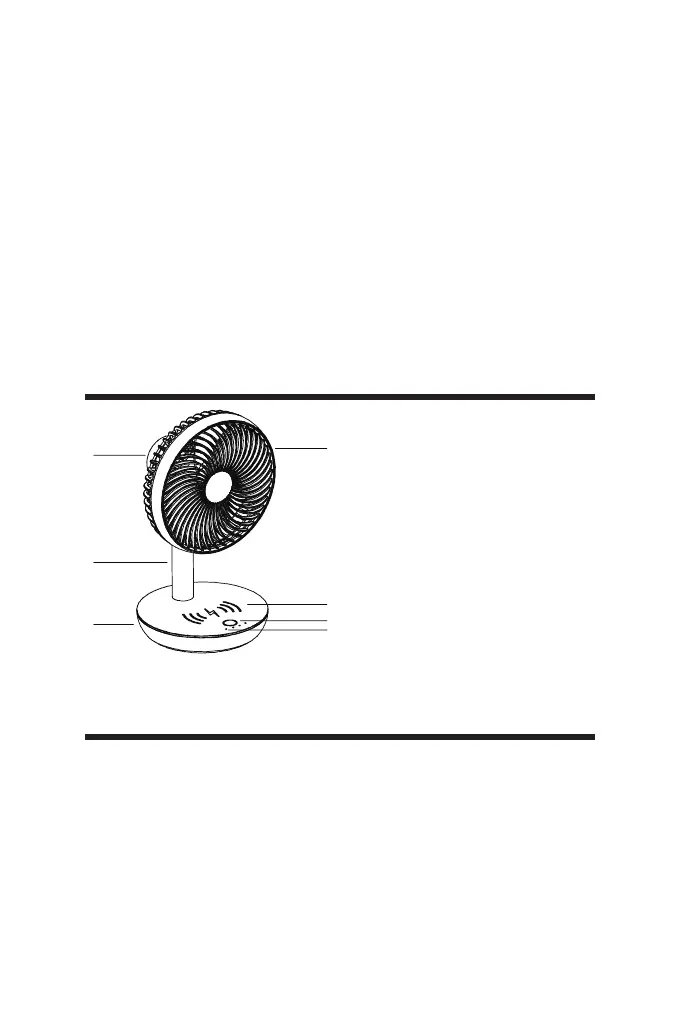
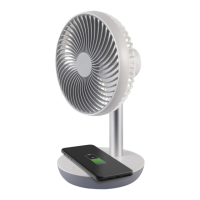
1. Grid
2. Wireless charging area
3. Button switch
4. Indicator lights
5. Motor housing
6. Stand pole
7. USB ports
Do not weld or solder directly to batteries.
Do not dismantle batteries.
Do not deform batteries.
Do not dispose of batteries in re.
Do not expose batteries to water or humidity, expecially in case their
container were damaged.
Do not encapsulate and/or modify batteries.
Store unused batteries in their original packaging away from metal
objects. If already unpacked, do not mix or jumble batteries.
In case of leak from batteries, avoid any contact with it; in case of contact,
wash the affected part with water and seek medical attention.


 To Next Page