461306186 (A-000)
8
E
123
M
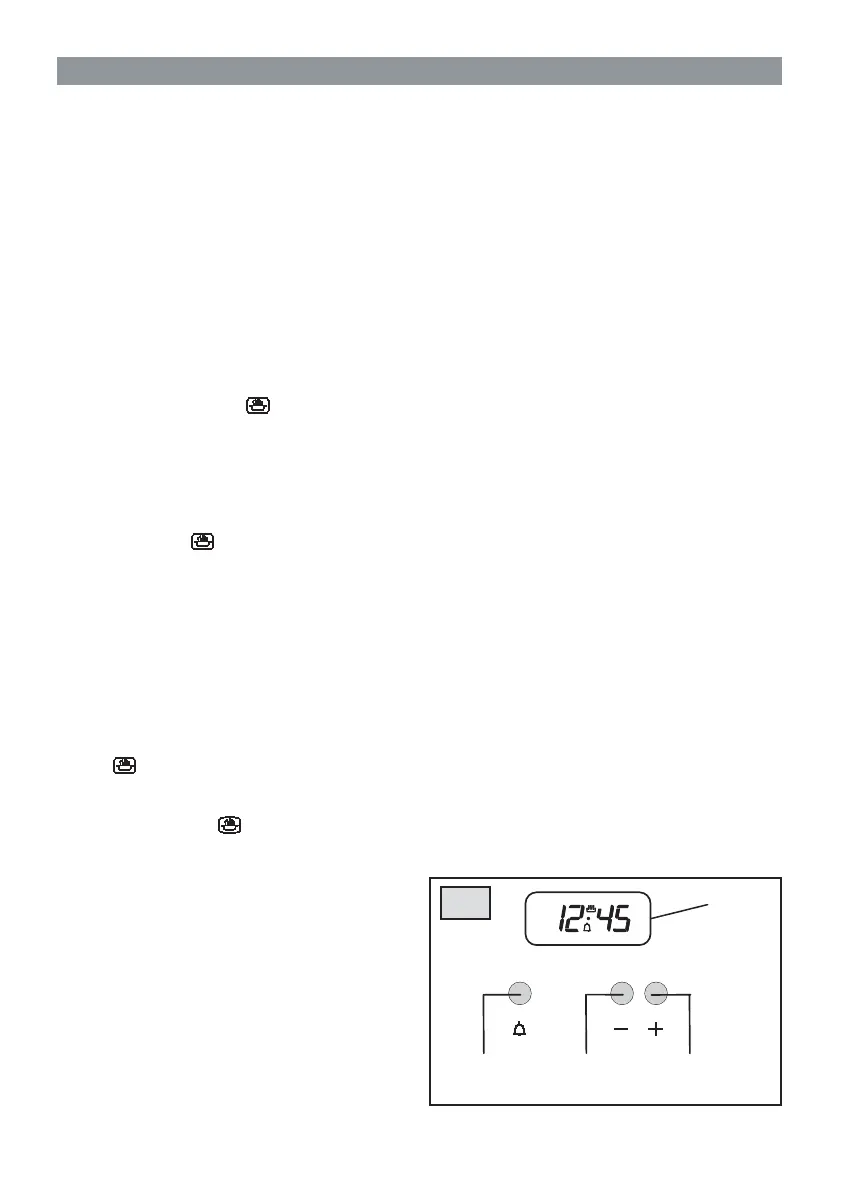
ELECTRONIC TIMER WITH COOKING TIME (ref. E)
This timer has two different functions: a clock function
and one that automatically stops the oven by setting
the length of cooking time.
The digital display (M) always shows the time but will
also show timer time when this function is set.
Setting the time (from 0.01 to 24.00 = hh,mm)
After connecting to the electricity mains or
subsequent to a power cut either the figures “0.00”
or the time elapsed since electricity was returned,
will flash on the display. Press push button 1 and
start setting the current time by pressing button
2 or 3. While you are setting the time the manual
functioning mode symbol will turn on. The
function will start 7 seconds after setting.
Manual operation
By simply setting the time (push button 1) or when
the buzzer is interrupted (push button 3) the timer is
programmed on the manual functioning mode which is
confi rmed when the symbol turns on.
To the contrary, the manual functioning mode is only
possible at the end of semi-automatic programming or
after having cancelled it.
Semi-automatic operation (with cooking time from
0.01 to 0.99 = hh,mm)
By selecting the time on the minute counter with push
button 3 this function will always be active (the time
is set in 10 second units). The time will disappear
from the display leaving the minute counter time
and the symbol showing and the AUTO symbol
will turn on. The time units are in seconds during
count down. At the end of the set time the buzzer
will ring, the AUTO and symbols will turn off and
the time reappears. The time can be seen during
this function by pressing push button 1.
Buzzer
The buzzer goes off at the end of the minute counter
function and lasts about 7 minutes. The buzzer can be
stopped by pressing button 3. After having done this
remember to turn the selector knob and the thermostat
round to the off position.
GB 2. DESCRIPTION OF THE APPLIANCE
Buzzer intensity
There are three different buzzer intensities: to select
the one you want press push button 2 when the time
is displayed. Manual function programming is now
cancelled.
Correcting/cancelling functions
To correct or cancel the time set on the timer, press
keys 2 and 3 simultaneously and then release key
3 fi rst. The time can be corrected at any moment by
pressing push button 1 followed by 2 or 3.



 To Next Page