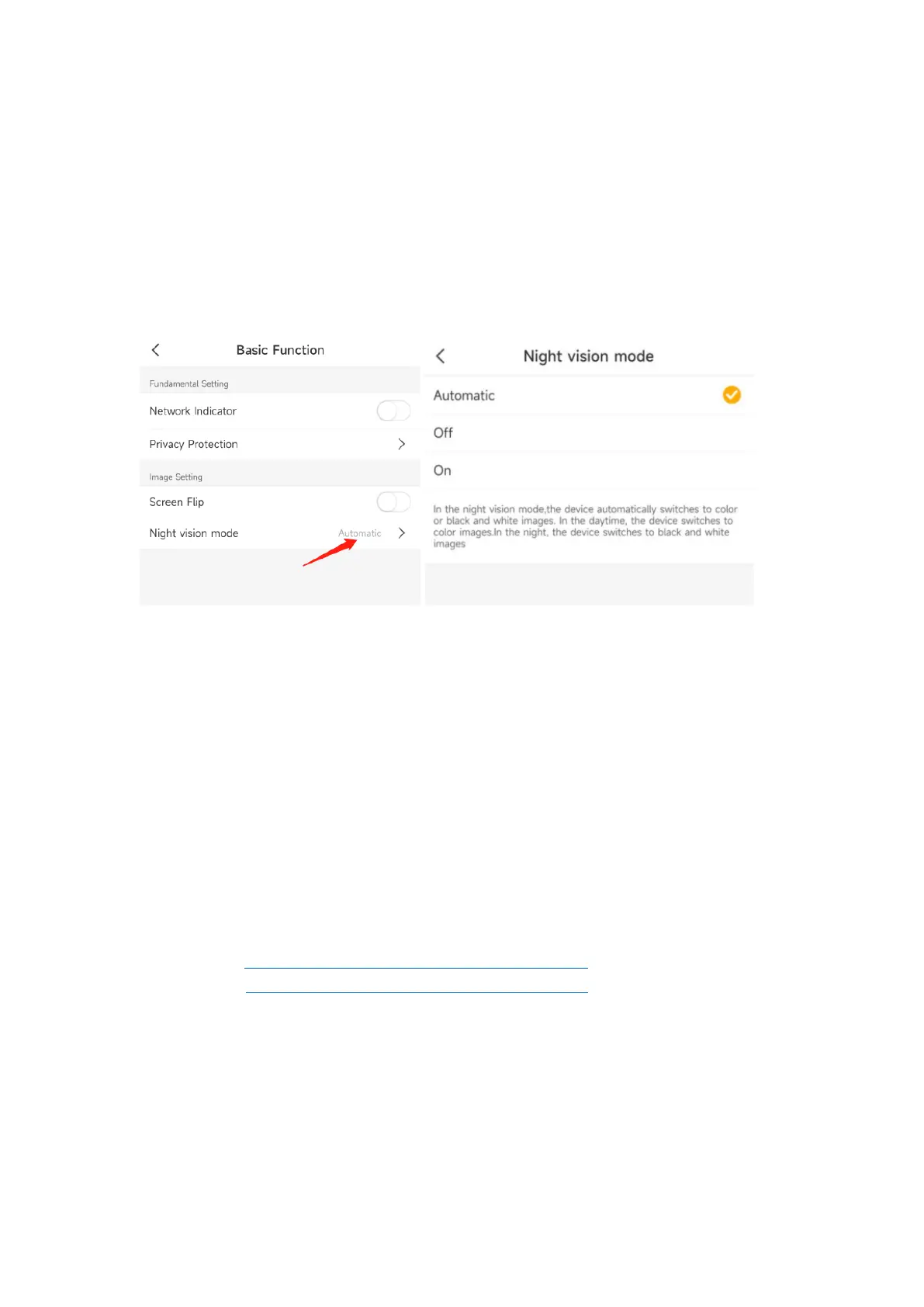
Night Vision
Set the camera’s color mode during different times of the day and night.
Automatic: The camera will automatically switch between Color and Black & White
modes according to the light conditions.
OFF: The camera will capture color images that usually appear during the day.
On: The camera will capture black-and-white images that usually appear during the night
with the IR LEDs on.
Amazon Echo Show & Google Home
Tap Amazon Echo/Google home to learn how to bind camera.
After bind, you can check the camera Live video on Amazon Device and Google Home
device.
Note:
1. User name is the account name (email address/phone number) in Arenti APP and it is
case sensitive. Need use lower case.
2. Please do not use the auto-filling, input the information manually.
3. Please select the country
4. If login failed, please re-start the Alexa APP and enable the skill again.
Instructions:
Amazon Echo: https://www.youtube.com/watch?v=fUzPfG7zlm4
Google Home: https://www.youtube.com/watch?v=2Bt3xIAGsh4



 To Next Page