Need help?
Do you have a question about the Arexx AAR-04 and is the answer not in the manual?
Introduces the Arduino robotics family concept and its use in electronics development.
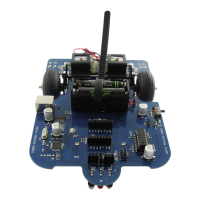
Details the technical specifications of the AREXX Arduino Robot (AAR), including motors, processor, and dimensions.
Provides essential safety warnings and attention points before operating the robot hardware.
Lists general safety guidelines for handling the robot kit, tools, and batteries.
Explains what Arduino is, its open-source nature, and its platform for microcontrollers.
Defines microcontrollers and discusses their broad applications in various electronic devices and systems.
Details microcontroller power usage characteristics and operating speeds, referencing the ATmega328P.
Discusses microcontroller program memory, compilers, and programming languages.
Explains microcontroller interface architecture, including GPIO, ADC, and DAC.
Presents a block diagram of the AREXX Arduino Robot, detailing its key components and connections.
Provides background information on the AREXX Arduino Robot's hardware components and design.
Offers background information on the Arduino software, its structure, and programming concepts.
Guides users through downloading and installing the necessary Arduino software for the robot.
Briefly explains where to find documentation for the Arduino programming language.
Details the process of installing USB drivers for connecting the Arduino board to a computer.
Covers hardware aspects of the AAR, specifically battery installation and connections.
Explains how to correctly install batteries into the robot's compartment and related attention points.
Explains how to program the robot using Arduino software.
Describes connecting the robot and opening the Arduino software for programming.
Guides on selecting a sample program like 'Blink' to load onto the robot.
Instructs on selecting the correct COM port for Arduino interface communication.
Details the process of transferring compiled programs from a PC to the Arduino robot.
Explains the H-bridge circuit design for 3-volt power supplies using transistors.
Discusses the use of the L293D chip for H-bridge motor control at 4.5-volt power supplies.
Explores programming robots for behaviors like line-seeking and responding to colors.
Discusses programming robots to react to environmental noise and music frequencies.
Covers advanced line-seeking robot behaviors and programming strategies.
Details complex programming tasks for robot behavior, like navigating colored areas and finding a 'garage'.
Guides on uploading an Arduino boot-loader to the microcontroller, requiring programming experience.
Lists all electronic components used in the AREXX Arduino Robot with their values and packages.
Provides a top-view diagram of the AREXX Arduino Robot's main printed circuit board.
Shows a bottom-view diagram of the AREXX Arduino Robot's main printed circuit board.
Presents the complete circuit diagram for the AREXX Arduino Robot, illustrating all connections and components.

 To Next Page
 General