14
6. Display
The electrically power assisted cycle has a control device on the handlebar, LCD display, powered by the battery supplied
with the bike which controls all the bike’s electrical and electronic functions.
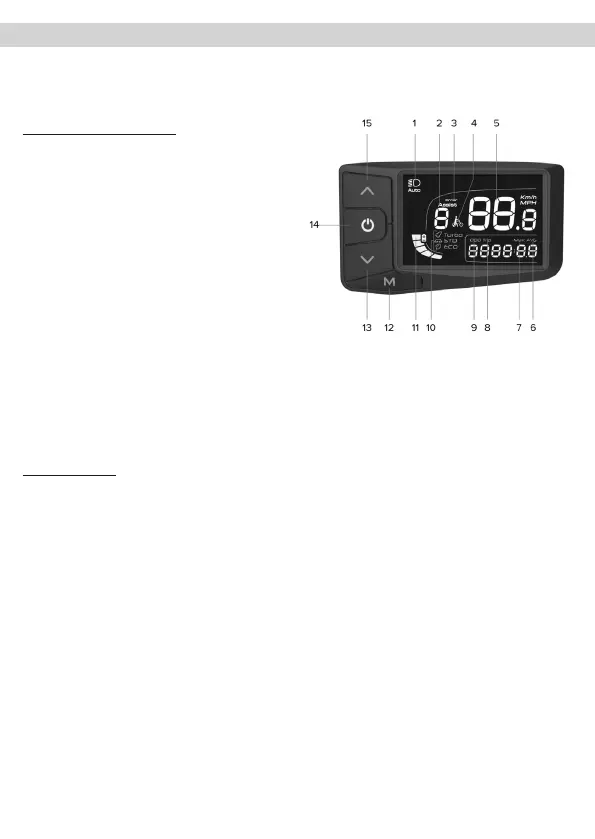
• LCD display - CDC13-BT
Overview of controls and symbols
1. Indicator light for light ON
2. Assist: indicator of the assisted pedalling level
selected (number)
3. Error: malfunction warning light
4. Indicator light for walk assist mode ON
5. Digital speedometer: indicator light for speed
detected during use (Km/H or MPH)
6. AVG: display of average speed data recorded during
last use (Km/h or MPH)
7. MAX: display of maximum speed data recorded during
the last use (Km/h or MPH)
8. TRIP: display of partial distance travelled (Km or Miles)
9. ODO: display of total distance travelled (Km or Miles)
10. Travel mode corresponding to the selected assisted
pedalling level (ECO-STD-Turbo)
11. Indicator light for residual battery charge
12. M: mode button (MODE)
13. Button to vary and/or decrease value (-)
14. ON/OFF button
15. Button to vary and/or increase value (+).
Function description
Display on/o
Press the ON/OFF button for at least 3 seconds to switch the display on or o.
Selecting the assisted pedalling level
Press the relevant button to increase or decrease the level of selected assisted pedalling. There are between 1 and 5 assisted
pedalling levels that can be selected (Assist).
Assist level 1 sets minimum electrical support by the motor (minimum power - ECO mode).
Service levels 2 and 3 determine the setting of an electrical support provided by the intermediate motor (normal power
- Std usage mode).
Service levels 4 and 5 determine the setting of the maximum electrical support provided by the motor (maximum power -
Turbo operating mode).
If you select level 0, you exclude electrical assistance from the motor.
Enabling walk assist mode
Set the walk assist level to 0 and then, press and hold the - button to enable the walk assist mode which allows you to
activate electric motor assistance up to a maximum speed of 6 Km/h.
Disable the function by releasing the button.



 To Next Page