19
5. Command information / Control panel
Active Bike
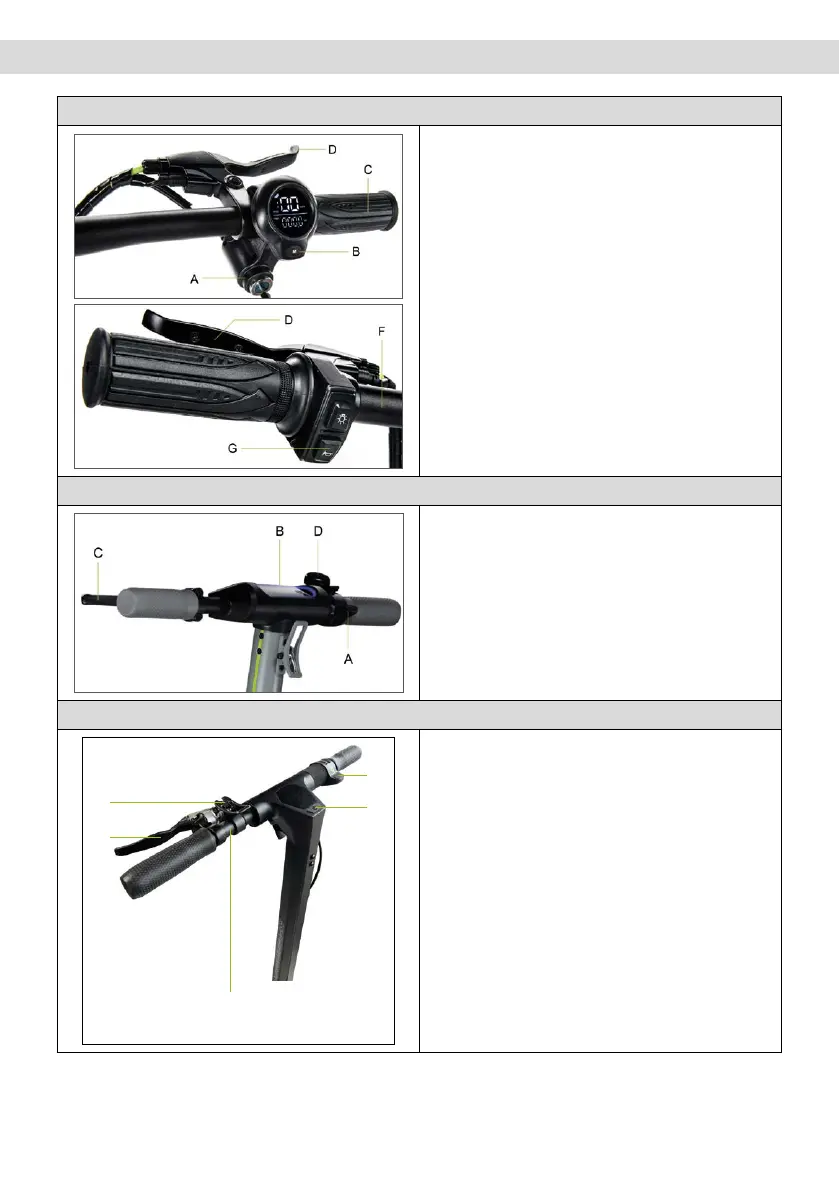
Ignition switch (A), to turn the display on/o,
insert key into the ignition switch and turn the
key to the right.
Function button (B): press button (B) briefly once
to select the desired speed level.
Throttle (C): turn the handle downwards to
accelerate.
Front brake (D): pull the lever to brake
Rear brake (E): pull the lever to brake
Lights: press button (F) once to turn on/o.
Bell: press button (G) once to activate.
Active Sport
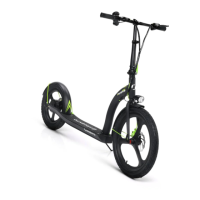
Throttle (A): press down to accelerate.
Power button (B): press to switch the item on/o.
Brake lever (C): pull the lever to brake
Speed level change: press the button (B) twice to
select the desired level.
Lights: press the button (B) once to switch them
on/o.
Horn: press the button (D) once to activate it
Argento by Pininfarina KPF
C
D
B
A
Operation of direction indicators
(if present)
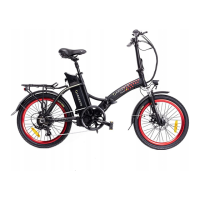
Throttle (A): press down to accelerate.
Power button (B): Press to switch the item on/o.
Brake lever (C): pull the lever to brake
Speed level change: press the button (B) once to
select the desired level.
Quickly press 3 times in a row to switch from
Km/h to Mph.
Quickly press 4 times in a row to switch from
ODO to TRIP.
Lights: press the button (B) twice to switch them
on/o.
Horn: press the button (D) once to activate it


 To Next Page