EasyManua.ls Logo

argon audio FAN HAT - User Manual

argon audio FAN HAT
4 pages
Print Icon
To Next Page IconTo Next Page
Loading...
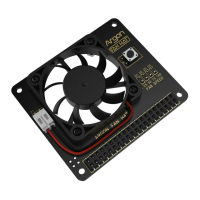
Power / Reset
Button
LED Fan Speed
Indicator
GPIO Connector to
Raspberry Pi 4
Female GPIO
access
Designed for Raspberry Pi 4
Question and Answer IconNeed help?

Do you have a question about the argon audio FAN HAT and is the answer not in the manual?

Summary

Argon FAN HAT Hardware Overview

Power and Reset Button

Controls power and initiates soft shutdown/reboot sequences.

Raspberry Pi GPIO Connector

Connects the FAN HAT to the Raspberry Pi's GPIO pins.

Fan Speed Indicator LED

Provides visual feedback on the fan's operational speed.

Female GPIO Access Header

Offers pass-through access to GPIO pins for other devices.

Argon FAN HAT Installation Guide

Script Installation Process

Steps to install the control script for fan and power button functionality.

Script Uninstallation

Instructions to remove the installed script via Desktop icon or Terminal command.

Argon FAN HAT Speed Configuration

Default Fan Speed Settings

Outlines default fan speed percentages based on CPU temperature after script installation.

Custom Fan Speed Configuration

Methods to change or configure fan speed using the Argon ONE Config icon or Terminal.

Argon FAN HAT Power Button Functions

Power Button Operation Modes

Details the functions assigned to short press, long press, and double tap actions of the power button.

Overview

The Argon FAN HAT is an accessory designed for the Raspberry Pi 4, primarily focused on thermal management and power control. It integrates a cooling fan directly onto the Raspberry Pi, along with a power/reset button, and provides pass-through access to the Raspberry Pi's GPIO pins.

Function Description:

The core function of the Argon FAN HAT is to provide active cooling for the Raspberry Pi 4, preventing overheating and ensuring stable performance, especially under heavy loads. It achieves this through an integrated fan whose speed can be dynamically controlled based on the CPU temperature of the Raspberry Pi. Beyond cooling, the HAT also incorporates a multi-functional power button that allows for convenient power management, including turning the device on, initiating a soft shutdown, and rebooting. The design ensures that the Raspberry Pi's GPIO pins remain accessible, allowing for the connection of other HATs or external components.

Important Technical Specifications:

  • Compatibility: Specifically designed for Raspberry Pi 4.
  • Cooling Mechanism: Integrated fan for active cooling.
  • Fan Control: Software-controlled fan speed based on CPU temperature.
  • Power Management: Includes a power/reset button with configurable functions.
  • GPIO Access: Provides female GPIO access, allowing other HATs to be stacked or external components to be connected.
  • Indicators: Features an LED Fan Speed Indicator to visually represent the fan's operational speed.
  • Default Fan Speed Settings (after script installation):
    • 55°C: 10% fan speed
    • 60°C: 55% fan speed
    • 65°C: 100% fan speed

Usage Features:

Installation:

  1. Hardware Connection: Connect the Argon FAN HAT to the Raspberry Pi 4 before plugging in the power.
  2. Software Installation (Script):
    • Ensure the Raspberry Pi is running Raspbian OS and connected to the internet.
    • Open the "Terminal" application in Raspbian.
    • Execute the following command to download and install the Argon FAN HAT script:
      curl https://download.argon40.com/argonfanhat.sh | bash
      
    • After the installation is complete, REBOOT the Raspberry Pi.
    • Note: Without the Argon FAN HAT script, the fan will run constantly at 50% speed.

Fan Control:

  • The fan speed is automatically regulated by the installed script based on the CPU temperature, following the default settings (10% at 55°C, 55% at 60°C, 100% at 65°C).
  • Configuration: Users can customize the fan's temperature-speed settings. This can be done in two ways:
    • Graphical Interface: Click the "Argon ONE Config" icon on the Desktop.
    • Terminal: Type argonone-config in the Terminal and follow the prompts.

Power Button Functions:

The power button on the Argon FAN HAT provides versatile control over the Raspberry Pi, configured automatically upon script installation:

  • When OFF (from a soft shutdown):
    • Short Press: Turns the Raspberry Pi ON.
  • When ON:
    • Short Press: Performs no action (Nothing).
    • Long Press (> 3 Seconds): Initiates a soft shutdown of the Raspberry Pi. This is a controlled shutdown, meaning there is no immediate power cut, which helps prevent data corruption.
    • Double Tap: Reboots the Raspberry Pi.

Maintenance Features:

Uninstallation:

Should the user wish to remove the Argon FAN HAT script, there are two methods:

  • Graphical Interface: Click the "Argon ONE Uninstall" icon on the Desktop.
  • Terminal: Open the Terminal and type:
    argonone-uninstall
    

The Argon FAN HAT is designed to be a low-maintenance accessory once installed and configured. Its primary maintenance aspect involves ensuring the fan remains free of dust and obstructions to maintain optimal cooling performance. The software-based control and configuration options provide flexibility for users to adapt the cooling profile to their specific needs and environment. The pass-through GPIO access is a significant advantage, ensuring that the HAT does not monopolize the Raspberry Pi's expansion capabilities, allowing for further customization and integration with other hardware.

argon audio FAN HAT Specifications

General IconGeneral
Brandargon audio
ModelFAN HAT
CategoryComputer Accessories
LanguageEnglish

Related product manuals