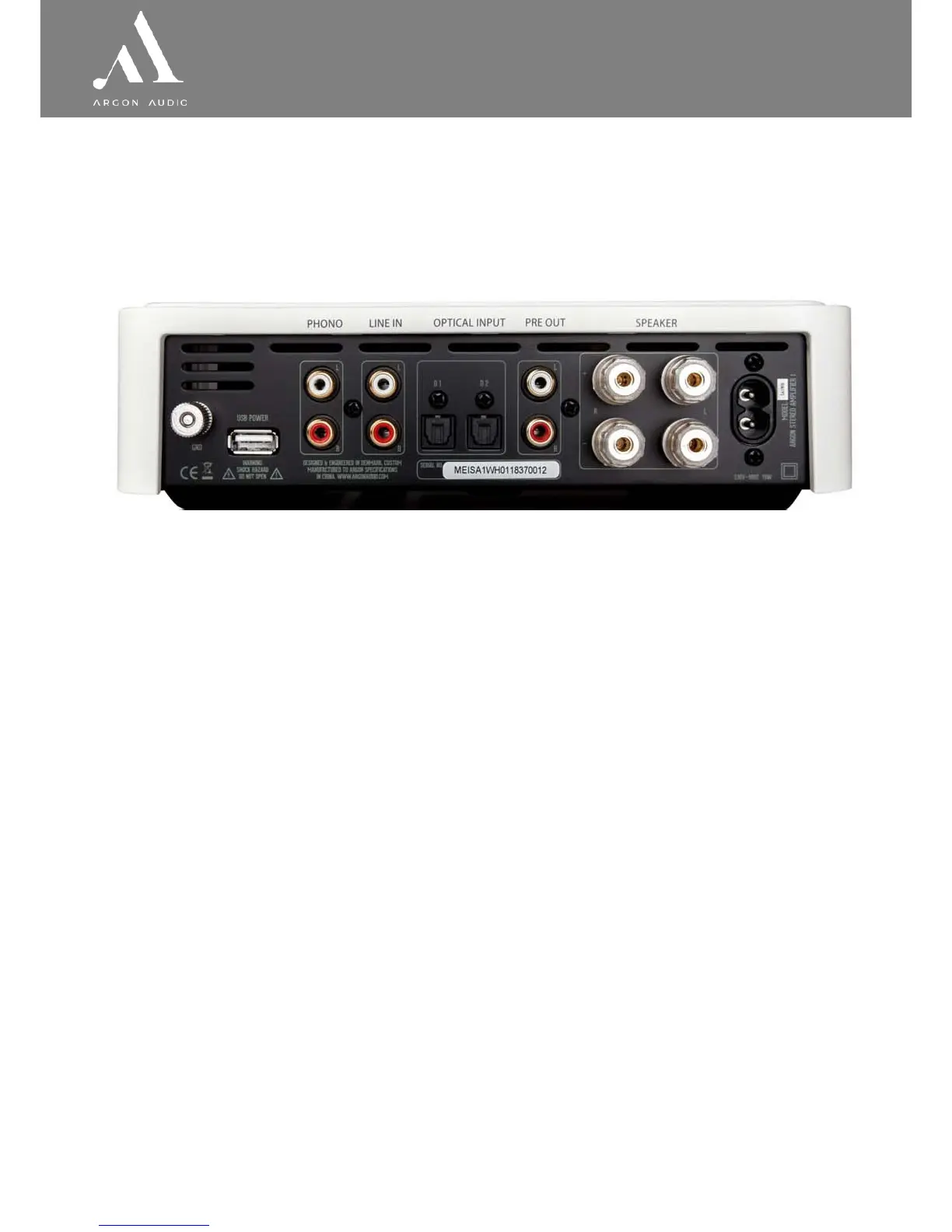
2.2 Overview of Back (inputs and connections)
① ② ③ ④ ⑤ ⑥ ⑦ ⑧ ⑨ ⑩
1. Ground (GND)
◊ Connection for turntable grounding
2. USB power
◊ Connect power to a Chromecast device (see point 5 on page 8)
3. Phono (MM) for turntable only
◊ Connect a turntable, remember to connect “Ground” (①) as well
4. Line in for analogue sources (AUX)
◊ Connect any analogue audio source with Left Right cable
5. Optical 1 (D1), optimized for TV input
◊ Digital input, connect a TV to this input
6. Optical 2 (D2), optimized for Hi-Fi listening
◊ Digital input, connect a audio product to this input
7. Pre out for pre-amplifier or subwoofer
◊ Connect to a external Power Amplifier or,
◊ Connect a Subwoofer to this output
8. Speaker right
◊ Unscrew the plug to mount the un-isolated speaker cable or use a banana plug.
(remember to get + and – connected similar on SA1 and your loudspeakers)
9. Speaker left
◊ Unscrew the plug to mount the un-isolated speaker cable or use a banana plug.
(remember to get + and – connected similar on SA1 and your loudspeakers)
10. Power
◊ Insert the power cable that comes with the SA1, and connect to an electric outlet


 To Next Page