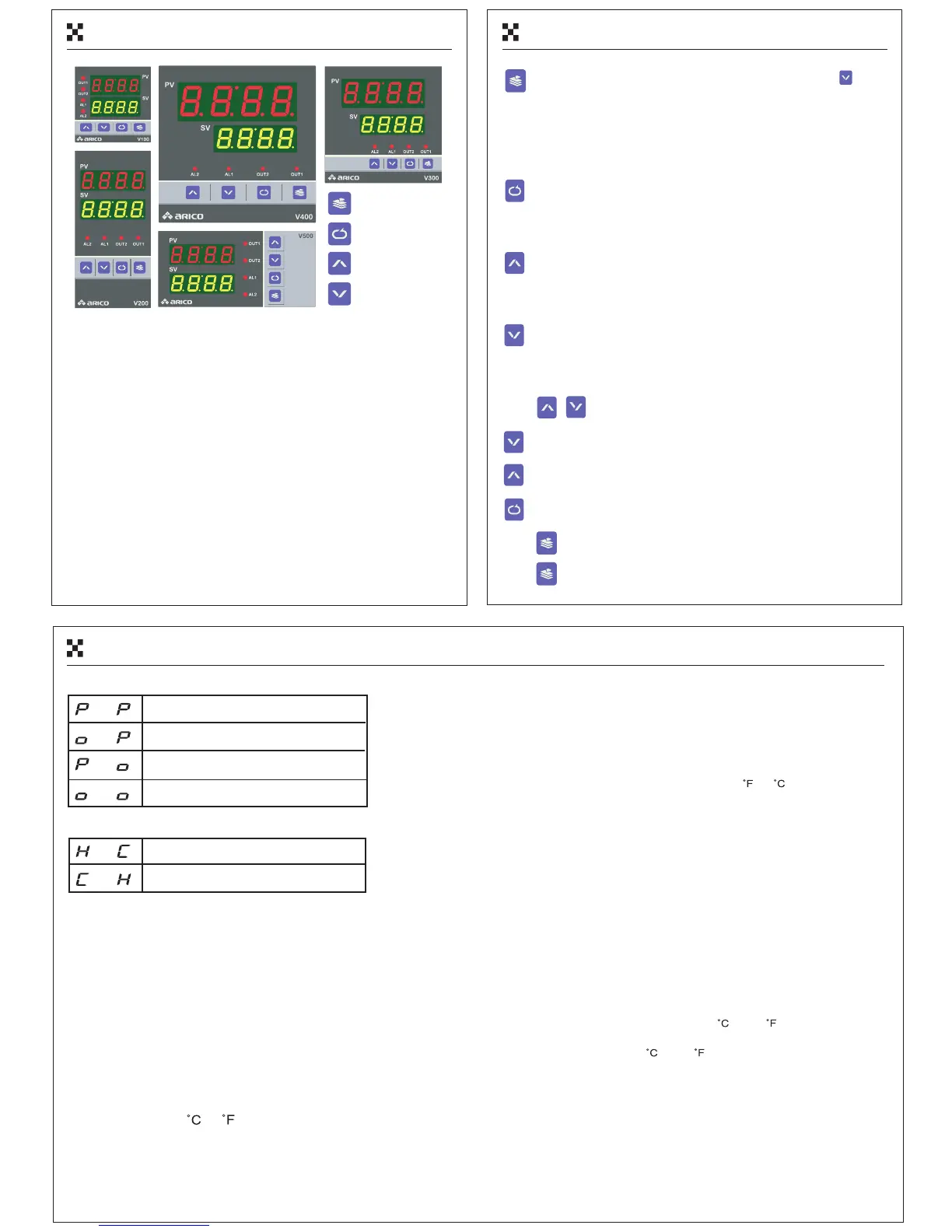
(11)Faceplate (12)Key Operation
Level Key
Set Key
Increment Key
Decrement Key
(23)PID Control
1、Entry into level select mode and select level, and press into
parameter mode.
2 、In parameter mode, press level key leave parameter mode to
3、In setting mode, press level key for saving parameter and return to
mode.parameter
Press for 2 sec to return to normal mode.
1、Press set key enable set value.
2、In parameter mode, press set key for enable to set parameter.
3、In setting mode, press set key for saving parameter or setting
return to parameter mode.digit, and
1、In level select mode, key to entry parameter modepress increment
2、In parameter mode, key for selecting parameter.press increment
3、In setting mode, key to increase the setting value
until high limit.
press increment
1、In level select mode, press decrement key to entry parameter mode
2、In parameter mode, key for selecting parameter.press decrement
3、In setting mode, key to decrease the setting value
until low limit,,
press decrement
Press + at the same time for 2 sec to start or stop self-tuning.
Press decrement key for 2 sec to start or stop control output.
Press increment key for 2 sec to start or stop manual output.
Press set key for 8 sec to set the pass word "0044" automatically
Press to return to the head of level in parameter mode.
1. Output control mode
Main : PID Aux. : PID
Main : on/off Aux. : on/off
Main : on/off Aux. : PID
Main : PID Aux. : on/off
2. Output heating &cooling control mode
Main :heating Aux. :cooling
Main :cooling Aux. :heating
Auxiliary output function assists main output function in avoiding
the temperature out of control. They have opposite modes to
control.
3. Alarm Hysteresis band :
The output cycle time is one of important factor in control.It's
necessary to evaluate the heating and cooling system effici-
ency to set the output cycle time.suggest that the output
cycle time >20sec in relay output. If the output cycle tim
e=0,
it will be analog output mode for that the higher temperature
stability system is desired,and the time=1~19 are for voltage
output mode and lower stability system.
4. Proportional Band : P
Range=1~100 or and it 's avalible to set by user.
5. Integral Time : I
The time is fluctuation. I
6. Differential Time : D
Range=0~250 units,1unit=0.1sec and 0 for disable.It's
avalible to set by user.
7. What is the "PID" Control?
"P" is proportional band and unit = or .It can describe
with the following equation:
P = [ ( SV - PV ) * 100 ] / proportional band
"D" is differential time and unit=0.1sec. If "D"=10,10*0.1=1
sec, it means that differential action will be executed once
per sec. The setting is smaller and the time is shorter and
the output percentage is fewer.
8. PID Value Self Tuning :
PID value self tuning has three types: The first is disable
for self tuning,the second is only once ,and the other is
every times after power on.
But it only will be executed by the following situations:
The setting value of heating system should be higher than
the present tem
perature for 45 or 85 .Or the setting
value of cooling system should be lower than the present
tem perature for 45 or 85 .If this function was executed
is desired,it's necessary to start this one, to set value,and
to comfirm that the temperature range is enough to execute
it, then turn off the power supply and restart the instrum
ent,
we will see the PID value and the flashing of decim
al point
in the right-down horn.It will be shuted after changing value
during self tuning.
PV:Normal mode:Present temp. Value
Level select mode:Parameter level 1~4
Parameter mode:Parameter name
SV:Normal mode:Setting value、Manual output percentage
Parameter mode:Parameter value
OUT1:Main output indicator
OUT2:Aux. output indicator
AL1:Alarm 1 output indicator
AL2:Alarm 2 output indicator
Level select mode.


 To Next Page
 Loading...