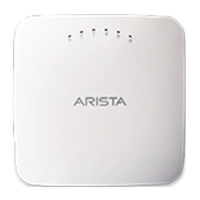
The Arista C-200 Access Point is a dual-radio 802.11ax access point designed for wireless network deployments. This Quick Start Guide provides comprehensive instructions for its installation, configuration, and basic troubleshooting, making it accessible for anyone looking to deploy and manage the device.
Function Description
The C-200 Access Point serves as a crucial component in establishing and extending wireless network coverage. Its primary function is to provide wireless connectivity to client devices, operating on both 2.4 GHz and 5 GHz radio frequencies, adhering to the 802.11ax standard. This dual-radio capability allows for flexible and efficient allocation of wireless bandwidth, supporting a wide range of applications and user densities. The device is designed to integrate seamlessly into existing network infrastructures, offering robust and reliable wireless access.
The access point can be powered either through Power over Ethernet (PoE) or a compatible AC power adapter. PoE simplifies deployment by allowing both power and data to be transmitted over a single Ethernet cable, reducing cabling complexity and installation costs. Alternatively, the AC power adapter provides flexibility for deployments where PoE is not available or preferred.
A key feature of the C-200 is its support for zero-configuration, which streamlines the initial setup process. Under specific network conditions—such as the presence of a DHCP server and a DNS entry for wifi-security-server pointing to the Wireless Manager—the access point can automatically obtain an IP address and connect to the server without manual intervention. This capability significantly reduces the time and effort required for large-scale deployments.
For scenarios where zero-configuration is not feasible, the access point supports manual configuration. This allows administrators to precisely define network settings, including static IP addresses and server discovery parameters, to meet specific network requirements or overcome firewall restrictions. The device communicates with a Wireless Manager (referred to as 'server' in the documentation) to receive configurations and report operational status, ensuring centralized control and management of the wireless network.
The C-200 also incorporates a console port, enabling a serial connection for direct configuration and troubleshooting. This provides a fallback mechanism for accessing the device's command-line interface (CLI) in situations where network connectivity is not yet established or is experiencing issues. The reset button offers a convenient way to restore the device to its factory default settings, which can be useful for resolving configuration conflicts or preparing the device for redeployment.
Usage Features
The C-200 Access Point is designed for flexible deployment in various environments, with support for both ceiling and wall mounting. The package includes a 15/16" (24 mm) mounting bracket (MNT-AP-24MM) for ceiling installations on T-grids. The mounting process involves affixing the bracket to the T-grid and then snapping the AP onto the bracket, ensuring a secure fit. For wall mounting, an optional accessory SKU (MNT-AP-FLAT-14CM) can be ordered separately. Wall mounting involves drilling holes, inserting anchors, affixing the mounting bracket, and then attaching the AP to the bracket, securing it with a tamper-resistant T10 torx screw. These mounting options provide versatility to optimize wireless coverage and aesthetics in different locations.
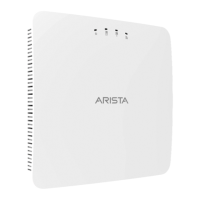
The device features a set of four LEDs on its front panel, providing visual indicators of its operational status. These include a Power LED, a 2.4 GHz Radio LED, a 5 GHz Radio LED, and a LAN1 LED. The Power LED, for instance, glows solid green when the device is running normally, blinks green when it has received an IP address but is not connected to the server, and glows orange if it has not received an IP address. The LAN1 LED illuminates when the corresponding interface is active, and the Radio LEDs light up when their respective radios are operational. These LEDs offer a quick and intuitive way to assess the device's status without requiring access to the management interface.
Connecting the C-200 to the network is straightforward. If using PoE, an Ethernet cable is plugged into the PoE switch or injector and then into the AP's Ethernet/PoE port. If using an AC power adapter, the power cable is connected to the DC power receptacle on the AP and then to an AC power source. For zero-configuration, it is essential that a DHCP server is available on the network and that a DNS entry for wifi-security-server is configured to point to the Wireless Manager. Once connected and powered, the AP attempts to establish communication with the server, enabling it to receive configurations and begin functioning as a wireless access point.
The access point supports AP-server mutual authentication, where both the AP and the server authenticate each other using a shared secret. This ensures secure communication between the devices, with all subsequent data encrypted using a generated session key. The shared secret is pre-configured with a default value, but it can be changed via CLI commands on both the server and the AP for enhanced security. This secure communication protocol is fundamental for maintaining the integrity and confidentiality of network management traffic.
Maintenance Features
Maintenance of the C-200 Access Point is designed to be straightforward, focusing on ease of troubleshooting and configuration management. The device includes a reset button, which, when held down and followed by a power cycle, restores the AP to its factory default settings. This action resets the config shell password to 'config', erases the server discovery value (reverting to redirector.online.spectraguard.net for primary and wifi-security-server for secondary), clears all VLAN configurations, and sets the IP address to DHCP mode (with a factory default IP of 169.254.11.74 if DHCP fails). This feature is invaluable for recovering from misconfigurations or preparing the device for a new deployment.
Troubleshooting guidance is provided to address common issues such as the AP not receiving a valid IP address or failing to connect to the server. For IP address issues, the recommendation is to ensure the DHCP server is operational and available on the correct VLAN/subnet. If the problem persists, a reboot of the AP is suggested. For server connectivity problems, administrators are advised to verify that the server is running and reachable from the AP's network. This includes checking firewall rules to ensure UDP port 3851 traffic is allowed, confirming correct DNS server IP addresses, and ensuring the wifi-security-server DNS entry is accurate.
In cases where the AP fails to authenticate with the server, an 'Authentication failed' event is raised on the server, prompting administrators to take corrective action. For deployments using Arista Cloud Services, it is crucial to ensure TCP port 443 (SSL) is open. For on-premises installations, UDP port 3851 and port 80 must be open. If a proxy, web accelerator, or URL content filter is in use, settings must allow communication between the AP and Arista Cloud Services. These guidelines help in diagnosing and resolving connectivity and authentication issues efficiently.
The ability to label APs using MAC addresses or custom conventions (e.g., serial numbers) is a practical maintenance feature, especially in large deployments. This allows for easy identification of individual APs, simplifying inventory management, troubleshooting, and physical location tracking.
Regular updates to product documentation and software are encouraged. Users are directed to the Arista Networks website for important news on product updates and to access the latest documentation. This ensures that administrators have access to the most current information, including new features, bug fixes, and updated troubleshooting procedures, contributing to the long-term stability and performance of the wireless network. The continuous enhancement of documentation based on customer feedback further supports effective maintenance and management of the C-200 Access Point.


 To Next Page
 General